
HubSpot Diamond Solutions Partner
HubSpot Dynamics 365 Integration for Simple Syncs and Complex Revenue Workflows
Need the native setup steps? Get the step-by-step playbook instantly. Already tried and stuck? Talk to engineers who build custom HubSpot–Dynamics 365 integrations for real sales, service, and operations workflows.

What the Simple Playbook Covers
Five things you'll know by the time you finish reading in under 20 minutes.
- When the native HubSpot–Dynamics 365 connector is enough for basic CRM sync
- Exactly how to connect HubSpot and Dynamics 365 step by step
- What standard object sync looks like: leads, contacts, accounts, opportunities
- The most common setup mistakes and how to avoid them before going live
- Clear signals that tell you when it’s time to move beyond the native setup
Note: This playbook is designed for standard integration needs. If your team has custom workflows or ERP dependencies, see the custom integration section below.
Already tried integrating HubSpot and Dynamics 365 and got stuck?
For some teams, the native integration works for basic CRM sync. But once enterprise workflows, custom entities, service operations, or multi-system dependencies enter the picture, the default setup starts breaking down.
Duplicate Records
Leads and contacts syncing inconsistently across HubSpot and Dynamics with no unified deduplication logic.
Broken Entity Mapping
Custom Dynamics entities not aligning with HubSpot objects, leading to sync failures or missing data.
Opportunity Sync Gaps
Deals in HubSpot not properly aligning with opportunities in Dynamics, affecting pipeline visibility.
Service & Sales Disconnect
Customer service data in Dynamics not syncing with HubSpot, causing fragmented customer journeys.
Manual Data Transfers
Teams exporting and re-entering CRM data due to incomplete or unreliable sync.
API & Sync Limitations
Sync delays, API throttling, and performance issues impacting real-time data flow.


Integrate IQ has consistently shown they can be trusted with even the most complex projects. I know our customers are in great hands and that the job will always get done right.
Achieve True Closed-Loop Reporting
Marketing needs to know what drives revenue, not just leads. By deploying a deep HubSpot integration with dynamics 365, you complete the feedback loop. We sync closed-won deal data back to HubSpot, empowering your marketing team to optimize for revenue, not just volume.
Multi-Touch Revenue Attribution: Definitively attribute closed revenue to specific campaigns and channels, proving marketing’s impact on the bottom line.
Pipeline Velocity Analysis: Identify friction points where leads stall between MQL and Opportunity stages, allowing you to refine nurture sequences based on real CRM data.
Precision Segmentation: Build hyper-targeted marketing lists in HubSpot using rich purchase data and contract details synced directly from Dynamics 365.
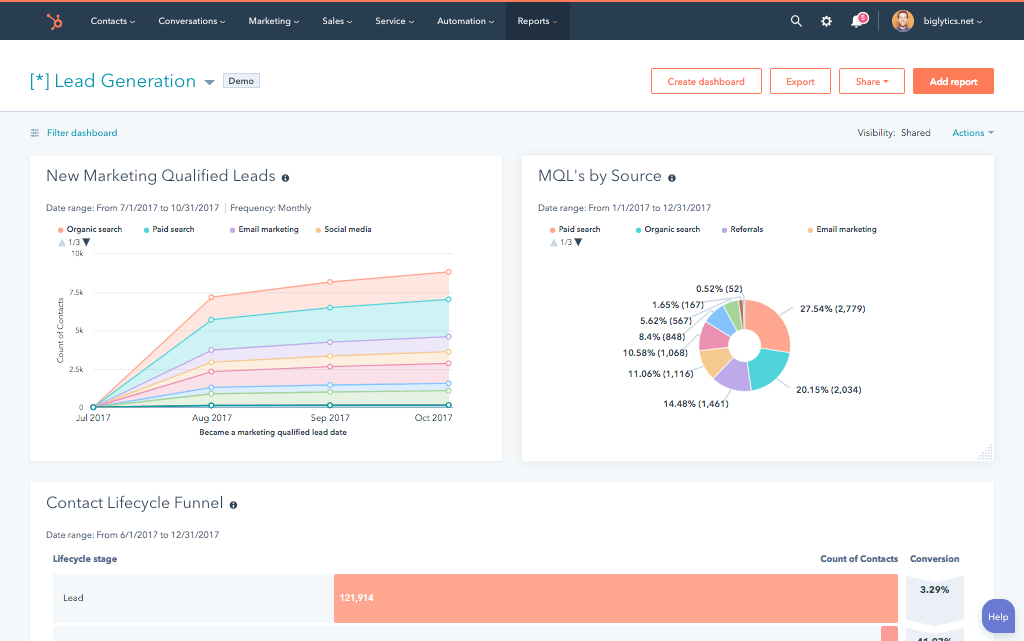
Marketing needs to know what drives revenue, not just leads. By deploying a deep HubSpot integration with dynamics 365, you complete the feedback loop. We sync closed-won deal data back to HubSpot, empowering your marketing team to optimize for revenue, not just volume.
Flexible Sync Architecture: Your Business, Your Rules
Whether you want data to flow in real time or under certain circumstances, we can build the sync to fit your exact needs.
Built for Your Business Process
Generic connectors force you into rigid data models that break under enterprise complexity. Our HubSpot Microsoft dynamics integration is architected to adapt to your business logic, handling custom objects and complex routing rules without compromise.
- One-Way Sync: Ideal for strict data governance. Push MQLs from HubSpot to Microsoft Dynamics, or send closed-won deal data back to HubSpot for reporting, maintaining a clear system of record.
- Two-Way Sync: Ensure total alignment. Updates to contact records in either system are reflected instantly in the other, guaranteeing your teams always access the most current data.
- Custom Sync: Sync data only when specific criteria are met. For example, sync a contact to the CRM only when their lifecycle stage becomes 'SQL' or a deal value exceeds a certain threshold.
Comprehensive Object & Field Mapping
We map standard and custom objects to ensure zero data loss during transfer.
HubSpot
Microsoft Dynamics 365
- Contacts
- Companies
- Products
- Users
- Engagements
- Properties
- Contacts
- Accounts
- Products
- Users
- Marketing / Campaign Responses
- Fields
- Contacts Contacts
- Companies Accounts
- Products Products
- Users Users
- Engagements Marketing / Campaign Responses
- Properties Fields
Transparent, Project-Based Pricing
No surprises. Clear scope, clear acceptance tests. We believe in straightforward pricing so you know exactly what to expect before we begin.
A failed integration is more than a technical problem; it's a drain on time, budget, and morale. We are the specialists that leading companies like MetLife trust to handle their most mission-critical data flows. We don't rely on fragile connectors or simplistic platforms because we know they can't handle enterprise scale. Our approach is built on robust, custom development and a deep understanding of both HubSpot and the systems you need to connect it to. Partnering with us isn't just another attempt; it's an investment in certainty.
Why Integrate IQ?
Our four pillars for delivering successful outcomes on complex projects.
Mastery of Complexity
We thrive on custom API integrations, multi-system migrations, and "messy data" that makes others pause. Full support for standard and custom objects across your stack is table stakes here.
Pragmatic Innovation
Real problems, shipped solutions. Our proprietary Smart Ramp apps were developed to solve real-world customer problems. The same practical mindset powers our HubSpot AI Accelerator: We focus on data readiness and shipped outcomes, not shiny features.
De-Risking the Process
Complex projects demand clarity. Our Smart Process runs on an 8-12 week cadence with stage gates, transparent deliverables, and clear pricing. That's how we keep a 98.5% retention rate.
The Expert You Call
We're a developer-led team of integration engineers, solution architects, and technical PMs. Clients describe us simply: 'the folks you call when something seems impossible.


Choose Your Path
I need the simple integration steps
Perfect if you want a direct walkthrough for the standard HubSpot–Dynamics 365 connection and basic CRM sync. No custom development, no engineering team required.
Get The Free PlalybookI already tried, or my use case is more complex
Best for enterprise workflows, multi-team sync logic, custom entities, service modules, ERP integrations, and advanced automation across systems.
Talk To an EngineerCheck Out Our Case Studies






















Trusted by High-Growth Companies
See why leaders at scaling companies partner with Integrate IQ's experts.
HubSpot Is the Platform. We Make It Perform
Why Businesses Trust Integrate IQ for a Smarter HubSpot Experience

Frequently Asked Questions
Middleware tools like Zapier are designed for simple, linear triggers. Our service builds a robust, enterprise-grade architecture capable of handling high-volume data, historical backfills, and complex multi-object relationships that off-the-shelf connectors simply cannot support.
Yes. A critical first step in our HubSpot Dynamics 365 integration is a comprehensive historical backfill. We align your existing databases to ensure day-one accuracy before enabling real-time syncs.
While basic connectors exist, they often lack the depth required for complex B2B sales cycles. Our custom solution goes beyond simple data passing to map custom entities and enforce business rules that align specifically with your operational requirements.
We handle the full spectrum: Contacts, Companies (Accounts), Deals (Opportunities), and Products. Beyond standard objects, we specialize in mapping custom entities and activity data (notes, tasks, meetings) to ensure a 360-degree view.
Absolutely. We understand that enterprise CRMs are heavily customized. Our integration maps your unique Dynamics 365 entities directly to HubSpot Custom Objects, ensuring no critical business data remains siloed.
Yes. We offer fully configurable bi-directional syncs for Opportunities/Deals. This ensures that as sales reps move deals through stages in Dynamics, marketing automation in HubSpot can trigger relevant nurturing tracks automatically.