






HubSpot Data Mapping Service: What It Includes, When You Need One and How to Choose
Every failed HubSpot migration and every broken integration we get called to fix traces back to the same root cause: fields that don’t line up. A…

HubSpot Diamond Solutions Partner
Connect your cloud phone system directly to your customer data. This integration syncs 8x8 call logs, recordings, and contact data with HubSpot, creating a seamless workflow for your sales and support teams.

Discover how top companies use their CRM to power marketing, sales & growth. No spam. No sales pitch. Just expert insights from certified HubSpot professionals.
ERPs, custom objects, legacy databases, real-time bi-directional sync. Every estimate is built by the same engineers who ship the integration.
60-second ballpark · No back-and-forth
Bi-directional sync
One-way or two-way, built to your data flow
Granular field mapping
Every property mapped, validated, tested
Real-time + scheduled
Instant triggers and batched syncs together
Custom sync logic
Your business rules, written into the build
Error handling
Monitoring, alerts, retry logic baked in
Year 1 continuity
License, maintenance, ongoing support
Discover how top companies use their CRM to power marketing, sales & growth. No spam. No sales pitch. Just expert insights from certified HubSpot professionals.
Eliminate the need for your reps to toggle between multiple apps. This integration embeds 8x8’s powerful CTI (Computer Telephony Integration) directly within the HubSpot interface, enabling faster, smarter communication.
Click-to-Dial Efficiency: Initiate calls instantly by clicking any phone number within a HubSpot contact, company, or deal record, saving seconds on every dial.
Instant Screen Pops: When an inbound call arrives, a "screen pop" displays the caller's HubSpot profile, giving your rep immediate access to open deals, recent tickets, and interaction history.
Automated Call Logging: Automatically log every inbound and outbound call to the HubSpot contact timeline, ensuring a complete record of communication without manual data entry.
Access Recordings Instantly: Save call recordings links directly to the HubSpot activity feed, allowing managers to review calls for QA and coaching without leaving the CRM.
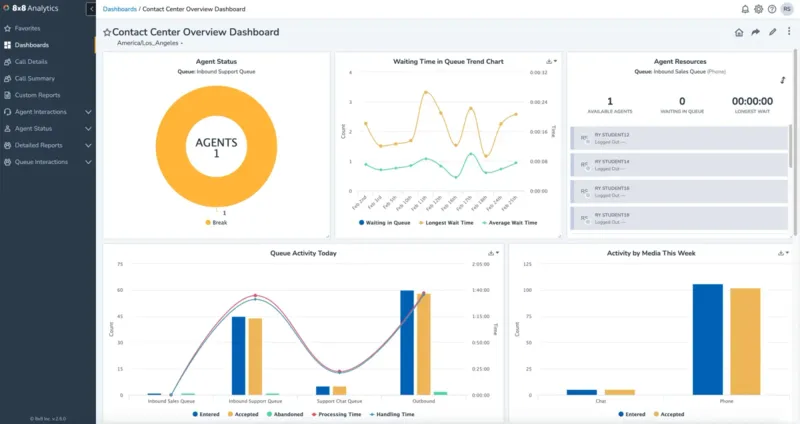
Eliminate the need for your reps to toggle between multiple apps. This integration embeds 8x8’s powerful CTI (Computer Telephony Integration) directly within the HubSpot interface, enabling faster, smarter communication.


Integrate IQ has consistently shown they can be trusted with even the most complex projects. I know our customers are in great hands and that the job will always get done right.
Your phone conversations hold critical business insights. This integration pipes that audio and metadata back into HubSpot, allowing your GTM teams to analyze performance and optimize their strategy.
Trigger Workflows from Call Outcomes: Use 8x8 disposition codes (e.g., "Left Voicemail," "Decision Maker Reached") to trigger HubSpot workflows. Automatically send a follow-up email or rotate the lead based on the call result.
Enhance Lead Scoring: Increase a contact's lead score based on call frequency or duration, surfacing the most engaged prospects to your sales team.
Report on Activity vs. Revenue: Build dashboards in HubSpot that track call volume, connection rates, and talk time against closed-won revenue to identify your most productive reps.
Streamline Support: Automatically create a HubSpot service ticket for missed inbound calls or specific support-related dispositions, ensuring no customer issue falls through the cracks.
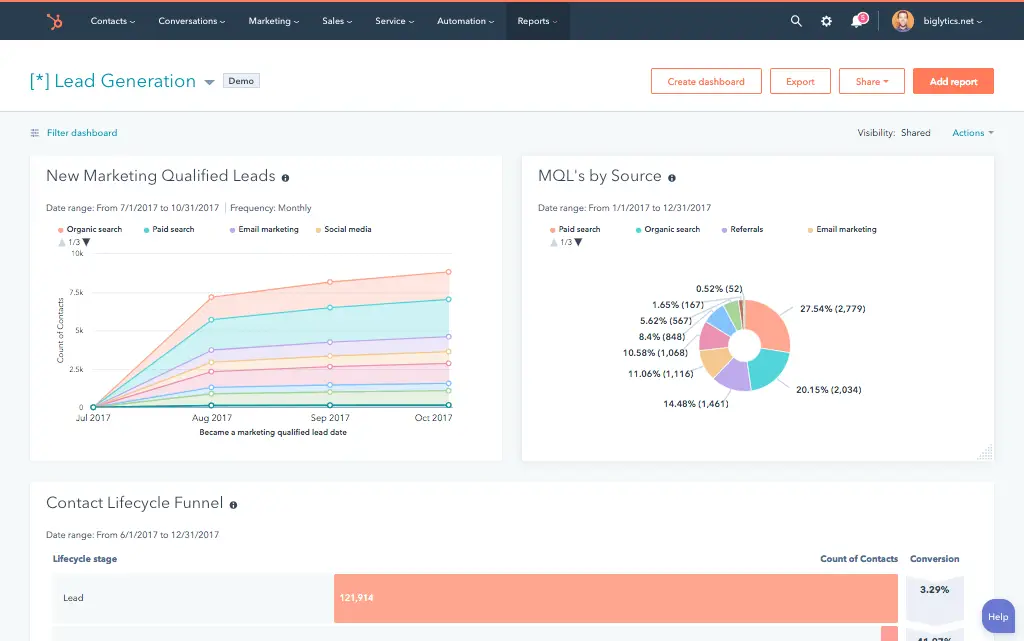
Your phone conversations hold critical business insights. This integration pipes that audio and metadata back into HubSpot, allowing your GTM teams to analyze performance and optimize their strategy.
Our custom integrations are engineered for flexibility and scale, handling any business logic and data transformation you require.
Native integrations provide basic connectivity, but complex organizations need more. We build a robust, API-level integration that maps to your specific routing logic, custom dispositions, and unique data needs.
We map the data that matters, connecting your cloud phone system directly to your customer records.
No surprises. Clear scope, clear acceptance tests. We believe in straightforward pricing so you know exactly what to expect before we begin.
A failed integration is more than a technical problem: it's a drain on time, budget, and morale. We are the specialists that leading companies like MetLife trust to handle their most mission-critical data flows. We don't rely on fragile connectors or simplistic platforms because we know they can't handle enterprise scale. Our approach is built on robust, custom development and a deep understanding of both HubSpot and the systems you need to connect it to. Partnering with us isn't just another attempt; it's an investment in certainty.
Our four pillars for delivering successful outcomes on complex projects.
We thrive on custom API integrations, multi-system migrations, and “messy data” that makes others pause. Full support for standard and custom objects across your stack is table stakes for us.
Real problems, shipped solutions. Our proprietary Smart Ramp apps were developed to fill gaps in HubSpot capabilities and solve real-world customer problems. The same practical mindset powers our HubSpot AI Accelerator: We focus on data readiness and shipped outcomes, not shiny features.
Complex projects demand clarity. Our Smart Process runs on an 8-12 week cadence with stage gates, transparent deliverables, and clear pricing. That’s how we maintain a 98.5% customer retention rate.
We’re a developer-led team of integration engineers, solution architects, and technical PMs. Clients describe us simply: 'the folks you call when something seems impossible.'

















See why leaders at scaling companies partner with Integrate IQ's experts.
Why Businesses Trust Integrate IQ for a Smarter HubSpot Experience

Yes. The integration saves a link to the secure 8x8 call recording directly in the HubSpot call activity log. You can listen to the call with one click, provided you have the correct permissions.
Absolutely. We map 8x8 disposition codes or "wrap-up codes" to HubSpot properties. You can use these updates to enroll contacts in nurture sequences, create tasks, or update deal stages.
If a call comes from a number that does not exist in your CRM, the integration can be configured to automatically create a new contact in HubSpot and assign it to the agent who answered the call.
Yes. We can configure different logic for different teams. For sales, it focuses on logging activity to Deals and Contacts. For support, it can focus on ticket creation and case management.
It is time to unify your communication stack. Schedule a free discovery call, and we will map out your call data flow and show you how to turn every conversation into an actionable data point.
Connect HubSpot & 8x8
Every failed HubSpot migration and every broken integration we get called to fix traces back to the same root cause: fields that don’t line up. A…
Your HubSpot migration date is on the calendar. Your source CRM is full of duplicates, contacts who changed jobs three years ago, and a “Lead Source”…
HubSpot’s AI Chatbot is the conversational layer built into the HubSpot Customer Platform, and it answers website visitors using your CRM data and your own knowledge…
