


























What is a HubSpot RouteManager integration?
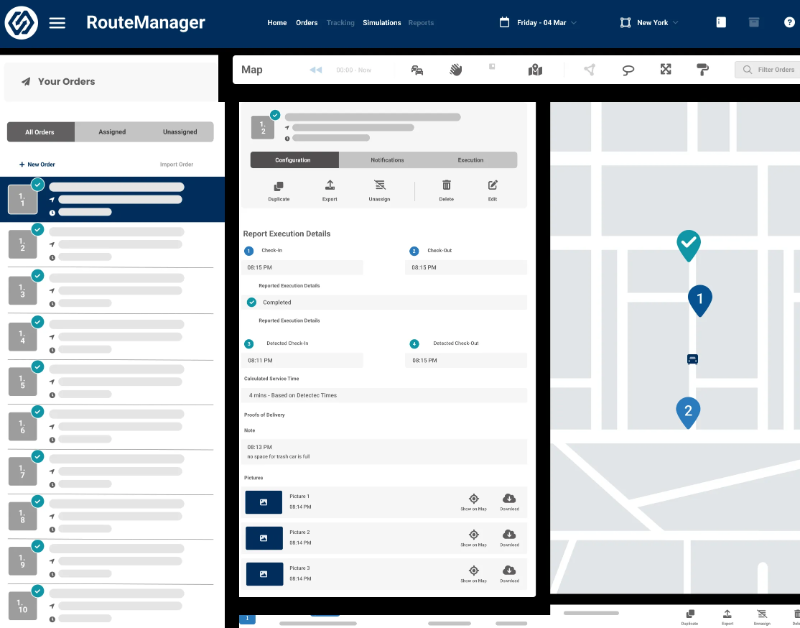
A HubSpot RouteManager integration connects your fleet dispatch and delivery software to HubSpot, syncing orders, delivery status and proof of delivery so sales and support teams see fulfillment context without leaving the CRM.
How does the HubSpot RouteManager integration work?
The integration maps HubSpot deals, contacts, and custom delivery objects to RouteManager’s orders, stops, and route manifests, then keeps both systems current. A deal marked “Closed Won” in HubSpot can create a new order in RouteManager, while delivery status updates sync back to HubSpot in real time.

Turn HubSpot Into A Real-Time SMS Engine with Message IQ
 Two-Way Conversations
 Shared Team Inbox
 Automation Triggers
 Advanced Reporting
 Compliance Tools
- 98% SMS read within 3 min
- 78% Buy from first responder
- 21× More likely to qualify

*MessageIQ is an IntegrateIQ product – built natively for HubSpot by the same team.
Does RouteManager have a native HubSpot integration?
Not a packaged native marketplace app specifically. RouteManager offers an open, no-cost API for CRM connectivity, and Zapier supports common triggers like order completion or dispatch changes. Most businesses wanting custom business logic, like capacity-based throttling or cross-suite coordination, build a custom integration against that open API instead.
How long does a HubSpot RouteManager integration take to build?
A custom HubSpot RouteManager integration typically takes 8 weeks: 2 weeks of discovery and field mapping, 3 weeks of build and staging, 1 week for historical order data backfill, and 2 weeks for testing and go-live support.
Can HubSpot and RouteManager sync bi-directionally?
Yes. A custom integration can sync new orders, delivery status, and proof of delivery from RouteManager into HubSpot and push closed deals and updated contact or address information from HubSpot back into RouteManager. Direction and timing are configurable per object.
Do we need a separate integration if we also use other WorkWave products like PestPac or ServMan?
Not necessarily a separate one, but it needs to be scoped together. RouteManager is part of the broader WorkWave suite alongside products like PestPac and ServMan; if you run more than one, we scope the integration against all of them together so triggers don’t conflict, rather than building RouteManager in isolation and bolting on others later.
How a HubSpot RouteManager Integration Actually Works
A HubSpot RouteManager integration works by connecting to RouteManager’s open API, keeping RouteManager as the source of truth for orders, routes, and delivery status, while HubSpot owns the sales and customer relationship side.
In the HubSpot-to-RouteManager direction, a deal marked Closed Won creates a new order with address and line item details already filled in, so dispatchers never re-type what sales already captured.
In the RouteManager-to-HubSpot direction, delivery status changes, proof of delivery, and delivery exceptions sync back into HubSpot, triggering surveys, service tickets or account manager alerts depending on the outcome.
Three Ways to Connect RouteManager and HubSpot
Not every team needs custom. Here is the honest comparison.
| Factor | Zapier / iPaaS | DIY Against the Open API | Custom Integration (Integrate IQ) |
|---|---|---|---|
| Best for | Simple order-status triggers for a single delivery workflow | In-house dev teams comfortable maintaining code against WorkWave’s API | Fleets needing capacity-based logic or coordination across multiple WorkWave products |
| Cross-suite coordination | Not supported, each Zap is isolated | Possible but requires your team to track dependencies manually | Scoped against your full WorkWave footprint, RouteManager, PestPac, ServMan, together |
| Sync direction | One-way per Zap, several needed for two-way | Whatever gets built, often one-way | True bi-directional, configurable per object |
| Custom objects/fields | Limited, mapped per trigger | Whatever gets scripted, rarely documented | Full mapping of orders, stops, manifests, and custom fields |
| Business logic | Basic conditional logic per Zap | Basic, maintained by whoever wrote it | Custom rules, e.g. capacity-based throttling, repeat-failure escalation |
| Volume handling | Task limits and throttling at scale | Breaks under volume without dedicated maintenance | Built for thousands of daily stops without timeouts |
| Maintenance | You manage it, breaks silently on field changes | Falls on whoever built it | Monitored, maintained, and supported |
If you’re running simple order-status triggers for a single delivery workflow, Zapier against RouteManager’s own open API covers the basics. Once capacity-based sales logic, repeat-failure escalation, or coordination across other WorkWave products like PestPac or ServMan matter, a custom integration is what keeps all of it working together instead of as separate, uncoordinated pieces.
Fleet and Dispatch Workflows You Can Automate Once RouteManager Data Lives in HubSpot
- Cross-Suite Trigger Coordination for WorkWave Customers. For businesses running RouteManager alongside other WorkWave products like PestPac or ServMan, HubSpot coordinates triggers across the full suite so a single HubSpot deal doesn’t create conflicting or duplicate orders across multiple WorkWave systems.
- Driver Capacity-Based Sales Throttling. When RouteManager shows a delivery zone or route nearing vehicle capacity for a given day, HubSpot flags sales to offer the next available delivery window instead of overpromising a date the fleet can’t hit.
- Repeat Failed-Delivery Escalation. When a customer has two or more “Failed” or “Not Completed” deliveries in RouteManager within a short window, HubSpot escalates to an account manager for a direct call, instead of another automated survey email.
- Fuel and Mileage Cost Attribution to Account Profitability. Beyond simple revenue and cost reporting, HubSpot can flag accounts where delivery cost trends are eroding margin over time, not just a single delivery’s cost, prompting a pricing or service-area conversation before the account becomes unprofitable.
- Real-Time ETA Text Alerts via Message IQ. Using RouteManager’s real-time tracking data, HubSpot can trigger a Message IQ text to the customer with an accurate delivery ETA, reducing “where’s my delivery” support inquiries before they happen.
What Breaks in a RouteManager HubSpot Sync, and How We Prevent It
- Duplicate records and identity resolution. Customers with multiple delivery addresses or recurring orders can create duplicate RouteManager or HubSpot records if matching relies on name alone. We de-duplicate on a stable customer or account identifier, not name or address string matching.
- System-of-record conflicts. Dispatch may update a delivery address in RouteManager while sales updates the same contact’s address in HubSpot. We define RouteManager as the source of truth for delivery and route fields, HubSpot for engagement fields, with locked writes.
- Field mapping and status drift. RouteManager’s order and delivery statuses (En Route, Arrived, Done, Failed) don’t map cleanly onto HubSpot deal or ticket stages by default. We build a translation layer so revenue and service reporting never silently diverges from what actually happened on the road.
- WorkWave suite overlap and versioning. Since RouteManager sits inside the broader WorkWave suite alongside products like PestPac and ServMan, businesses running more than one WorkWave product risk building conflicting integrations if each is scoped in isolation. We scope against your specific WorkWave products and API versions together, not RouteManager alone in a vacuum.
- API rate limits at high stop-volume. Fleets running thousands of daily stops can hit API limits during bulk syncs, especially around peak delivery seasons. Across 300+ platform integrations moving 20 billion plus fields annually, we batch and throttle high-volume syncs by design, not by accident.
Implementation Timeline: What to Expect
Most HubSpot RouteManager integrations ship in 8 weeks. The first 2 weeks cover discovery and field mapping, including whether other WorkWave products are in scope. The next 3 weeks cover build and staging. Week 6 handles historical order data backfill. The final 2 weeks cover user acceptance testing, cutover, and hypercare support. Our HubSpot integration process is the same repeatable framework behind our 98.5% client retention rate.
See your 12-month revenue impact with HubSpot CRM
Enter your current numbers — visitors, leads, deal size — and get a personalized projection based on real HubSpot customer benchmarks.
Calculate My ROI
Connect the Rest of Your Fleet Stack
If your operation runs more than RouteManager alone, see our dedicated WorkWave suite integration page, which covers PestPac, ServMan, and RealGreen alongside RouteManager, so you’re scoping the right integration for your full stack, not just one piece of it. Delivery ETA texting works well paired with Message IQ, our own HubSpot SMS solution. Custom capacity or cross-suite logic beyond the standard build often needs full-stack development support. Getting dispatch and sales onto the new workflow goes faster with HubSpot training. Not sure what any of this is worth to your team? Run the numbers on our Integration ROI Calculator.


Table of Contents
- What is a HubSpot RouteManager integration?
- How does the HubSpot RouteManager integration work?
- Does RouteManager have a native HubSpot integration?
- How long does a HubSpot RouteManager integration take to build?
- Can HubSpot and RouteManager sync bi-directionally?
- Do we need a separate integration if we also use other WorkWave products like PestPac or ServMan?
- How a HubSpot RouteManager Integration Actually Works
- Three Ways to Connect RouteManager and HubSpot
- Fleet and Dispatch Workflows You Can Automate Once RouteManager Data Lives in HubSpot
- What Breaks in a RouteManager HubSpot Sync, and How We Prevent It
- Implementation Timeline: What to Expect
- Connect the Rest of Your Fleet Stack