























HubSpot Help Scout Integration: Native Connector, Limitations, and Custom Builds
The HubSpot Help Scout integration is one of the few support-to-CRM connections where a genuine native connector exists. Help Scout built and maintains the HubSpot app themselves. It’s free for Help Scout Plus and Pro plan customers and works with any HubSpot account except Marketing Hub Free. For many teams, the native connector is all they need. For teams wanting support data to power HubSpot marketing automation ticket volume affecting lead scores, CSAT scores updating contact records, support tags triggering lifecycle stage changes the native connector’s limits become visible quickly.
This guide covers exactly what the native Help Scout HubSpot integration delivers, where it stops, and when a custom build closes the remaining gaps.
What the Native Help Scout HubSpot Integration Does
The native integration creates a two-way connection between Help Scout conversations and HubSpot contact data. Once installed, it delivers:
| Feature | Direction | Description |
| HubSpot sidebar in Help Scout | HubSpot to Help Scout | While viewing a Help Scout conversation, agents see a HubSpot panel showing the contact’s lifecycle stage, recent activity, associated deals, HubSpot owner, and custom properties you select |
| Support conversations logged to HubSpot | Help Scout to HubSpot | Conversations and interactions in Help Scout appear on the HubSpot contact’s Activity timeline giving sales and marketing a view of support history |
| Customer satisfaction ratings synced | Help Scout to HubSpot | CSAT ratings from Help Scout conversations sync back to HubSpot, ensuring the CRM reflects support feedback |
| Contact property display in sidebar | HubSpot to Help Scout | Any HubSpot contact or company property can be selected to display in the Help Scout sidebar |
Plan requirements: The integration is included with Help Scout Plus and Pro plans. It works with any HubSpot subscription except Marketing Hub Free. Only one HubSpot account can be connected per Help Scout workspace.

Turn HubSpot Into A Real-Time SMS Engine with Message IQ
 Two-Way Conversations
 Shared Team Inbox
 Automation Triggers
 Advanced Reporting
 Compliance Tools
- 98% SMS read within 3 min
- 78% Buy from first responder
- 21× More likely to qualify

*MessageIQ is an IntegrateIQ product – built natively for HubSpot by the same team.
How to Install the Native Connector
- In Help Scout, go to Manage > Apps in the top navigation.
- Search for HubSpot and select the HubSpot app.
- Click Install App. You will be prompted to log in to HubSpot.
- Select the HubSpot account you want to link. Only one HubSpot account can be connected.
- Review and grant the required permissions, then click Connect app.
- Once connected, select which HubSpot Contact and Company properties to display in the Help Scout sidebar. You can include lifecycle stage, recent activity, list memberships, workflows, and associated deals.
The setup takes under 15 minutes. The HubSpot panel then appears in the Help Scout conversation view for every contact who has a matching HubSpot record.
One-CRM limitation: Help Scout only allows one CRM integration to sync and update customer profiles on the Help Scout side. If you want HubSpot to handle the primary profile sync, select the Sync Profile option for HubSpot during setup. You cannot simultaneously run a Salesforce profile sync and a HubSpot profile sync in Help Scout.
Native Integration Limitations: What It Does Not Do
The native connector is a visibility tool it puts HubSpot data in front of support agents and logs conversations to HubSpot timelines. It does not drive automation from support data. Specifically:
| Capability | Native Connector | Custom Integration |
| View HubSpot contact data in Help Scout sidebar | Yes | Yes |
| Log Help Scout conversations to HubSpot timeline | Yes | Yes |
| CSAT scores synced to HubSpot | Basic | Full maps to specific HubSpot contact properties for segmentation |
| Ticket volume as HubSpot contact property | No | Yes, ticket count updates contact property for lead scoring |
| Support ticket tags triggering HubSpot workflows | No | Yes, tag applied in Help Scout fires HubSpot workflow enrollment |
| Support ticket category updating HubSpot lifecycle stage | No | Yes, e.g., churn risk tag in Help Scout triggers win-back workflow in HubSpot |
| CSAT score below threshold triggering HubSpot alert | No | Yes, low CSAT scores create HubSpot tasks for account manager review |
| First ticket date / ticket resolution time in HubSpot | No | Yes, synced as contact properties for health scoring |
What a Custom Build Adds
Support-Driven Lead Scoring
Ticket volume is a leading indicator of product fit and churn risk. A contact who has submitted 10 support tickets in 60 days behaves differently from one who has submitted zero. With the native connector, this data is visible in Help Scout but not accessible as a HubSpot contact property for lead scoring or lifecycle automation. A custom integration syncs ticket count, first ticket date, last ticket date, and average response time as HubSpot contact properties making support engagement a factor in your scoring model.
Tag-Triggered Marketing Workflows
Help Scout’s tagging system is where support agents capture intent signals: ‘churn risk’, ‘upgrade inquiry’, ‘feature request’, ‘billing issue’. These tags are meaningful and currently invisible to HubSpot. A custom integration maps specific Help Scout conversation tags to HubSpot workflow enrollment triggers. When an agent tags a conversation ‘churn risk’, HubSpot immediately enrolls the contact in a retention workflow and creates a Customer Success task. When a tag says ‘upgrade inquiry’, a sales-ready contact appears in the HubSpot pipeline with context attached.
CSAT-Driven Contact Health Scoring
The native connector syncs CSAT ratings back to HubSpot but as timeline events, not as structured contact properties. A custom integration writes CSAT scores as a contact property ‘Last CSAT Score’, ‘Average CSAT Score’, ‘CSAT Below Threshold Flag’ that HubSpot can query for list building and workflow triggers. When a long-term customer gives a poor CSAT score, HubSpot can alert their account manager immediately and enrol them in a proactive outreach sequence.
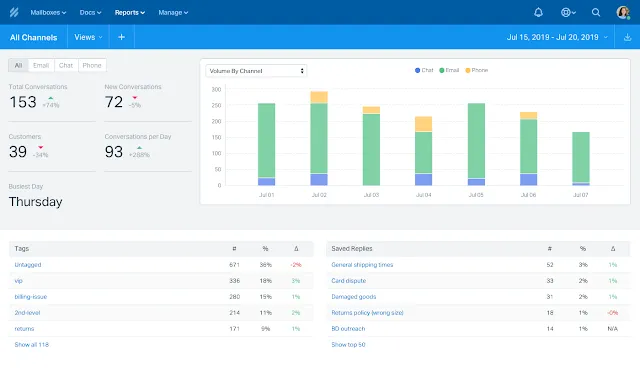
Integrate vs Consolidate: Help Scout + HubSpot vs HubSpot Service Hub
Help Scout markets itself as a HubSpot Service Hub alternative simpler, more support-focused, lower cost for support-only teams. Some companies evaluating this integration are also asking whether to consolidate onto Service Hub.
| Scenario | Recommendation |
| Support team loves Help Scout and it runs well. Marketing and sales run on HubSpot. The only gap is getting support data into HubSpot for attribution. | Integrate. Native connector covers the basics; custom build covers advanced attribution and scoring. |
| Company is already paying for HubSpot Service Hub but also paying for Help Scout overlapping for basic ticket management | Consolidate. Service Hub handles the same ticket management at no additional cost if you already have the plan. |
| Support team needs Help Scout-specific features: Docs knowledge base, Beacon chat with custom integrations, specific Help Scout workflows | Integrate. Service Hub’s feature parity is close but not identical. If Help Scout’s specific capabilities matter, keep both. |
| Growing team wants a unified platform for support, sales, and marketing with fewer vendor relationships | Consolidate to Service Hub. The native integration across HubSpot hubs is more powerful than any third-party connection. |
See your 12-month revenue impact with HubSpot CRM
Enter your current numbers — visitors, leads, deal size — and get a personalized projection based on real HubSpot customer benchmarks.
Calculate My ROI
What to Expect from a Custom Build
- Weeks 1-2: Map support data to HubSpot. Define which Help Scout properties (ticket count, tags, CSAT) become HubSpot contact properties. Define workflow triggers.
- Weeks 3-4: Build and test. Build against Help Scout API and HubSpot API. Test tag-to-workflow trigger, ticket count sync, CSAT property mapping.
- Weeks 5-6: UAT. Support team validates data appearing correctly in HubSpot. Marketing team validates workflow triggers firing on correct tag events.
- Weeks 7-8: Go-live with monitoring. Validate that tag events fire in real time and don’t create duplicate HubSpot workflow enrollments.
We are a HubSpot Diamond Solutions Partner with custom integration accreditation. 98.5% client retention. For teams also evaluating other support desk connections, we build HubSpot Zendesk integration and HubSpot Freshdesk integration with the same architecture.



Table of Contents
- HubSpot Help Scout Integration: Native Connector, Limitations, and Custom Builds
- What the Native Help Scout HubSpot Integration Does
- How to Install the Native Connector
- Native Integration Limitations: What It Does Not Do
- What a Custom Build Adds
- Integrate vs Consolidate: Help Scout + HubSpot vs HubSpot Service Hub
- What to Expect from a Custom Build