










































HubSpot Sortly Integration: Connecting Inventory to Your CRM Pipeline
Two problems sit on opposite sides of the gap between Sortly and HubSpot. On the sales side: reps close deals without knowing current stock levels, sometimes promising product they don’t have. On the ops side: when a deal closes, someone has to manually open Sortly and deduct the sold quantities from inventory. Neither is complicated both are entirely avoidable with a connection between the two platforms.
Sortly is a mobile-first inventory management app used widely in construction, field service, retail, and event management. HubSpot is where the customer relationship and deal pipeline live. There’s no native HubSpot connector for Sortly Sortly’s integrations are limited generally, and their API is in public beta. But the API is functional and covers the objects the integration needs.
We’re Integrate IQ, a HubSpot Diamond Solutions Partner with custom integration accreditation. We’ve processed over 20 billion records annually across 300+ platform integrations. Here’s what the HubSpot Sortly integration connects and what to expect from the build.
What Sortly Is and Where HubSpot Fits
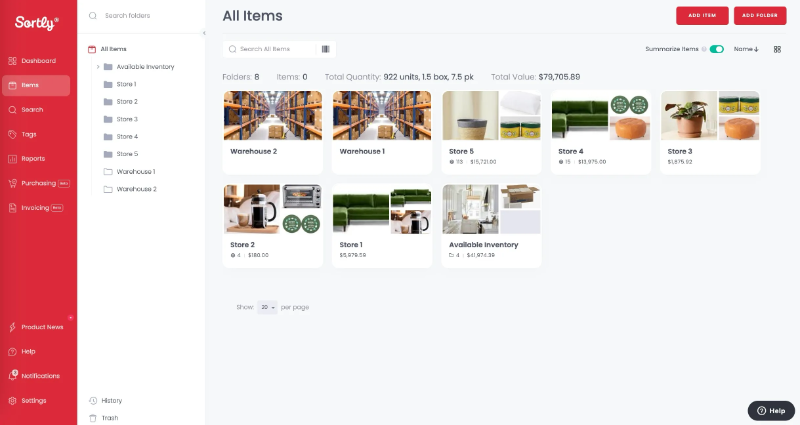
Sortly is a visual, mobile-first inventory management platform for SMBs. Its core capabilities include barcode and QR code scanning, photo-based item tracking, multi-location inventory management, check-in/check-out for tools and equipment, low-stock alerts, and activity history. Industries that use Sortly heavily include construction (tools and materials per job site), field service (equipment checked out per job), retail (product stock), and event management (AV equipment, furniture).
HubSpot manages the customer relationship and sales pipeline upstream. The integration connects Sortly’s physical inventory picture to HubSpot’s deal pipeline, so that sales decisions are informed by real stock data and sales outcomes drive real inventory updates.
Free ROI Calculator
See your 12-month revenue impact with HubSpot CRM
Enter your current numbers — visitors, leads, deal size — and get a personalized projection based on real HubSpot customer benchmarks.

| System | What It Handles | What’s Missing Without Integration |
| HubSpot | CRM, deal pipeline, quoting, marketing automation | No real-time stock visibility reps quote blind on availability |
| Sortly | Physical inventory tracking, stock counts, equipment checkout | No connection to deal outcomes stock doesn’t update when deals close |

Turn HubSpot Into A Real-Time SMS Engine with Message IQ
 Two-Way Conversations
 Shared Team Inbox
 Automation Triggers
 Advanced Reporting
 Compliance Tools
- 98% SMS read within 3 min
- 78% Buy from first responder
- 21× More likely to qualify

*MessageIQ is an IntegrateIQ product – built natively for HubSpot by the same team.
Sortly’s API: What It Exposes and What the Plan Requires
Sortly offers a Public API that is currently in beta. Key points for anyone scoping a HubSpot integration:
- Plan requirement: API access is available on Sortly’s Ultra and Enterprise plans only. Basic and Advanced plan users do not have API access.
- Authentication: Key-pair based (Public Key and Secret Key). Generate via Settings > Public API in Sortly.
- Rate limit: 1,000 requests per 15-minute window.
- Self-service: Sortly does not build integrations for customers API integrations require a developer to design and maintain the connection.
- Capabilities: CRUD operations on Items and Folders. Read item quantities, locations, and custom fields. Create or update items programmatically. Access check-in/checkout records and activity history.
HubSpot’s side uses the standard Deals, Products/Line Items, and Contacts APIs. When a deal closes, the integration reads its line items and maps them to matching Sortly items by SKU or custom field.
What the Custom Integration Connects
Deal-Close Triggers Inventory Deduction
When a HubSpot deal moves to Closed Won, the integration reads the deal’s line items product name, SKU, quantity and deducts those quantities from matching Sortly items. The stock count updates in Sortly the moment the deal closes in HubSpot. No manual step, no end-of-day batch update, no risk of overselling while someone forgets to update the inventory.
| HubSpot Trigger | Sortly Action |
| Deal moves to Closed Won (with product line items) | Matching Sortly item quantities reduced by deal line item quantities |
| Deal line item quantity updated before close | Sortly reservation updated to reflect revised quantity (if pre-close reservation workflow is configured) |
| Deal moved back to pipeline (sale reversed) | Sortly item quantities restored deal line item quantities returned to stock |
Stock Visibility on HubSpot Deal Records
Using HubSpot’s CRM Cards (custom UI extensions), the integration surfaces current Sortly stock levels directly on HubSpot deal or product records. A sales rep opens a deal, sees the relevant product, and sees the current Sortly quantity alongside it without opening Sortly. This changes quoting behaviour: reps stop promising product they don’t have and start giving accurate delivery timelines based on actual stock.
| Sortly Data Surfaced in HubSpot | Where It Appears | What It Enables |
| Current item quantity per location | Deal record CRM card | Accurate quoting and availability promises |
| Low stock flag (below minimum threshold) | Deal record or product page | Rep notified during quoting that stock is low |
| Last updated timestamp | Deal record | Confidence in data freshness |
| Check-out status (equipment in use or available) | Deal record (field service use case) | Equipment availability before scheduling a job |
Low-Stock Alert to HubSpot Workflow
Sortly fires low-stock alerts when an item’s quantity drops below a configured minimum threshold. The integration catches that event and triggers a HubSpot workflow:
- Creates a purchasing task assigned to the operations manager: ‘Reorder [product] current stock is [quantity], below minimum of [threshold]’
- Optionally pauses any active HubSpot email sequences featuring that product, to avoid promoting product you can’t fulfill
- Sends an internal HubSpot notification to the sales manager so they can manage prospect expectations on deals that include that product
The result: the gap between a low-stock event and a purchasing decision closes from ‘whenever someone checks Sortly’ to ‘the moment Sortly fires the alert’.
Vertical Use Cases
Field Service and Construction: Equipment Checkout per Deal
Field service and construction companies use Sortly’s check-in/check-out feature to track which tools, equipment, or materials go to which job site. The integration connects Sortly checkout events to HubSpot deals: when a piece of equipment is checked out in Sortly for a specific job, that checkout logs to the associated HubSpot deal record equipment name, quantity, checkout date, and expected return date. Account managers see the full equipment picture on the deal without calling the ops team. When equipment is returned (checked back into Sortly), the deal timeline updates. This is particularly valuable for equipment rental companies and field service firms where knowing what’s deployed to which customer is part of the service delivery record.
Retail and Product Sales: Accurate Quoting and Stock Alerts
Retail companies using Sortly for product inventory and HubSpot for sales pipeline can use the deal-close deduction to keep inventory accurate across all channels. The low-stock-to-HubSpot-workflow automation handles the reorder cycle. For companies also managing product sales through their website, our HubSpot Shopify integration guide covers the ecommerce inventory pattern alongside CRM pipeline management.
Event Management: AV and Furniture Inventory per Event
Event management companies tracking AV equipment, furniture, and supplies in Sortly can link each equipment checkout to a HubSpot deal representing an event booking. The deal record shows what’s allocated to the event, what’s available for other bookings, and triggers low-stock alerts when popular equipment is heavily booked. Double-booking equipment across two simultaneous events becomes visible before it becomes a problem.
See your 12-month revenue impact with HubSpot CRM
Enter your current numbers — visitors, leads, deal size — and get a personalized projection based on real HubSpot customer benchmarks.
Calculate My ROI
What to Expect from the Build
- Weeks 1-2: Scope and field mapping. Confirm Sortly Ultra/Enterprise plan API access. Map HubSpot line item SKUs to Sortly item identifiers. Define which HubSpot deal stages trigger Sortly updates and which Sortly events trigger HubSpot workflows.
- Weeks 3-4: Build and sandbox testing. Build against Sortly’s Public API and HubSpot’s Deals/Line Items API. Test deal-close deduction with real deal and inventory data. Test low-stock webhook trigger to HubSpot workflow.
- Weeks 5-6: UAT. Ops team validates inventory counts are reducing correctly on deal close. Sales team validates stock visibility appears on deal records. Low-stock workflow triggers reviewed against real threshold data.
- Weeks 7-8: Go-live and monitoring. Production deployment with active monitoring. Alerts configured for API rate limit proximity (1,000 requests per 15 minutes) during high-volume deal close periods.
We’re a HubSpot Diamond Solutions Partner with custom integration accreditation. 98.5% client retention rate. 55 million fields synced daily. Builds go live in 8 weeks. For companies also managing HubSpot QuickBooks integration for purchase orders alongside Sortly for physical stock, we scope the full procurement-to-CRM loop as a single architecture.







