















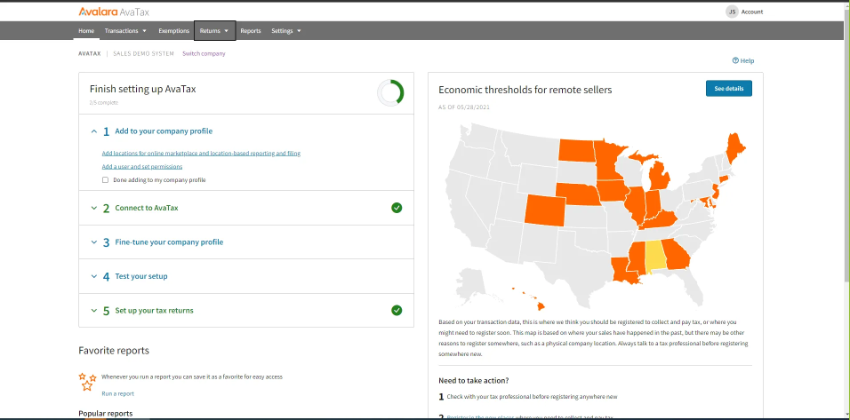



























What is a HubSpot Avalara integration?
A HubSpot Avalara integration is a data connection that sends deal, quote, and company information from HubSpot to Avalara’s AvaTax engine so it can calculate accurate sales tax, VAT or GST in real time. It also pulls the calculated tax total and audit trail back into HubSpot for quote-to-cash visibility.
How does the HubSpot Avalara integration work?
It works through the HubSpot and Avalara REST APIs, mapping HubSpot Product library items to Avalara Tax Codes and Companies to Avalara Customer Codes. When a Quote is generated or a deal reaches a defined stage, HubSpot calls AvaTax, which returns the correct rate based on the ship-to address and taxability rules.

Turn HubSpot Into A Real-Time SMS Engine with Message IQ
 Two-Way Conversations
 Shared Team Inbox
 Automation Triggers
 Advanced Reporting
 Compliance Tools
- 98% SMS read within 3 min
- 78% Buy from first responder
- 21× More likely to qualify

*MessageIQ is an IntegrateIQ product – built natively for HubSpot by the same team.
Does HubSpot have a native Avalara integration?
Yes, HubSpot supports a marketplace app called Sales Tax Powered by AvaTax, built by Avalara partner Taxiom. It handles basic real-time tax calculation on Quotes but relies on manual product and exemption mapping, triggers only at Quote publish and has no automated multi-entity logic. Teams scaling past one region typically move to a custom build.
How long does a HubSpot Avalara integration take to build?
A custom HubSpot Avalara integration takes about 8 weeks from kickoff to production. Discovery runs two weeks to map tax codes, exemption rules, and ship-to logic. Build and staging tests run three weeks, historical backfill runs one, and cutover with hypercare covers the final two. Multi-entity setups can extend this.
Can HubSpot and Avalara sync bi-directionally?
Yes. A custom integration pushes deal, quote, and address data from HubSpot to Avalara for tax calculation, then pulls the calculated tax, transaction ID, and audit trail back into the HubSpot Deal timeline. You define which system owns each field, so conflicts resolve by rule rather than by which system wrote last.
What data can sync between HubSpot and Avalara?
Deals, quotes, line items, company addresses, and product-to-tax-code mappings sync from HubSpot to Avalara, while calculated tax amounts, transaction IDs, exemption status, and audit trail entries sync back. Custom HubSpot properties, such as a Tax Exempt Status field mapped to Avalara’s Entity Use Code, are supported through the Avalara REST API.
How a HubSpot Avalara Integration Actually Works
A HubSpot Avalara integration works by giving each system one job. HubSpot owns the deal, the quote, and the customer relationship. Avalara owns tax determination: rates, jurisdictions, exemption logic, and filing-ready transaction records. Neither system tries to do the other’s job, which is what keeps the tax total trustworthy.
Data flows in both directions. HubSpot sends the quote, the ship-to address, and the product-to-tax-code mapping to Avalara, which calculates the tax and returns it in real time so the rep never leaves the CRM. Avalara then sends the transaction ID, the tax breakdown, and the exemption reason code back to the HubSpot Deal timeline for audit purposes.
Not everything syncs by accident. You define which fields flow which direction and which stage triggers a tax call, so the integration only fires when a quote is genuinely ready, such as when a deal reaches Proposal or Closed-Won, instead of on every minor edit.
Three Ways to Connect Avalara and HubSpot
Not every team needs custom. Here is the honest comparison.
| Factor | Native Marketplace App | Zapier / iPaaS | Custom (Integrate IQ) |
|---|---|---|---|
| Best for | Basic US sales tax on Quotes, low complexity | Point-to-point data movement, no tax logic | Multi-entity, multi-jurisdiction, exemption automation at scale |
| Sync direction | One-way, Quote to tax total only | One-way or two-way, object-level only | Bi-directional, field-level control |
| Custom objects/fields | Standard Quote and Product fields only | Depends on the connector, often shallow | Full support, including custom deal and company properties |
| Multi-entity and multi-jurisdiction support | Single AvaTax account, manual exemption setup | No native jurisdiction logic, just data movement | Automated nexus detection and entity-aware routing |
| Business logic | Fires at Quote publish only | Basic triggers, no staged logic | Custom triggers by deal stage, probability, or region |
| Volume handling | Fine for low quote volume | Throttles at scale without custom logic | Built to handle high-volume quoting without hitting API limits |
| Historical backfill | Not supported | Rarely supported | Full historical backfill included |
| Maintenance | Vendor-maintained, limited support | Self-managed | Ongoing support and monitoring included |
If you sell in one state, calculate tax on a handful of quotes a month, and can live with manual exemption entry, the Sales Tax Powered by AvaTax marketplace app is enough. Once you cross state lines, add exemption certificates at volume, or need tax logic tied to a specific deal stage, a custom build closes those gaps. Our custom HubSpot integration services team scopes that work around your actual tax footprint, not a generic connector.
Revenue Workflows You Can Automate Once Avalara Data Lives in HubSpot
- Quote-to-tax accuracy check. A rep generates a Quote in HubSpot, the integration calls AvaTax with the ship-to address and product tax codes, and the correct tax total appears on the quote before it reaches the customer, no manual lookup required.
- Exemption enforcement at the deal level. A Company marked “Tax Exempt” in HubSpot passes its Entity Use Code to Avalara automatically, so every transaction on that account returns $0 tax with the correct compliance reason code attached.
- Address validation gate. A new or edited Company address in HubSpot triggers Avalara’s address validation before a quote finalizes, catching invalid ship-to data before it produces a wrong tax calculation or a failed delivery.
- Multi-jurisdiction deal expansion. When a deal expands into a new state or country, the integration flags the new jurisdiction so AvaTax applies the correct sales tax, VAT, or GST rate instead of defaulting to the rep’s home jurisdiction.
- Audit trail logging. Every AvaTax calculation and transaction ID writes back to the HubSpot Deal timeline automatically, so finance and audit teams have a complete history without leaving the CRM.
What Breaks in a Avalara HubSpot Sync, and How We Prevent It
- Duplicate records and identity resolution. Duplicate Company records in HubSpot create duplicate Avalara Customer Codes, which splits exemption certificates and audit history across two accounts. We dedupe before mapping and enforce one Customer Code per Company.
- System-of-record conflicts. A quote revised after tax calculation can leave HubSpot and Avalara disagreeing on the final tax amount. We define which event triggers recalculation and lock the field until that event fires.
- Field mapping and tax code drift. A HubSpot Product mapped to the wrong Avalara Tax Code taxes a software license like hardware. We validate every product-to-tax-code mapping against Avalara’s tax code library at build time and flag drift in ongoing monitoring.
- Jurisdiction and nexus drift. As a company expands into new states or countries, an unvalidated ship-to address in HubSpot can trigger the wrong jurisdiction’s rate or miss a new nexus obligation entirely, an exposure that often only surfaces during an audit. We validate addresses and flag new jurisdictions before they reach a quote.
- API rate limits at volume. Across our client base we move 20 billion plus fields annually, so we batch, checkpoint, and throttle tax calculation calls by design instead of by accident.
Implementation Timeline: What to Expect
Most HubSpot Avalara integrations complete inside eight weeks of kickoff. The first two weeks cover discovery: object inventory in both systems, field-by-field mapping, system of record decisions, and mapping every product to its correct Avalara tax code and every exempt customer to its Entity Use Code. Weeks three to five are build and unit testing against a staging Avalara sandbox and a HubSpot sandbox. Week six runs the historical backfill and reconciliation. Weeks seven and eight cover user acceptance testing, cutover, and hypercare. Post-launch monitoring is included, so if a Avalara tax rule changes or HubSpot pushes an API update, we see it before your reports do. Full detail is on our HubSpot integration process page and 98.5% of clients renew for a follow-on scope.
See your 12-month revenue impact with HubSpot CRM
Enter your current numbers — visitors, leads, deal size — and get a personalized projection based on real HubSpot customer benchmarks.
Calculate My ROI
Connect the Rest of Your Revenue Stack
Avalara rarely runs alone. Most HubSpot Avalara clients also connect their ERP since tax calculation only matters once invoices and revenue recognition line up downstream: our HubSpot NetSuite integration and HubSpot QuickBooks integration cover that side of the stack. If your transactions originate in an online store, our HubSpot Shopify integration extends the same tax logic to ecommerce checkout. Teams weighing a full ERP against a lighter CRM-led stack can start with our HubSpot vs NetSuite comparison, and you can scope your own build with the Integration ROI Calculator.



Table of Contents
- What is a HubSpot Avalara integration?
- How does the HubSpot Avalara integration work?
- Does HubSpot have a native Avalara integration?
- How long does a HubSpot Avalara integration take to build?
- Can HubSpot and Avalara sync bi-directionally?
- What data can sync between HubSpot and Avalara?
- How a HubSpot Avalara Integration Actually Works
- Three Ways to Connect Avalara and HubSpot
- Revenue Workflows You Can Automate Once Avalara Data Lives in HubSpot
- What Breaks in a Avalara HubSpot Sync, and How We Prevent It
- Implementation Timeline: What to Expect
- Connect the Rest of Your Revenue Stack




