






































HubSpot Diamond Solutions Partner

HubSpot Document360 Integration: Operationalize Your Knowledge Base

Bridge the gap between your service desk and your documentation. Automatically surface relevant knowledge base articles within HubSpot tickets and sync contact permissions to ensure seamless, secure access to your technical resources without manual provisioning.

98.5%
Client Retention
300+
Platforms Integrated
20B+
Fields Synced Annually
HubSpot Diamond Partner

Get Your Free HubSpot Consultation + Claim The 2026 CRM Growth Playbook Instantly for FREE

Discover how top companies use their CRM to power marketing, sales & growth. No spam. No sales pitch. Just expert insights from certified HubSpot professionals.

  • Proven Playbooks from top-performing companies
  • Strategies to drive more leads, pipeline & revenue
  • Actionable insights from HubSpot experts
🎁Bonus: Submit the form to Instantly download The 2026 CRM Growth Playbook for highest ROI
(Offer valid for Limited Time Only)
HubSpot Diamond Partner

Get a scoped estimate not a guess

ERPs, custom objects, legacy databases, real-time bi-directional sync. Every estimate is built by the same engineers who ship the integration.

  • Scope-based pricing. From $3,450 - scales with actual complexity, never padded flat fees.
  • 98.5% year-one retention. The engineers who quote it are the ones who build it.
  • 300+ platforms shipped. Your edge case is likely already in production somewhere in our library.
Build your estimate

60-second ballpark · No back-and-forth

Standard on every build

Every estimate already includes all six

Bi-directional sync

One-way or two-way, built to your data flow

Granular field mapping

Every property mapped, validated, tested

Real-time + scheduled

Instant triggers and batched syncs together

Custom sync logic

Your business rules, written into the build

Error handling

Monitoring, alerts, retry logic baked in

Year 1 continuity

License, maintenance, ongoing support

Get Your Free HubSpot Consultation + Claim The 2025 CRM Growth Playbook Instantly for FREE

Discover how top companies use their CRM to power marketing, sales & growth. No spam. No sales pitch. Just expert insights from certified HubSpot professionals.

  • Proven Playbooks from top-performing companies
  • Strategies to drive more leads, pipeline & revenue
  • Actionable insights from HubSpot experts
🎁Bonus: Submit the form to Instantly download The 2025 CRM Growth Playbook for highest ROI
(Offer valid for Limited Time Only)

Turn Your Document360 Knowledge Base Into HubSpot Action

Your technical writers and product experts shouldn't write into a void. Integrating Document360 with HubSpot turns your static documentation into a dynamic support engine that puts answers exactly where they are needed most.

Contextual Delivery: Enable support agents to search, preview, and share Document360 articles directly inside the HubSpot record, eliminating tab-switching.

Reader Analytics: Feed data on who is reading what back to your product team to identify gaps in documentation or frequent customer pain points.

Secure Provisioning: Automatically grant or revoke access to private knowledge bases based on a contact’s lifecycle stage or list membership in HubSpot.

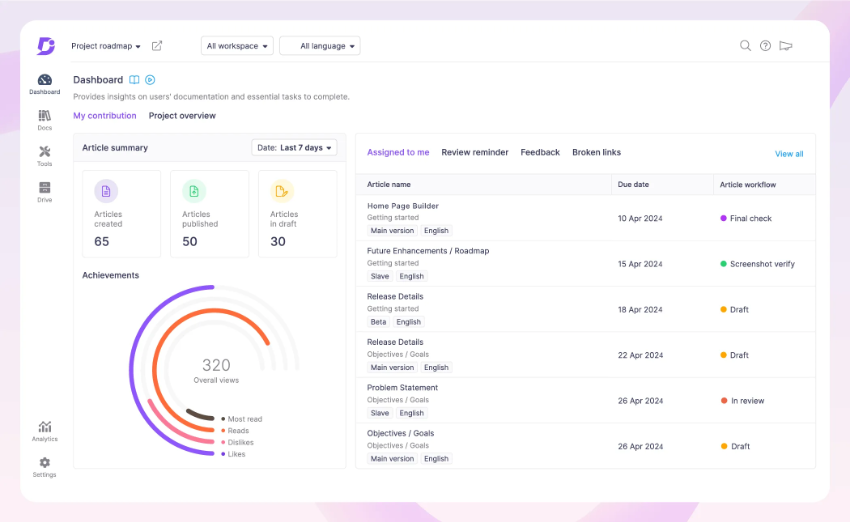
document360 dashboard

Your technical writers and product experts shouldn't write into a void. Integrating Document360 with HubSpot turns your static documentation into a dynamic support engine that puts answers exactly where they are needed most.

Integrate IQ has consistently shown they can be trusted with even the most complex projects. I know our customers are in great hands and that the job will always get done right.

Kathleen Rush

Manager, Strategic Partner Development Team at HubSpot

Supercharge HubSpot Service Hub With Document360 Knowledge

Service Hub is powerful, but it needs fuel. This integration injects your specialized technical documentation directly into the support workflow, reducing average handle time and boosting customer satisfaction scores.

One-Click Resolution: Allow agents to insert full article links or snippets directly into email replies and chat flows without leaving the conversation.

Self-Service Deflection: Empower HubSpot chatbots to serve up specific Document360 articles based on inquiry intent, solving issues before a ticket is even created.

Timeline Visibility: View exactly which articles a contact visited before they logged a ticket, giving agents immediate context on the user's attempt to self-solve.

HubSpot Report

Service Hub is powerful, but it needs fuel. This integration injects your specialized technical documentation directly into the support workflow, reducing average handle time and boosting customer satisfaction scores.

Flexible Document360 HubSpot Sync Architecture

Our custom integrations are engineered for flexibility and scale, handling any business logic and data transformation you require.

Built for Your Business Process

Standard, out-of-the-box connectors are built for simple, one-way data pushes. They can't handle the dynamic, tag-based segmentation or knowledge management functions of Document360. We build your integration around your specific automations, mapping custom fields and knowledge data bi-directionally.

  • Bi-Directional & Uni-Directional Sync:: We configure data to flow where it adds value—pushing HubSpot contacts to Document360 for access, or pulling article view metrics back into HubSpot for reporting.
  • Real-time & Scheduled Syncs:: We utilize webhooks to provision access instantly when a deal closes, while using scheduled syncs for updating bulk usage analytics to respect API limits.
  • Custom Sync Logic & Triggers:: We apply logic to the sync, such as only syncing contacts with an "Active Support Maintenance" property to your private documentation readers group.
  • High-Volume Data Handling:: Our architecture is designed to handle high-traffic support centers, ensuring that search queries and link unfurling remain fast and reliable even during peak volume.

HubSpot and Document360 Object and Field Mapping

We map your CRM architecture directly to your knowledge management hierarchy.

HubSpot

Document360

  • Contact (List Membership)
  • Ticket / Ticket Subject
  • Contact Timeline Event
  • Company / Deal Stage
  • Knowledge Base Search
  • Reader / Reader Group
  • Article Search Query
  • Article View / Feedback Rating
  • Access Scope / Project Version
  • Search Analytics
  • Contact (List Membership) Reader / Reader Group
  • Ticket / Ticket Subject Article Search Query
  • Contact Timeline Event Article View / Feedback Rating
  • Company / Deal Stage Access Scope / Project Version
  • Knowledge Base Search Search Analytics

Transparent, Scoped Document360 Integration Pricing

No surprises. Clear scope, clear acceptance tests. We believe in straightforward pricing so you know exactly what to expect before we begin.

We fix what others can't: 50% Of our customers hired us to fix a failed integration.

A failed integration is more than a technical problem: it's a drain on time, budget, and morale. We are the specialists that leading companies like MetLife trust to handle their most mission-critical data flows. We don't rely on fragile connectors or simplistic platforms because we know they can't handle enterprise scale. Our approach is built on robust, custom development and a deep understanding of both HubSpot and the systems you need to connect it to. Partnering with us isn't just another attempt; it's an investment in certainty.

Trusted by Leaders, Proven by Results

Trusted by High-Growth Companies

See why leaders at scaling companies partner with Integrate IQ's experts.

I've been working with Integrate IQ for over 2 years now. We've had several outside systems that we wanted integrated with our HubSpot instance. From project planning and scoping, through build, and after deployment support, the team at Integrate IQ has been exemplary to work with. They've delivered on all commitments, helped established reasonable time frames for deliverables, and kept lines of communication open.

Marohn, M

We've partnered with Integrate IQ for over five years to develop integrations between our complex and not-so-widely-known ERP. They understand HubSpot's strengths, weaknesses and limitations, and are able to easily adapt to our evolving needs. They had an ownership change a few years ago, but that did not impact their expertise/service. We really appreciate our relationship with IIQ and recommend them to anyone looking to embed HubSpot deeper into their organization's systems.

Craychee, A

Integrate IQ has been great to work with! As someone who can be intimidated when things get too technical, they made the process of outlining our integration very approachable and understandable. They're great to work with and built the integration that we asked for, and then continued to work with us to fine-tune the tool over time as we figured out exactly what we needed.

Lauren Little

Integrate has been fantastic to work with. They helped us implement our CRM, design a framework for our pipeline that works perfectly and they built out an integration between HubSpot and Netsuite which allows our data to flow seamlessly. They've been an invaluable partner in our growth.

Whipple, M

We worked with Integrate IQ on a complex integration and now we have a fantastic solution that makes HubSpot work even better!

Ben Donahower

HubSpot Is the Platform. We Make It Perform

Why Businesses Trust Integrate IQ for a Smarter HubSpot Experience

Category
HubSpot Direct
Integrate IQ
Setup Approach
Guided setup with best-practice coaching.
Done-for-you configuration — we build and optimize everything for you.
Integrations
Standard native apps and limited connectors.
Custom integrations with 300+ platforms — fully tested and supported.
CRM Migrations
Basic import support.
Complete migration from any CRM — clean data, mapped fields, zero downtime.
Technical Capability
Advisory-focused.
Engineer-led builds with API, automation, and custom object expertise.
Ongoing Support
Ticket-based, reactive
Dedicated partner support, proactive optimization & monitoring
Team Expertise
Generalists across thousands of accounts
Senior HubSpot engineers with 300+ complex integrations delivered

What is a HubSpot Document360 integration?

A HubSpot Document360 integration is a two-way data connection that syncs contacts, tickets, and knowledge base articles between HubSpot and Document360 in near real time. It keeps article views and reader access visible inside HubSpot and pushes contact and lifecycle data back to Document360 for a unified, permission-aware customer view.

How does the HubSpot Document360 integration work?

It works through the HubSpot and Document360 REST APIs, with field mapping, deduplication and a defined system of record for every object. When a reader’s access level or a ticket updates in either system, the sync writes the change to the other within minutes, governed by bi-directional field rules.

for HubSpot

Turn HubSpot Into A Real-Time SMS Engine with Message IQ

chat icon Two-Way Conversations inbox icon Shared Team Inbox thunder icon Automation Triggers chart icon Advanced Reporting shield icon Compliance Tools
  • 98% SMS read within 3 min
  • 78% Buy from first responder
  • 21× More likely to qualify
Proven results
98% open rate 3–5 min avg response $45–$50 ROI / $1

*MessageIQ is an IntegrateIQ product – built natively for HubSpot by the same team.

Does HubSpot have a native Document360 integration?

HubSpot does not maintain a first-party Document360 integration. The marketplace lists Zapier and PixieBrix templates that handle basic ticket-to-article lookups and contact syncing. These templates skip SLA field sync, custom ticket field mapping, and reader group provisioning. Teams needing secure, permission-based access typically move to a custom-built integration.

How long does a HubSpot Document360 integration take to build?

A custom HubSpot Document360 integration takes about 8 weeks from kickoff to production. Discovery runs two weeks, build and staging tests run three, historical backfill runs one week, and cutover with hypercare covers the final two weeks. Timelines extend for multi-brand knowledge bases or high article volume.

Can HubSpot and Document360 sync bi-directionally?

Yes. Bi-directional sync is standard in a custom HubSpot Document360 integration. You define system of record at the field level, so article views and reader status flow one way while lifecycle stage and deal data flow the other, with conflicts resolved by rule instead of by whichever system wrote last.

What data can sync between HubSpot and Document360?

Contacts, tickets, deals, and companies from HubSpot; readers, reader groups, articles, article feedback, and search analytics from Document360; plus marketing activity like emails, forms, and lifecycle stage. Field mapping is configured per project so only relevant data flows and every field has a clear owner.

How a HubSpot Document360 Integration Actually Works

A HubSpot Document360 integration works by giving each system ownership of the data it knows best. Document360 owns the knowledge base: articles, versions, categories, reader groups, and search behavior. HubSpot owns the relationship: contacts, deals, tickets, and lifecycle stage. The sync moves data between them without either side overwriting the other’s source of truth.

In practice, that means two sync directions running side by side. Article views, feedback ratings, and search queries flow from Document360 into the HubSpot contact timeline, so agents see what a customer already tried before they opened a ticket. Contact properties, list membership, and deal stage flow from HubSpot into Document360, so reader access to private knowledge bases updates automatically the moment a deal closes or a support tier changes.

None of this happens by accident. Every field carries a defined system of record, so a support tier downgrade in HubSpot revokes Document360 reader access on schedule, and a new article published in Document360 does not silently overwrite manually tagged HubSpot properties. Business rules, not whichever system wrote last, decide what moves and when.

Three Ways to Connect Document360 and HubSpot

Not every team needs custom. Here is the honest comparison.

Factor Native / Marketplace App Zapier / iPaaS Custom (Integrate IQ)
Best for Basic article lookup for a handful of reps Simple ticket-to-article automations, no engineering needed Enterprise-scale, permission-aware KB integration
Sync direction One-way, ticket to article search only Configurable, but built one Zap at a time True bi-directional, controlled at the field level
Custom objects/fields Not supported Limited, breaks on custom ticket fields Full support for custom objects and reader groups
Ticket routing and SLA sync No SLA field mapping Manual, per-Zap SLA logic that drifts over time SLA fields mapped and monitored end to end
Business logic None Basic conditional logic per Zap Your access rules, tier logic, and escalation paths built in
Volume handling Degrades past a few hundred tickets a month Rate limits kick in at moderate volume Built for high-traffic support centers
Historical backfill Not available Manual, one record at a time Automated backfill with reconciliation
Maintenance None, and it breaks silently You maintain every Zap as fields change We monitor and maintain it post-launch


Zapier or a marketplace app is enough if you are syncing one ticket field to one article search box for a small team. Once you need reader group provisioning tied to deal stage, SLA-aware routing, or a knowledge base that spans multiple brands, custom development from our custom HubSpot integration services  is the option that will not break under load.

Support Workflows You Can Automate Once Document360 Data Lives in HubSpot

  • Self-service deflection scoring. A contact views three or more Document360 articles without submitting a ticket, so a HubSpot lifecycle property updates to reflect self-service engagement. Support sees who solved their own problem, and marketing gets a fresh onboarding signal.
  • Tier-based reader provisioning. A deal closes or a support tier property changes in HubSpot, so the contact is automatically added to or removed from the matching Document360 reader group. Private documentation access always matches current entitlement, with zero manual work.
  • Documentation gap alerts. A support ticket closes with no matching Document360 article found, so HubSpot creates a task for the documentation team with the ticket subject and resolution notes attached. The knowledge base grows from real gaps, not guesswork.
  • Pre-ticket context for agents. A contact opens a support ticket in HubSpot, so their Document360 article views and search history populate the ticket timeline automatically. Agents start every conversation already knowing what the customer tried.
  • Chatbot-first deflection. A HubSpot chatflow visitor asks a product question, so the bot queries the Document360 API and returns the matching article before a ticket is ever created. Ticket volume drops without adding headcount.

What Breaks in a Document360 HubSpot Sync, and How We Prevent It

  • Duplicate records and identity resolution. Anonymous KB visitors who later submit a ticket under a different email create two contact records. We match on verified identifiers and merge history before it splits your reporting.
  • System-of-record conflicts. Without a defined owner per field, a manually tagged HubSpot property and an auto-synced Document360 field can overwrite each other. We assign system of record at the field level so overwrites never happen by accident.
  • Field mapping and status drift. Ticket status values and article categories get renamed over time in both systems. We build a mapped translation layer and monitor for drift instead of letting it silently break reporting.
  • SLA and reader-access mismatch. Support tiers and SLA rules are defined differently in HubSpot and Document360, so a downgrade in one system can leave stale reader access or a missed SLA alert in the other. We fire tier and access changes off the same trigger so they never fall out of step.
  • API rate limits at volume. Across our client base we move 20 billion plus records annually and 7 million fields daily, so we batch, checkpoint, and throttle by design instead of by accident.

Implementation Timeline: What to Expect

Most HubSpot Document360 integrations complete inside eight weeks of kickoff. The first two weeks cover discovery: object inventory in both systems, field-by-field mapping, system of record decisions, and reader group and access-tier mapping across every private knowledge base. Weeks three to five are build and unit testing against a staging Document360 project and a HubSpot sandbox. Week six runs the historical backfill and reconciliation. Weeks seven and eight cover user acceptance testing, cutover, and hypercare. Post-launch monitoring is included, so if a Document360 project version changes or HubSpot pushes an API update, we see it before your reports do. Full detail is on our HubSpot integration process page and 98.5% of clients renew for a follow-on scope.

Free ROI Calculator

See your 12-month revenue impact with HubSpot CRM

Enter your current numbers — visitors, leads, deal size — and get a personalized projection based on real HubSpot customer benchmarks.

Calculate My ROI

ROI Calculator Preview

Connect the Rest of Your Revenue Stack

Document360 rarely runs alone. Teams that route KB access by deal stage often also connect Salesforce for account ownership through our HubSpot Salesforce integration pair the knowledge base with a live chat widget through our HubSpot Intercom integration and escalate undocumented issues to engineering with our HubSpot Jira integration. Weighing HubSpot’s own help desk against a dedicated KB tool? Our HubSpot vs Zendesk comparison breaks down where each one wins. Not sure what any of this is worth in hours saved? Run the numbers on our integration ROI calculator.


Tim Ritchie

Tim Ritchie

CEO of Integrate IQ

An admitted HubSpot fanboy, Tim has been in the HubSpot ecosystem as a consumer of the platform from the beginning. Tim believes that Message IQ’s success begins and end with the success of our customers and partners.

Integration CTA Image Message IQ CTA Image
Frequently Asked Questions

HubSpot Document360 Integration FAQs

Yes. We can automate user provisioning so that a contact is only added as a "Reader" in Document360 when their associated deal moves to "Closed Won" or a specific support tier.

Yes. We can configure the integration to allow your chatbots to query the Document360 API and return relevant articles to visitors in real-time.

Yes. We can map search terms and article views to the Contact Timeline, giving your agents insight into the customer's journey prior to contacting support.

This is a managed integration solution. We configure the endpoints specifically for your security needs and workflow, ensuring it handles your custom lists and permission groups reliably.

Cost depends on how many objects you sync, whether reader provisioning needs tier-based logic, and how many private knowledge bases you manage. Book a discovery call or run our integration ROI calculator for a scoped estimate instead of a guess.

We map your SLA rules and custom ticket fields to the equivalent Document360 access tiers and project versions, so a multi-brand support desk keeps separate reader groups and separate escalation paths without manual cross-referencing.

Post-launch monitoring is included. If HubSpot changes its API or you add a new Document360 project version, we catch it before it breaks your sync, which is a big part of why 98.5% of our clients renew for follow-on scope.

Ready for a Custom HubSpot Document360 Integration?

Don't let your knowledge base sit on an island. Let’s configure a system where your documentation actively solves problems and your support agents have the right answers at their fingertips.

Book Your HubSpot Document360 Integration Consultation

Post You May Like

Contact Us Book A Meeting





