










































HubSpot Invoiced Integration: Connecting Your CRM to AR Automation
Companies using Invoiced for accounts receivable automation and HubSpot for CRM are managing two financial gaps manually. When a deal closes in HubSpot, finance logs into Invoiced to create the customer record and configure the first invoice. When Invoiced marks an invoice as paid, account managers in HubSpot don’t see it without checking Invoiced separately. Both steps are manual, both create lag, and both introduce room for data entry errors.
No native HubSpot connector for Invoiced exists in HubSpot’s App Marketplace. Invoiced does have a well-documented REST API with webhook support which makes a custom integration fully viable. The question is what each approach (Zapier vs custom) actually delivers.
We are Integrate IQ, a HubSpot Diamond Solutions Partner with custom integration accreditation. We have processed over 20 billion records annually across 300+ platform integrations. Here is what the HubSpot Invoiced integration connects and how to build it.
What Invoiced Does and Where HubSpot Fits
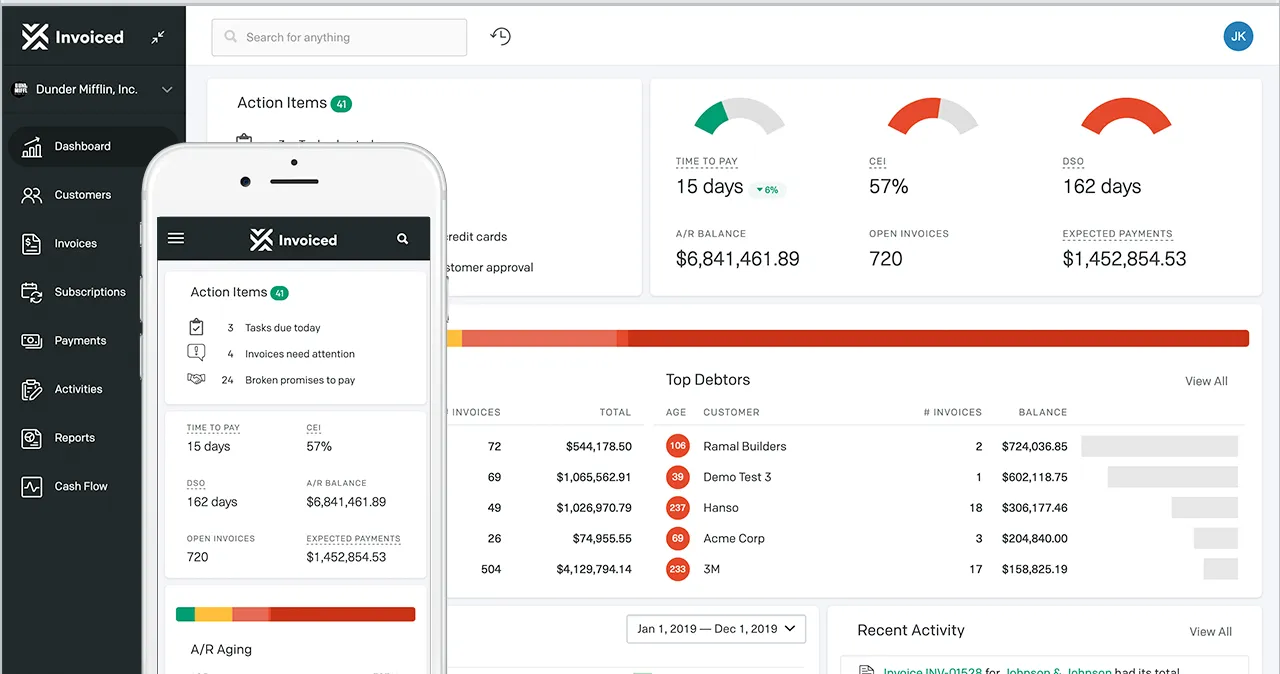
Invoiced is a cloud-based accounts receivable automation platform. Its core capabilities cover recurring invoice generation, subscription billing, automated payment reminders, payment plan management, a customer self-service portal, and cash application. It integrates natively with accounting platforms like QuickBooks, Xero, and NetSuite for the books side. HubSpot is the upstream CRM layer the system that generates the customer relationship before they become a billing account. The integration connects the moment a prospect becomes a paying customer.
| System | What It Handles | What Goes Missing Without Integration |
| HubSpot | Lead-to-deal pipeline, email marketing, lifecycle management, CRM data | No visibility into Invoiced invoice status, payment history, or overdue accounts |
| Invoiced | Recurring invoicing, subscription billing, payment reminders, payment plans, customer portal | No deal context, no marketing automation triggers from payment events |

Turn HubSpot Into A Real-Time SMS Engine with Message IQ
 Two-Way Conversations
 Shared Team Inbox
 Automation Triggers
 Advanced Reporting
 Compliance Tools
- 98% SMS read within 3 min
- 78% Buy from first responder
- 21× More likely to qualify

*MessageIQ is an IntegrateIQ product – built natively for HubSpot by the same team.
Zapier vs Custom Integration: What Each Delivers
| Capability | Zapier | Custom Integration |
| Deal-close creates Invoiced customer | Supported (basic) | Full Company data, payment terms, billing address from HubSpot deal properties |
| Deal-close triggers first invoice | Partial limited field mapping | Full deal line items populate Invoiced invoice with amounts, terms, due date |
| Invoice paid updates HubSpot | Supported (basic event) | Full deal stage, CLV property, onboarding workflow trigger, timeline event |
| Overdue invoice triggers HubSpot workflow | Not supported | Full dunning sequence enrolled, account manager task created |
| Subscription renewal events in HubSpot | Not supported | Full renewal date, amount, next billing cycle updated as HubSpot contact properties |
| Real-time sync | Polling (15-min on free plans) | Webhook-driven fires the moment Invoiced event occurs |
What the Custom Integration Connects
HubSpot to Invoiced
| HubSpot Event | Invoiced Action |
| Deal moves to Closed Won | Invoiced Customer created from HubSpot Company data company name, billing address, contact email, payment terms, currency |
| Deal with line items moves to Closed Won | Invoiced Invoice created with deal line items, amounts, and due date pulled from HubSpot deal properties sent to customer automatically |
| Deal amount updated before invoice sent | Invoiced draft invoice updated to match revised deal amount |
| HubSpot contact billing details updated | Invoiced Customer record updated |
Invoiced to HubSpot
| Invoiced Webhook Event | HubSpot Action |
| Invoice sent | HubSpot contact timeline updated: Invoice sent [amount] due [date] |
| Invoice paid | HubSpot deal property updated with payment date; CLV updated; contact enrolled in post-payment onboarding sequence; account manager task created |
| Invoice overdue | HubSpot workflow trigger: enrol contact in overdue payment sequence; create account manager task |
| Subscription renewed | HubSpot contact property updated: Next Billing Date, Subscription Amount, Renewal Count |
| Subscription cancelled | HubSpot lifecycle stage updated; win-back workflow triggered after cooling period |
Use Cases That Drive the Build Decision
Deal-to-Invoice Without Manual Finance Setup
A SaaS company closes a 12-month contract in HubSpot. The custom integration immediately creates an Invoiced Customer from the HubSpot Company record billing address, contact email, payment terms and generates a recurring monthly invoice for the subscription amount pulled from the HubSpot deal. Finance opens Invoiced and sees the new customer and first invoice ready. No manual entry, no delay between contract signed and billing started.
Overdue Invoice Triggering HubSpot Dunning
When Invoiced marks an invoice overdue, the integration fires a HubSpot workflow. The billing contact gets enrolled in a timed overdue sequence an initial polite reminder from the account manager, a more formal overdue notice at 15 days, an escalation task at 30 days. The sequence pauses automatically when Invoiced records a payment. Account managers stay in HubSpot; finance stays in Invoiced. For companies building similar AR-to-CRM workflows, our HubSpot BILL integration guide covers the same pattern for BILL’s AP/AR module.
for HubSpot
Turn HubSpot Into A Real-Time SMS Engine with
Message IQ
Two-Way Conversations
Shared Team Inbox
Automation Triggers
Advanced Reporting
Compliance Tools
- 98%
SMS read within 3 min - 78%
Buy from first responder - 21×
More likely to qualify
3–5 min avg response
$45–$50 ROI / $1
*MessageIQ is an IntegrateIQ product – built natively for HubSpot by the same team.
Subscription Lifecycle in HubSpot
Invoiced manages subscription billing recurring charges, dunning management, payment plan tracking. When subscription events occur (renewal, upgrade, cancellation), the integration writes those events back to HubSpot contact properties. Marketing can build active lists based on subscription status: ‘Customers on monthly plans due for renewal’ gets enrolled in a pre-renewal upsell campaign. ‘Customers who cancelled in the last 30 days’ gets enrolled in a win-back sequence. This is marketing automation driven by real billing data from Invoiced not manual status updates in HubSpot. See also: HubSpot Stripe integration for teams using Stripe as their payment processor alongside Invoiced.
Invoiced API Architecture
Invoiced provides a REST API with full CRUD coverage for its core objects. Key endpoints relevant to the HubSpot integration:
- Customers API: Create and update Invoiced customer records. Maps to HubSpot Company and Contact objects.
- Invoices API: Create invoices, update invoice status, retrieve payment history and outstanding balance.
- Subscriptions API: Manage recurring billing plans, retrieve renewal dates, update subscription amounts.
- Events and Webhooks: Real-time notifications for invoice status changes (paid, overdue, written-off) and subscription lifecycle events. This is what makes the HubSpot automation event-driven rather than polling-based.
What to Expect from the Build
- Weeks 1-2: Discovery and mapping. Map HubSpot deal and company properties to Invoiced Customer and Invoice fields. Define trigger events and deal stage logic. Confirm Invoiced API access and webhook endpoint configuration.
- Weeks 3-4: Build and sandbox testing. Build against Invoiced REST API and HubSpot API. Test Customer creation from deal data, invoice generation with line item mapping, and webhook handling for payment events.
- Weeks 5-6: UAT. Finance team validates that Customer records and invoices are creating correctly in Invoiced. Account managers validate that payment status appears on HubSpot records and triggers the right sequences.
- Weeks 7-8: Go-live and monitoring. Production deployment with active monitoring. Payment webhooks are real-time the integration responds the moment Invoiced processes a payment or flags an invoice overdue.
For companies also connecting HubSpot QuickBooks integration for accounting alongside Invoiced for AR, we scope those as a combined financial stack connection from a single HubSpot deal close event.
When the Invoiced HubSpot Integration Pays Off Most
Subscription SaaS Businesses
SaaS companies billing monthly or annual subscriptions through Invoiced get the most value. When a prospect converts in HubSpot, the subscription starts automatically in Invoiced. When a subscription renews, HubSpot tracks the renewal date and amount. When a subscription goes overdue, HubSpot runs a dunning sequence from the account manager email address. This combination of billing automation and relationship-led dunning is what most SaaS finance teams try to build manually.
Professional Services Firms
Professional services companies often issue invoices after project milestones. When HubSpot marks a project deal stage as Milestone Completed, the integration creates the milestone invoice in Invoiced with the correct amount from deal line items. The client receives the invoice without the account manager having to alert finance. When payment arrives, the HubSpot deal record updates and the account manager is notified to proceed with the next project phase.
See your 12-month revenue impact with HubSpot CRM
Enter your current numbers — visitors, leads, deal size — and get a personalized projection based on real HubSpot customer benchmarks.
Calculate My ROI
Data Security for Invoiced HubSpot Sync
Financial data moving between Invoiced and HubSpot requires careful access control design:
- Invoiced financial data syncs to HubSpot as read-only contact and deal properties HubSpot users can view payment status but Invoiced remains the source of truth.
- HubSpot user permissions should restrict invoice-related properties to finance and account management roles.
- Webhook payloads from Invoiced should be validated with signature verification to prevent spoofed payment events from triggering HubSpot workflows.
- For GDPR compliance, contact deletion in HubSpot should trigger a review process for corresponding Invoiced customer records.



Table of Contents
- HubSpot Invoiced Integration: Connecting Your CRM to AR Automation
- What Invoiced Does and Where HubSpot Fits
- Zapier vs Custom Integration: What Each Delivers
- What the Custom Integration Connects
- Use Cases That Drive the Build Decision
- Invoiced API Architecture
- What to Expect from the Build
- When the Invoiced HubSpot Integration Pays Off Most
- Data Security for Invoiced HubSpot Sync




