





































HubSpot Diamond Solutions Partner

HubSpot Dialpad Integration: Unify Communications & Customer Data

Sync Dialpad’s AI-powered voice data with HubSpot to automate call logging, enrich contact profiles, and unlock conversation intelligence for your entire revenue team. For sales leaders and RevOps executives, a seamless HubSpot Dialpad integration is critical to eliminating manual data entry, reducing administrative bloat, and scaling pipeline velocity.

98.5%
Client Retention
300+
Platforms Integrated
20B+
Fields Synced Annually
HubSpot Diamond Partner

Get Your Free HubSpot Consultation + Claim The 2026 CRM Growth Playbook Instantly for FREE

Discover how top companies use their CRM to power marketing, sales & growth. No spam. No sales pitch. Just expert insights from certified HubSpot professionals.

  • Proven Playbooks from top-performing companies
  • Strategies to drive more leads, pipeline & revenue
  • Actionable insights from HubSpot experts
Lead Magnet Book Image
🎁Bonus: Submit the form to Instantly download The 2026 CRM Growth Playbook for highest ROI
(Offer valid for Limited Time Only)

Your 12-Month Revenue Impact with HubSpot CRM

Get personalized projections based on real HubSpot customer data — matched to your industry and region.

1
Add Your Current Numbers

Visitors · Leads · Deals · Close Rate · Avg. Deal Size

2
Choose Your Industry & Region

Benchmarks that actually match your market

3
See Your Projected Growth

Leads · Pipeline · Revenue

4
Download Your ROI Report

Instant PDF, ready to share

ROI Calculator Preview

Make the case to your leadership

Two guides that turn this integration into the business case your VP wants to hear, with the framing and numbers ready to go.

Pitch your Sales Leadership

Forecast credibility, deal velocity, expansion revenue, in CRO language.

Read the sales guide

Pitch your Marketing Leadership

Attribution, budget defensibility, segmentation, in CMO language.

Read the marketing guide

Pitch your Operations Leadership

Cost per order, cycle time compression, team capacity at higher volume, in COO language.

Read the operations guide

Your 12-Month Revenue Impact with HubSpot CRM

Get personalized projections based on real HubSpot customer data — matched to your industry and region.

1
Add Your Current Numbers

Visitors · Leads · Deals · Close Rate · Avg. Deal Size

2
Choose Your Industry & Region

Benchmarks that actually match your market

3
See Your Projected Growth

Leads · Pipeline · Revenue

4
Download Your ROI Report

Instant PDF, ready to share

ROI Calculator Preview

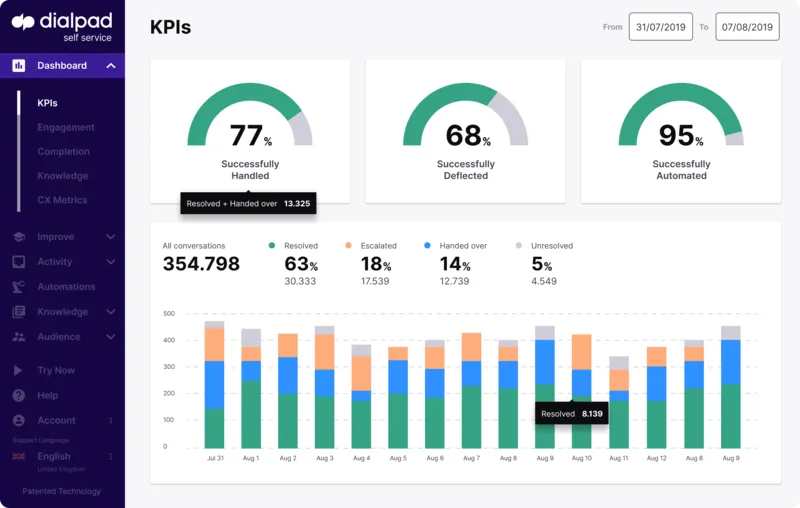
Empower Your Sales Teams with HubSpot Context in Dialpad

Give your sales organization the full customer history before they say "hello." By syncing HubSpot data to Dialpad, your team can personalize every interaction, eliminate manual data entry, and maximize active selling time.

View HubSpot contact details, deal stages, and owner information directly within the Dialpad app sidebar for immediate situational awareness.

Eliminate manual logging by automatically syncing outbound and inbound calls to the correct HubSpot record, ensuring 100% CRM adoption.

Click-to-dial directly from HubSpot to initiate calls in Dialpad, streamlining high-volume outreach and improving speed-to-lead.

Access real-time "Battle Cards" or sales scripts in Dialpad triggered by HubSpot contact properties to win competitive deals.

Give your sales organization the full customer history before they say "hello." By syncing HubSpot data to Dialpad, your team can personalize every interaction, eliminate manual data entry, and maximize active selling time.

Integrate IQ has consistently shown they can be trusted with even the most complex projects. I know our customers are in great hands and that the job will always get done right.

Kathleen Rush

Manager, Strategic Partner Development Team at HubSpot

Turn Dialpad Voice Data into HubSpot Revenue Insights

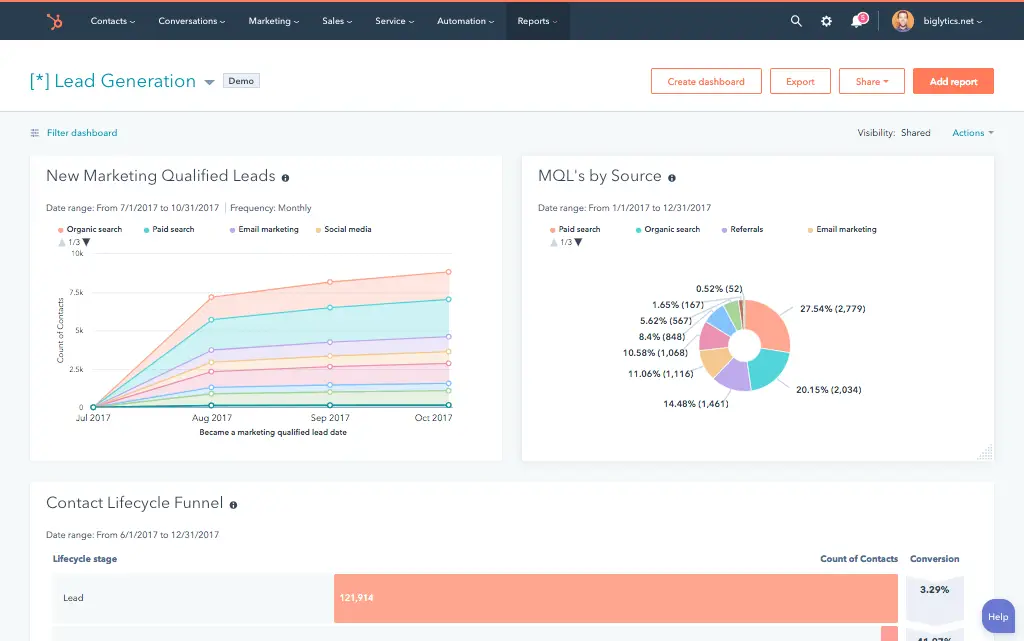
Your CRM is missing the nuance of actual conversations. Our custom Dialpad HubSpot integration pipes call summaries, transcripts, and sentiment scores back into HubSpot, enabling data-driven coaching and executive reporting.

Sync AI-generated call summaries and full transcripts to the HubSpot activity timeline for instant review and seamless handoffs between SDRs and AEs.

Build reports in HubSpot based on call sentiment (Positive/Negative) to identify at-risk accounts, forecast accuracy, or coaching opportunities.

Trigger automated workflows in HubSpot (e.g., "Send Follow-up Email") based on specific call dispositions logged in Dialpad.

Attribute closed deals to specific sales calls or SMS interactions to prove the ROI of your outreach efforts.

Hubspot Report

Your CRM is missing the nuance of actual conversations. Our custom Dialpad HubSpot integration pipes call summaries, transcripts, and sentiment scores back into HubSpot, enabling data-driven coaching and executive reporting.

A Flexible HubSpot Dialpad Sync Architecture for Voice

Our custom integrations are engineered for flexibility and scale, handling any complex business logic and data transformation your enterprise requires.

Built for Your Business Process

Standard integrations struggle with custom objects or specific logging rules. We build your sync logic around your unique sales process, ensuring your CRM remains a clean, actionable source of truth. This ensures your Dialpad integration with HubSpot adapts to your workflows, not the other way around.

  • Bi-Directional & Uni-Directional Sync: Keep contact details aligned in both systems, while pushing heavy voice data (recordings/transcripts) one-way to HubSpot to maintain system performance and data governance.
  • Real-time & Scheduled Syncs: Log calls and SMS instantly to the activity timeline, or run nightly batch syncs for comprehensive analytics reporting.
  • Custom Sync Logic & Triggers: Log calls only if they last longer than 30 seconds, or exclude internal calls from syncing to HubSpot to keep leadership dashboards clean.
  • High-Volume Data Handling: We manage high-volume call centers, ensuring that thousands of daily call logs and transcripts sync without hitting API limits or interrupting critical sales operations.

Comprehensive HubSpot and Dialpad Object and Field Mapping

We map the data that matters, connecting your communication platform directly to your customer records for true closed-loop reporting.

HubSpot

Dialpad

  • Contacts
  • Companies
  • Activities (Calls)
  • Activities (SMS)
  • Deals
  • Custom Properties
  • Contacts
  • Companies
  • Call Logs / Recordings
  • Message Logs
  • Active Calls (Context)
  • Call Sentiment / AI Summary
  • Contacts Contacts
  • Companies Companies
  • Activities (Calls) Call Logs / Recordings
  • Activities (SMS) Message Logs
  • Deals Active Calls (Context)
  • Custom Properties Call Sentiment / AI Summary

Transparent, Project-Based Pricing

No surprises. Clear scope, clear acceptance tests. We believe in straightforward pricing so you know exactly what to expect before we begin.

We fix what others can't: 50% Of our customers hired us to fix a failed integration.

A failed integration is more than a technical problem: it's a drain on time, budget, and morale. We are the specialists that leading companies like MetLife trust to handle their most mission-critical data flows. We don't rely on fragile connectors or simplistic platforms because we know they can't handle enterprise scale. Our approach is built on robust, custom development and a deep understanding of both HubSpot and the systems you need to connect it to. Partnering with us isn't just another attempt; it's an investment in certainty.

Trusted by Leaders, Proven by Results

Trusted by High-Growth Companies

See why leaders at scaling companies partner with Integrate IQ's experts.

I've been working with Integrate IQ for over 2 years now. We've had several outside systems that we wanted integrated with our HubSpot instance. From project planning and scoping, through build, and after deployment support, the team at Integrate IQ has been exemplary to work with. They've delivered on all commitments, helped established reasonable time frames for deliverables, and kept lines of communication open.

Marohn, M

We've partnered with Integrate IQ for over five years to develop integrations between our complex and not-so-widely-known ERP. They understand HubSpot's strengths, weaknesses and limitations, and are able to easily adapt to our evolving needs. They had an ownership change a few years ago, but that did not impact their expertise/service. We really appreciate our relationship with IIQ and recommend them to anyone looking to embed HubSpot deeper into their organization's systems.

Craychee, A

Integrate IQ has been great to work with! As someone who can be intimidated when things get too technical, they made the process of outlining our integration very approachable and understandable. They're great to work with and built the integration that we asked for, and then continued to work with us to fine-tune the tool over time as we figured out exactly what we needed.

Lauren Little

Integrate has been fantastic to work with. They helped us implement our CRM, design a framework for our pipeline that works perfectly and they built out an integration between HubSpot and Netsuite which allows our data to flow seamlessly. They've been an invaluable partner in our growth.

Whipple, M

We worked with Integrate IQ on a complex integration and now we have a fantastic solution that makes HubSpot work even better!

Ben Donahower

HubSpot Is the Platform. We Make It Perform

Why Businesses Trust Integrate IQ for a Smarter HubSpot Experience

Category
HubSpot Direct
Integrate IQ
Setup Approach
Guided setup with best-practice coaching.
Done-for-you configuration — we build and optimize everything for you.
Integrations
Standard native apps and limited connectors.
Custom integrations with 300+ platforms — fully tested and supported.
CRM Migrations
Basic import support.
Complete migration from any CRM — clean data, mapped fields, zero downtime.
Technical Capability
Advisory-focused.
Engineer-led builds with API, automation, and custom object expertise.
Ongoing Support
Ticket-based, reactive
Dedicated partner support, proactive optimization & monitoring
Team Expertise
Generalists across thousands of accounts
Senior HubSpot engineers with 300+ complex integrations delivered

What is a HubSpot Dialpad integration?

A HubSpot Dialpad integration connects your cloud phone and messaging platform to your CRM, syncing calls, SMS, recordings, transcripts, and sentiment data so sales and support teams have full conversation context without leaving HubSpot.

How does the HubSpot Dialpad integration work?

The integration maps Dialpad contacts, calls and dispositions to HubSpot contacts, deals, and engagements. Calls log automatically to the matched contact’s timeline while HubSpot contact and deal data can appear in the Dialpad sidebar during a live call.

for HubSpot

Turn HubSpot Into A Real-Time SMS Engine with Message IQ

chat icon Two-Way Conversations inbox icon Shared Team Inbox thunder icon Automation Triggers chart icon Advanced Reporting shield icon Compliance Tools
  • 98% SMS read within 3 min
  • 78% Buy from first responder
  • 21× More likely to qualify
Proven results
98% open rate 3–5 min avg response $45–$50 ROI / $1

*MessageIQ is an IntegrateIQ product – built natively for HubSpot by the same team.

Does HubSpot’s native Outcome field update automatically from Dialpad dispositions?

No. Dialpad’s own documentation confirms that HubSpot’s native Outcome field does not automatically update based on the disposition selected in Dialpad; reps have to manually select the Outcome separately when logging a call, creating a double-entry step the two systems don’t reconcile on their own.

What plan do you need for Dialpad’s native HubSpot integration?

Dialpad’s native HubSpot integration requires a Dialpad Support, Sell or Connect plan, with Connect users needing the Pro or Enterprise tier specifically. Some reliability features, like guaranteed uptime, require an additional upgrade beyond the base integration.

How long does a HubSpot Dialpad integration take to build?

A custom HubSpot Dialpad integration typically takes 6 to 8 weeks: 1 to 2 weeks of discovery and disposition mapping, 3 weeks of build and staging, and the remaining weeks for testing and go-live support.

Does Dialpad’s new Agentic AI feature update HubSpot automatically?

Dialpad recently launched an Agentic AI integration that lets AI agents autonomously create and update HubSpot contacts, companies and deals during a call. It’s a genuinely new capability, and most teams still want governance rules around which fields AI can touch autonomously versus which changes need human confirmation, which is where a custom integration adds guardrails the out-of-the-box feature doesn’t include.

How a HubSpot Dialpad Integration Actually Works

A HubSpot Dialpad integration works by treating Dialpad as the source of truth for call and communication activity, while HubSpot becomes the system where that activity turns into pipeline and support action, filling the specific gaps the native app leaves open.

On the Dialpad-to-HubSpot side, calls, SMS, recordings and dispositions log to the correct record automatically, and custom logic can route that data to HubSpot’s Outcome field or any custom object the native integration doesn’t reach.

On the HubSpot-to-Dialpad side, contact and deal context feeds the Dialpad sidebar during a live call, and governance rules can control what Dialpad’s Agentic AI is allowed to update autonomously versus what needs human review.

Three Ways to Connect Dialpad and HubSpot

Not every team needs custom. Here is the honest comparison.

Factor Native Dialpad App Zapier / iPaaS Custom (Integrate IQ)
Best for Standard sales and support teams on qualifying Dialpad and HubSpot plans Simple one-way trigger automation Teams needing accurate disposition mapping, tier independence, or AI governance
Disposition-to-Outcome mapping Not supported, per Dialpad’s own documentation Not supported Built in, disposition maps directly to HubSpot’s Outcome field
Plan / tier requirements Requires Dialpad Support, Sell, or Connect Pro/Enterprise; extra tiers for reliability features No Dialpad tier lock, but Zapier task limits apply No forced Dialpad tier upgrade required
Sync direction Mostly one-way call logging, limited two-way One-way per trigger True bi-directional, configurable per object
Business logic Fixed within Dialpad’s settings Basic conditional logic Custom rules, e.g. AI governance guardrails, multi-location routing
Volume handling Built for standard call volume Task limits and throttling at scale Built for high-volume, multi-location contact centers
Maintenance Vendor-managed; some reported reliability issues You manage it Monitored, maintained, and supported


If your reps are comfortable manually reconciling the Outcome field after every call and you’re already on a qualifying Dialpad plan, the native integration covers the basics. Once disposition-to-Outcome mapping, plan-tier independence, or governance around Dialpad’s new Agentic AI features matter, a custom integration is what closes those gaps.

RevOps Workflows You Can Automate Once Dialpad Data Lives in HubSpot

  • Outcome Field Auto-Population from Dialpad Disposition. Since HubSpot’s native Outcome field doesn’t automatically update from Dialpad’s disposition selection, a custom integration maps your actual disposition list to the HubSpot Outcome field automatically, eliminating the manual double-entry step reps currently have to do.
  • Agentic AI Guardrails for Autonomous Deal Updates. As Dialpad’s new Agentic AI capability lets AI agents autonomously update HubSpot deals and contacts, a custom integration can add governance rules, which fields AI can touch, which deal stages require human confirmation, so autonomous updates don’t create unreviewed changes to revenue-critical records.
  • Multi-Location Call Routing Intelligence. For businesses running multiple Dialpad locations or departments, HubSpot routes call follow-up tasks to the correct regional or department team automatically, based on which Dialpad number or location took the call.
  • Internal Call Coaching Visibility Despite Exclusion. Since Dialpad-to-HubSpot logging automatically excludes calls between users at the same company, a custom integration can still route true internal coaching calls into a separate coaching log, distinct from the customer-facing timeline, so that visibility isn’t lost entirely.
  • Sync Health Monitoring Dashboard. Given real user reports of contact-sync reliability issues with the native integration, a custom build includes its own sync health monitoring and alerting, so a failed sync gets caught and fixed before a rep works from stale data, rather than relying on Dialpad’s own uptime tier.

What Breaks in a Dialpad HubSpot Sync, and How We Prevent It

  • Duplicate records and identity resolution. Dialpad matches contacts by phone number, email, or name; a caller using a different number than what’s on file can create duplicate HubSpot contacts. We match on multiple stable identifiers and existing associations, not a single field.
  • System-of-record conflicts. A rep may manually log a disposition in Dialpad while also updating the HubSpot deal stage separately, creating two different, possibly conflicting, records of the same call outcome. We define clear field ownership so the two don’t drift apart.
  • Field mapping and disposition drift. Dialpad’s disposition and outcome codes are custom per account and, per Dialpad’s own documentation, don’t automatically map to HubSpot’s native Outcome field at all. We build that mapping explicitly rather than leaving reps to manually reconcile two separate outcome fields.
  • Plan-tier gating and reliability variance. Dialpad’s native HubSpot integration requires a Support, Sell, or Connect Pro/Enterprise plan, with add-on tiers required for reliability features like guaranteed uptime, and real users have reported contact-sync reliability issues on the native connector. We build with our own sync monitoring so reliability isn’t dependent on which Dialpad tier you’re on.
  • API rate limits at high call volume. High-volume sales and support lines logging thousands of daily calls, SMS, and AI transcripts can hit API limits during sync. Across 300+ platform integrations moving 20 billion plus fields annually, we batch and throttle high-volume syncs by design, not by accident.

Implementation Timeline: What to Expect

Most HubSpot Dialpad integrations ship in 6 to 8 weeks. The first 1 to 2 weeks cover discovery and disposition mapping, including which call flows and codes matter for reporting. The next 3 weeks cover build and staging. The final weeks cover testing, cutover, and hypercare support. Our HubSpot integration process is the same repeatable framework behind our 98.5% client retention rate.

Free ROI Calculator

See your 12-month revenue impact with HubSpot CRM

Enter your current numbers — visitors, leads, deal size — and get a personalized projection based on real HubSpot customer benchmarks.

Calculate My ROI

ROI Calculator Preview

Connect the Rest of Your Revenue Stack

Call and communication data rarely stands alone. Staffing and recruiting teams running high call volume often pair this with our recruiting and staffing industry work. SMS-heavy workflows work well alongside Message IQ, our own HubSpot SMS solution. Custom disposition mapping or AI governance logic beyond the standard build often needs full-stack development support. Getting reps and managers onto the new workflow goes faster with HubSpot training. Not sure what any of this is worth to your team? Run the numbers on our Integration ROI Calculator.


Tim Ritchie

Tim Ritchie

CEO of Integrate IQ

An admitted HubSpot fanboy, Tim has been in the HubSpot ecosystem as a consumer of the platform from the beginning. Tim believes that Message IQ’s success begins and end with the success of our customers and partners.

Integration CTA Image Message IQ CTA Image
Frequently Asked Questions

HubSpot Dialpad Integration FAQs

The native integration is robust, but our custom HubSpot Dialpad integration handles complex workflows, such as mapping custom call dispositions to specific HubSpot deal stages, routing logic, or ticket creation that enterprise teams require.

Yes. We can log SMS conversations as activities on the HubSpot contact timeline, keeping all communication history in one centralized, auditable place.

We sync the link to the call recording and the AI transcript directly to the HubSpot call object, making it easy for sales managers and QA teams to review.

Absolutely. We can trigger a HubSpot task or workflow (e.g., "Urgent Follow-up") whenever a missed call is logged from a high-value lead.

We use advanced phone number matching logic (stripping formatting to ensure accuracy) to associate incoming calls with the correct HubSpot contact record, preventing duplicate records.

It's a known gap in the native integration, confirmed by Dialpad's own documentation. The two systems track outcome data separately by design, so reps end up doing the same classification twice unless a custom mapping bridges the two.

Cost depends on how many objects you're syncing, how much custom disposition mapping is in scope, and your call volume. We scope every project after a discovery call rather than quoting blind. Run the Integration Cost Estimate tool for a ballpark before you talk to us.

Yes, we can build alongside it. Since Agentic AI is a newer capability, most teams want governance rules controlling which fields AI can update autonomously versus which changes require human review, which we scope as part of the integration rather than accepting the feature's default behavior as-is.

You get monitoring, error alerts, and retry logic from day one, plus a defined support window during hypercare. After launch, we remain available for ongoing maintenance as your call flows or Dialpad configuration change, which is part of why our client retention sits at 98.5%.

Capture Every Conversation with a HubSpot Dialpad Integration

Schedule a discovery call to see how a unified HubSpot Dialpad integration can automate your sales data, align your RevOps strategy, and improve team performance at scale.

Schedule Your Integration Discovery Call

Post You May Like

↑
Contact Us Book A Meeting





