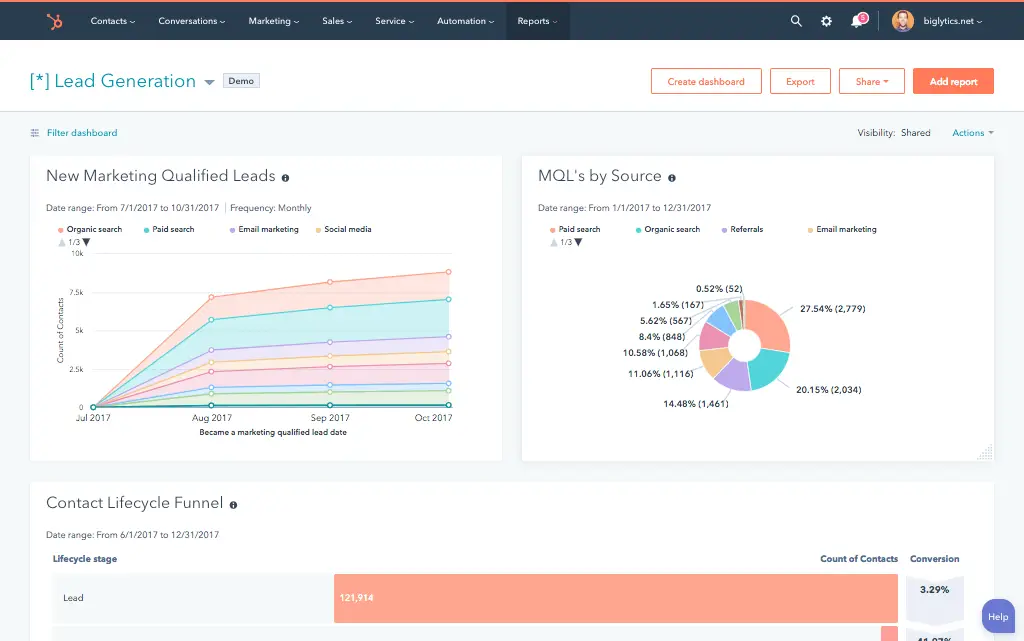


What is a HubSpot Tableau integration?
A HubSpot Tableau integration is a uni-directional data pipeline that extracts HubSpot CRM data (contacts, companies, deals, tickets, custom objects) and makes it available inside Tableau for visualization. No native connector exists in HubSpot’s App Marketplace because Tableau is BI, not CRM, so the pipeline runs through ETL, ODBC, a warehouse, or custom API.
How does the HubSpot Tableau integration work?
It works through one of four connection paths: no-code ETL tools (Windsor.ai, Improvado, Skyvia, Hevo) that schedule extraction, the CData ODBC driver for live Tableau queries against the HubSpot API, a data warehouse intermediary (Snowflake or BigQuery), or a custom API extraction built directly on HubSpot’s REST API for full custom object coverage and enterprise volume.

Turn HubSpot Into A Real-Time SMS Engine with Message IQ
 Two-Way Conversations
 Shared Team Inbox
 Automation Triggers
 Advanced Reporting
 Compliance Tools
- 98% SMS read within 3 min
- 78% Buy from first responder
- 21× More likely to qualify

*MessageIQ is an IntegrateIQ product – built natively for HubSpot by the same team.
Does HubSpot have a native Tableau integration?
No. HubSpot does not maintain a native Tableau connector in its App Marketplace, and Tableau does not sit inside HubSpot’s operational workflow ecosystem. The relationship is uni-directional (HubSpot data flows to Tableau for analysis, not the reverse), which is why the connection requires a data pipeline architecture rather than a marketplace connector installation.
Can I embed a Tableau dashboard inside a HubSpot dashboard?
Not natively. HubSpot’s Content Security Policy blocks private Tableau dashboard iframes and returns blank frames. The workaround is to host the Tableau dashboard externally behind SSO, then embed it via a HubSpot custom CRM card with query parameter filters (passing the HubSpot record ID) so dashboards render inside record views instead of portal-level dashboards.
How long does a custom HubSpot Tableau data pipeline take to build?
A custom HubSpot Tableau data pipeline takes about 8 weeks from kickoff to production. Discovery covers two weeks (object inventory, custom object mapping, refresh cadence requirements, destination architecture). Build and staging runs three weeks. Historical backfill runs one week. UAT and go-live cover the final two weeks. Warehouse-intermediary architectures add setup time in weeks 3-4.
Can ETL tools extract HubSpot custom objects to Tableau?
Custom object support varies by ETL tool and is often incomplete. Windsor.ai and Improvado support some custom object extraction with limitations. Skyvia and Hevo cover standard objects reliably but miss custom object relationships. For full custom object coverage including custom properties and association records, a custom API extraction or a properly configured warehouse sync is the reliable path.
HubSpot Tableau Integration: Four Paths Compared and When to Use Each
There is no native HubSpot Tableau integration in HubSpot’s App Marketplace. Tableau is a BI and visualisation platform, not a CRM integration tool so the connection lives outside HubSpot’s native connector ecosystem entirely. That does not make the integration difficult. It means choosing the right architecture before you build, because the four available paths have meaningfully different trade-offs on refresh cadence, custom object coverage, setup complexity, and long-term maintenance.
The four paths are: ETL/ELT tools that extract and load HubSpot data on a schedule; the CData ODBC driver for live HubSpot queries from Tableau; a data warehouse intermediary where HubSpot lands in Snowflake or BigQuery first and Tableau connects there; and custom API extraction built directly on HubSpot’s API. Each fits different use cases and scale requirements.
We’re Integrate IQ, a HubSpot Diamond Solutions Partner with custom integration accreditation. Here’s an honest comparison of all four paths including the one question almost nobody answers: whether you can embed a Tableau dashboard inside HubSpot (and what the actual workaround is when you can’t).
Why There’s No Native HubSpot Tableau Connector
Tableau is a data visualisation and business intelligence platform. Its model is to connect to data sources databases, warehouses, APIs, files and build dashboards on top of them. It does not sit in HubSpot’s App Marketplace because the integration is data-movement, not CRM workflow automation. HubSpot’s marketplace is built for tools that exchange customer data bidirectionally as part of operational workflows: email platforms, dialers, payment processors. Tableau’s relationship with HubSpot is unidirectional HubSpot data flows to Tableau for analysis, not the reverse.
This means the connection requires a data pipeline, not a connector installation. The four available pipeline architectures are described below.
The Four Connection Paths
| Path | Setup | Custom Objects | Best For |
| ETL/ELT Tools (Windsor.ai, Improvado, Skyvia, Hevo) | Low no-code | Variable many miss HubSpot custom objects | Quick setup; standard HubSpot objects; teams without dev resources |
| CData ODBC Driver | Medium driver + Tableau config | Good queries API directly | Live Tableau queries; smaller data volumes; no warehouse needed |
| Data Warehouse Intermediary (HubSpot to Snowflake or BigQuery then Tableau) | Higher warehouse + sync required | Full when sync configured correctly | Enterprise teams blending HubSpot with ERP or product data |
| Custom API Extraction | Highest requires development | Full all objects and properties | High volumes; complex custom objects; precise field control |
Path 1: ETL/ELT Tools
Tools like Windsor.ai, Improvado, Skyvia, and Hevo offer no-code connectors that extract HubSpot data on a schedule and load it into a data destination including Tableau via an intermediate database or directly. Setup is fast: connect your HubSpot account, choose which objects to extract, configure the destination, and set your refresh schedule.
The custom object limitation: Most ETL tools extract HubSpot’s standard objects (Contacts, Companies, Deals, Tickets) reliably. Custom objects which many HubSpot Enterprise users build for their specific business model are often not supported or require additional configuration that’s poorly documented. If your Tableau dashboards need to report on HubSpot custom objects, verify custom object coverage with the specific ETL tool before committing to it. Windsor.ai and Improvado both note limitations in this area.
ETL tools are the right starting point for standard-object reporting where you don’t need real-time data. They’re the wrong path for teams with significant HubSpot custom object usage or sub-hourly refresh requirements.
Path 2: CData ODBC Driver
CData offers an ODBC driver for HubSpot that lets Tableau connect to HubSpot’s API directly, treating it as a live data source. In Tableau Desktop or Tableau Server, you point the connection at the CData driver, which translates Tableau’s queries into HubSpot API calls. The data in your Tableau workbook reflects the current state of HubSpot because each query hits the API live.
Rate limit consideration: HubSpot’s API has rate limits (190 requests per 10 seconds on Professional/Enterprise plans). For small datasets and infrequent queries, ODBC is fine. For large contact or deal lists with many properties, a single Tableau refresh can consume significant API quota. The ODBC path is best suited for modest data volumes and for teams that need live HubSpot data in Tableau without a warehouse infrastructure investment.
Path 3: Data Warehouse Intermediary
The cleanest architecture for enterprise teams: HubSpot data syncs to a data warehouse (Snowflake, BigQuery, or similar) on a schedule or near-real-time, and Tableau connects to the warehouse. The warehouse becomes the unified layer where HubSpot data blends with ERP data, product usage data, ad spend, and any other source. Tableau queries the warehouse fast, scalable, no API rate limits in Tableau’s query path. Our HubSpot Snowflake integration and HubSpot BigQuery integration guides cover the warehouse sync architecture in detail.
This path adds the overhead of managing the warehouse sync, but it’s the right architecture for teams already using a data warehouse and for any use case that requires blending HubSpot with other data sources. The warehouse handles the heavy extraction; Tableau gets a clean, fast data source.
Path 4: Custom API Extraction
Built directly on HubSpot’s API, a custom extraction pipeline extracts specified HubSpot objects and properties on a configured schedule or trigger, transforms the data as needed, and loads it into a destination that Tableau can connect to (a database, data warehouse, or flat file store). This path requires development but delivers the most control: every HubSpot object and property including custom objects with custom properties is extractable with explicit handling of pagination, rate limits, and incremental sync.
For organisations with complex HubSpot data models multiple custom objects, many custom properties, association data between objects custom extraction is the most reliable path. The ETL tools that cover standard objects cleanly often struggle with the combination of custom objects, custom properties, and association records that enterprise HubSpot portals generate. We’ve processed over 20 billion records annually across 300+ platform integrations and have handled HubSpot custom object extraction at scale.
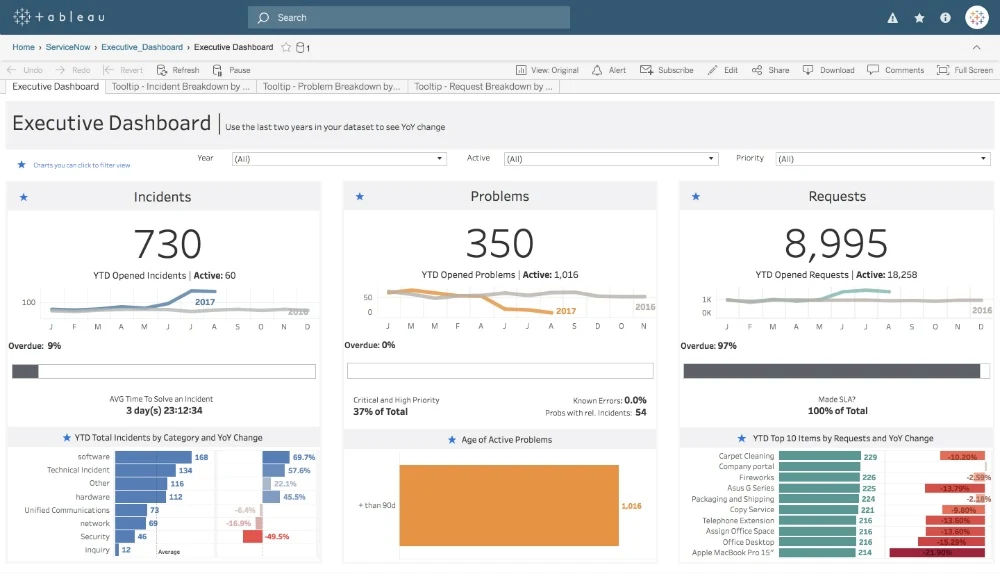
The Tableau Embed Question
Can you embed a private Tableau dashboard inside HubSpot? No and this remains unsolved natively in 2025. HubSpot blocks inline JavaScript and enforces Content Security Policy (CSP) restrictions that prevent private Tableau dashboards from rendering inside HubSpot iframes. Teams who try the standard Tableau embed code or an iframe in a HubSpot dashboard card get a blank frame. This is a confirmed HubSpot platform restriction, not a Tableau configuration issue.
The practical workaround for teams that need this:
- Host the Tableau dashboard on an externally accessible URL behind SSO or token authentication if the dashboard contains sensitive data
- In HubSpot, create a custom CRM card (using HubSpot’s CRM card framework) that loads the external Tableau URL in a card within a HubSpot record view
- Apply query parameter filters to the Tableau URL from the HubSpot record context passing the HubSpot Contact ID or Company ID to Tableau so the dashboard filters to the relevant record
This approach gives account managers Tableau visualisations inside HubSpot record views without embedding the full Tableau dashboard in a HubSpot portal-level dashboard. It’s more surgical than a global embed, but it works reliably where the iframe approach does not.
Path Selection: Use Case Mapping
| Use Case | Recommended Path |
| Marketing attribution HubSpot + ad spend in Tableau | ETL tool or data warehouse intermediary blend HubSpot with ad platform data |
| Live sales dashboard querying current HubSpot pipeline | CData ODBC for modest volumes; warehouse for large portals |
| Executive dashboards combining HubSpot, ERP, and product data | Data warehouse intermediary single source for all data in Tableau |
| Custom objects and complex HubSpot data models | Custom API extraction full coverage where ETL tools fall short |
| Embed Tableau inside HubSpot record view | External hosted dashboard + HubSpot custom CRM card with filtered URL |
Key Use Cases
Marketing Attribution: HubSpot plus Ad Spend
HubSpot tracks leads, contacts, and deal creation. Your ad platforms (Google Ads, Meta, LinkedIn) track spend. Blending the two in Tableau shows cost per lead, cost per closed deal, and ROAS by channel metrics that neither platform can produce independently. This is the most common reason marketing teams build a HubSpot Tableau connection.
Sales Pipeline Forecasting
HubSpot’s native pipeline reporting covers current state well. Tableau adds time-series analysis how deal velocity has changed quarter over quarter, which pipeline stages have the longest average time-in-stage, which deal sources have the highest close rates. These forecasting models require historical snapshots that are difficult to build inside HubSpot’s native reporting and straightforward in Tableau once the data is in a warehouse.
Cross-Functional Executive Dashboards
Leadership wants to see HubSpot pipeline revenue alongside ERP-reported revenue, product usage data, support ticket volume, and marketing spend in one view. This is a warehouse-intermediary use case by definition: Tableau connects to the warehouse where all those sources land, not to HubSpot directly. The HubSpot data that flows through is the CRM layer of a multi-source executive dashboard.
See your 12-month revenue impact with HubSpot CRM
Enter your current numbers — visitors, leads, deal size — and get a personalized projection based on real HubSpot customer benchmarks.
Calculate My ROI
What to Expect from a Custom Build
- Weeks 1-2: Data model audit. Map which HubSpot objects, properties, and associations the Tableau dashboards need. Identify custom objects and custom properties. Define refresh cadence requirements (hourly, daily, near-real-time). Choose destination architecture (direct to database, warehouse intermediary).
- Weeks 3-4: Build and test. Build the HubSpot extraction layer paginated API calls, incremental sync logic, rate limit handling, custom object coverage. Load to the configured destination. Connect Tableau to the destination and validate that data appears correctly.
- Weeks 5-6: UAT. Analytics team validates that Tableau dashboards show correct data from HubSpot. Verify custom object fields extract correctly. Test edge cases: deleted records, reassigned deals, backdated close dates.
- Weeks 7-8: Go-live and monitoring. Production deployment with active monitoring. Alerts on extraction failures or API rate limit breaches. Incremental sync validated to handle HubSpot record updates correctly.
We’re a HubSpot Diamond Solutions Partner with custom integration accreditation. 55 million fields synced daily. 98.5% client retention rate. Most builds go live in 8 weeks. See how our integration process works.



Table of Contents
- What is a HubSpot Tableau integration?
- How does the HubSpot Tableau integration work?
- Does HubSpot have a native Tableau integration?
- Can I embed a Tableau dashboard inside a HubSpot dashboard?
- How long does a custom HubSpot Tableau data pipeline take to build?
- Can ETL tools extract HubSpot custom objects to Tableau?
- HubSpot Tableau Integration: Four Paths Compared and When to Use Each
- Why There’s No Native HubSpot Tableau Connector
- The Four Connection Paths
- The Tableau Embed Question
- Path Selection: Use Case Mapping
- Key Use Cases
- What to Expect from a Custom Build