















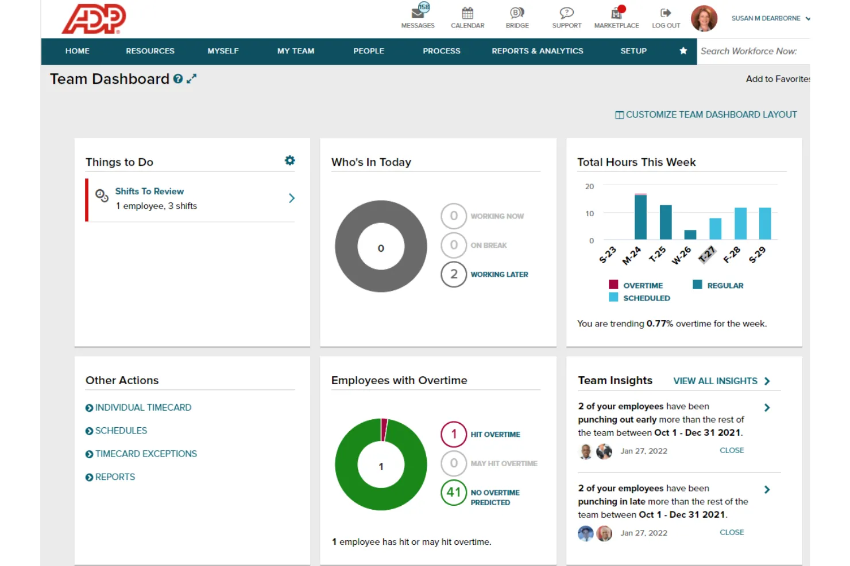



























What is a HubSpot ADP Workforce Now integration?
A HubSpot ADP Workforce Now integration connects your HR and payroll system to HubSpot, automating user account provisioning, access revocation, and commission calculations based on real employment data instead of manual IT and finance work.
How does the HubSpot ADP Workforce Now integration work?
The integration reads employee events from ADP, new hire, termination, leave of absence, role change and translates them into HubSpot actions: creating or deactivating user accounts, updating permission sets, and feeding closed-won deal data into ADP’s payroll module for commission calculation.

Turn HubSpot Into A Real-Time SMS Engine with Message IQ
 Two-Way Conversations
 Shared Team Inbox
 Automation Triggers
 Advanced Reporting
 Compliance Tools
- 98% SMS read within 3 min
- 78% Buy from first responder
- 21× More likely to qualify

*MessageIQ is an IntegrateIQ product – built natively for HubSpot by the same team.
Does HubSpot have a native ADP Workforce Now integration?
No dedicated native app exists in HubSpot’s marketplace specifically for ADP Workforce Now. Generic iPaaS platforms like Workato and PandaFlow offer basic trigger-based connectivity, but a custom integration is typically required for the specific business logic around commission calculation and access provisioning this use case needs.
Can ADP automatically provision and deprovision HubSpot user accounts?
Yes, and this is actually the direction ADP is built for. ADP Workforce Now is architected as an HR source system that pushes employee events out to other applications, not one that receives provisioning instructions. That outbound design is exactly what this integration uses: reading hire and termination events out of ADP to drive HubSpot account creation and deactivation.
How long does a HubSpot ADP Workforce Now integration take to build?
A custom HubSpot ADP integration typically takes 8 weeks: 2 weeks of discovery, including confirming your ADP plan’s API access and any associated implementation costs, 3 weeks of build and staging, and the remaining weeks for testing and go-live support.
Does HubSpot support SCIM provisioning for this kind of integration?
HubSpot launched a Custom SCIM Integration to general availability that supports provisioning through any identity provider, not just Okta and Google. A custom ADP integration can be built to work alongside this capability, depending on how your organization currently handles identity and access management.
How a HubSpot ADP Workforce Now Integration Actually Works
A HubSpot ADP Workforce Now integration works by treating ADP as the authoritative source for employment status and role data, using its outbound event architecture, ADP is built to push events out, not receive provisioning, to drive user lifecycle actions in HubSpot.
When ADP shows a new hire, a role change, or a termination, the integration triggers the corresponding HubSpot action: account creation with correct permissions, permission updates, or immediate deactivation and deal reassignment.
On the commission side, closed-won deal data flows from HubSpot into ADP’s payroll module at the cadence your payroll cycle requires, so commission calculations run against validated revenue data instead of a manually reconciled spreadsheet.
Three Ways to Connect ADP Workforce Now and HubSpot
Not every team needs custom. Here is the honest comparison.
| Factor | Generic iPaaS (Workato / PandaFlow) | ADP Marketplace IT/Security Connectors | Custom Integration (Integrate IQ) |
|---|---|---|---|
| Best for | Simple, standard triggers like new hire creates a contact | General IT/security workflows (Electric AI, OurPeople-style), not HubSpot-specific | Commission automation and role-based access tied to your specific HubSpot permission structure |
| Commission / business logic | Basic field transfer, no calculation logic | Not applicable, general IT connectors don’t handle sales commission | Full commission logic mapped to deal values, close dates, and payroll batch formatting |
| Access provisioning depth | Basic account creation trigger | Deep for general IT/security tools, but not built for HubSpot specifically | Role-based permission mapping, leave-of-absence handling, contractor differentiation |
| Sync direction | One-way per trigger, several needed for two-way | Depends on the specific app | True bi-directional, configurable per object |
| Custom objects/fields | Limited, mapped per trigger | Not applicable | Full mapping of commission objects, department hierarchies, and custom ADP fields |
| Volume handling | Task limits and throttling at scale | Built for its specific IT use case, not HubSpot volume | Built for thousands of employee records without timeouts |
| Maintenance | You manage it | Vendor-managed for its specific use case | Monitored, maintained, and supported |
If you just need basic contact creation when someone joins, a generic iPaaS flow like PandaFlow’s ADP-to-HubSpot template covers that. Once commission calculation logic, role-based permission mapping, or handling states like leave of absence and contractor status matter, a custom integration is what actually reflects how your organization really works instead of a generic new-hire trigger.
Featured snippet candidate: publish the comparison table as a real HTML table, not an image.
Workforce Lifecycle Workflows You Can Automate Once ADP Workforce Now Data Lives in HubSpot
- Leave-of-Absence Access Suspension. When ADP shows an employee on an extended leave of absence, not terminated, HubSpot can suspend rather than fully revoke their access, preserving their account and deal history for an easy return instead of a full offboarding and reprovisioning cycle.
- New Hire Ramp-Based Commission Tier Assignment. New reps entering ADP get assigned to a ramping or reduced commission structure in HubSpot automatically for their first 90 days, then transition to standard commission rules, without manual intervention from RevOps.
- Territory Reassignment on Role Change. When ADP shows an employee’s department or job title change, a promotion, a lateral move, HubSpot automatically reassigns their territory, deal ownership defaults, and permission set to match the new role, rather than IT manually updating HubSpot after the fact.
- Contractor vs. Employee Access Differentiation. ADP’s employment type field, contractor versus full-time, drives a different HubSpot permission tier automatically, ensuring contractors get scoped access appropriate to their engagement instead of the same default access as full-time staff.
- Compliance Audit Trail for Access Changes. Every HubSpot access change triggered by an ADP employment event, hire, termination, leave, role change, logs to an audit trail, giving IT and compliance teams a clean record for SOC 2 or similar access-review requirements without manually reconstructing the history.
What Breaks in an ADP Workforce Now HubSpot Sync, and How We Prevent It
- Duplicate records and identity resolution. Employees appearing in HubSpot as both an internal user and, rarely, a contact record from an earlier customer interaction can create ambiguous matches. We use ADP’s Associate ID as the definitive key for internal user records, kept separate from customer contact matching logic entirely.
- System-of-record conflicts. IT may manually adjust a HubSpot user’s permissions directly while ADP still shows the employee’s original role, creating drift between what ADP says someone should have access to and what they actually have. We define ADP as the source of truth for role and employment status, with HubSpot permissions reflecting rather than overriding it.
- Field mapping and status drift. ADP’s employment statuses and job title taxonomy are often customized per company; a generic “active or terminated” mapping misses states like leave of absence, suspended, or rehired. We map your actual ADP status list to HubSpot access rules, not a generic two-state assumption.
- ADP’s provisioning direction is outbound-only. ADP Workforce Now is architected as an HR source system that pushes employee events out to other applications; it has no native SCIM endpoint for inbound provisioning. This actually matches what this integration needs, reading hire and termination events out of ADP to drive HubSpot, but it means any assumption that ADP can receive provisioning instructions from HubSpot or an identity provider is backwards. We build the data flow in the direction ADP actually supports.
- API and implementation cost considerations at scale. Some ADP provisioning-adjacent features are gated behind premium plans, with per-employee implementation costs reported as high as $25 to $200 per employee industry-wide. We confirm your ADP plan’s actual API access and any associated costs during discovery, before scoping the build, so there are no surprises mid-project.
Implementation Timeline: What to Expect
Most HubSpot ADP Workforce Now integrations ship in 8 weeks. The first 2 weeks cover discovery, including confirming your ADP plan’s API access and any associated implementation costs, and mapping your actual employment status taxonomy. The next 3 weeks cover build and staging. The remaining weeks cover testing, historical data backfill, and go-live support. Our HubSpot integration process is the same repeatable framework behind our 98.5% client retention rate.
See your 12-month revenue impact with HubSpot CRM
Enter your current numbers — visitors, leads, deal size — and get a personalized projection based on real HubSpot customer benchmarks.
Calculate My ROI
Connect the Rest of Your Revenue and HR Stack
Custom commission logic or role-based permission mapping beyond the standard build often needs full-stack development support. Getting HR, IT, and RevOps aligned on the new workflow goes faster with HubSpot training and HubSpot onboarding right after go-live. Migrating off a different CRM at the same time? Our CRM migration services cover that too. Not sure what any of this is worth to your team? Run the numbers on our Integration ROI Calculator.



Table of Contents
- What is a HubSpot ADP Workforce Now integration?
- How does the HubSpot ADP Workforce Now integration work?
- Does HubSpot have a native ADP Workforce Now integration?
- Can ADP automatically provision and deprovision HubSpot user accounts?
- How long does a HubSpot ADP Workforce Now integration take to build?
- Does HubSpot support SCIM provisioning for this kind of integration?
- How a HubSpot ADP Workforce Now Integration Actually Works
- Three Ways to Connect ADP Workforce Now and HubSpot
- Workforce Lifecycle Workflows You Can Automate Once ADP Workforce Now Data Lives in HubSpot
- What Breaks in an ADP Workforce Now HubSpot Sync, and How We Prevent It
- Implementation Timeline: What to Expect
- Connect the Rest of Your Revenue and HR Stack




