















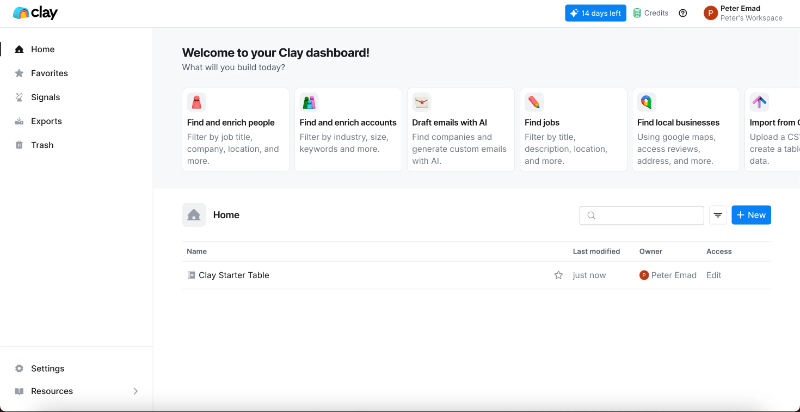



























What is a HubSpot Clay integration?
A HubSpot Clay integration connects Clay’s data enrichment and waterfall research platform to HubSpot, syncing enriched contact, company and AI-generated data so sales and marketing teams work from accurate, up-to-date records instead of stale CRM data.
How does the HubSpot Clay integration work?
The integration pulls contacts from a HubSpot active list into Clay, runs waterfall enrichment across dozens of data providers until it finds a match, and writes verified data, job titles, company details, AI-generated personalization, back to the HubSpot contact record automatically.

Turn HubSpot Into A Real-Time SMS Engine with Message IQ
 Two-Way Conversations
 Shared Team Inbox
 Automation Triggers
 Advanced Reporting
 Compliance Tools
- 98% SMS read within 3 min
- 78% Buy from first responder
- 21× More likely to qualify

*MessageIQ is an IntegrateIQ product – built natively for HubSpot by the same team.
Does HubSpot have a native Clay integration?
Yes. Clay offers a native HubSpot integration that pulls contacts from active lists, enriches them, and writes results back automatically. It’s a real, functional connector, though it has specific, documented gaps that become relevant at higher volume or with more complex logic.
What can’t Clay’s native HubSpot integration do?
Clay’s native HubSpot integration can’t apply conditional sync logic, like only syncing contacts above a certain ICP score, can’t create deals or companies alongside a contact in the same flow, and a single failed field can cause an entire row to fail silently with no visible error. Deduplication is also email-only, which fails when an email is missing or unverified.
How long does a HubSpot Clay integration take to build?
A custom HubSpot Clay integration typically takes 6 to 8 weeks: 1 to 2 weeks of discovery, including your specific waterfall and credit-usage strategy, 3 weeks of build and staging, and the remaining weeks for testing and go-live support.
Does the Clay HubSpot integration work on HubSpot’s free CRM?
Yes, for basic sync. The Clay integration works with HubSpot’s free CRM and all paid tiers for standard enrichment. Advanced capabilities, like workflow automation triggered by Clay-enriched properties, custom reporting on enrichment data, and sequence enrollment based on ICP score, require HubSpot Sales Hub Professional or Enterprise.
Three Ways to Connect Clay and HubSpot
Not every team needs custom. Here is the honest comparison, currently absent from the page.
| Factor | Native Clay Integration | Zapier / Make | Custom Integration (Integrate IQ) |
|---|---|---|---|
| Best for | Teams enriching under roughly 500 contacts per week with simple requirements | Basic trigger automation, still lacks Clay’s native waterfall logic | High-volume outbound teams needing ICP-based filtering, multi-object creation, and credit-optimized sequencing |
| Conditional sync logic | Not supported, e.g. can’t filter by ICP score before syncing | Basic, limited by available Clay actions | Full custom filtering logic built to your qualification criteria |
| Multi-object creation | Contacts only, can’t create deals or companies in the same flow | Possible but requires separate steps per object | Coordinated multi-object creation in a single pass |
| Deduplication | Email-only, fails on missing or unverified emails | Depends on the specific automation built | Multi-identifier matching, domain and HubSpot ID included |
| Error visibility | A failed field can fail the entire row silently | Varies by platform | Partial-failure alerting surfaced to RevOps |
| Volume handling | Reasonable up to roughly 500 contacts per week | Task limits and throttling at scale | Built for high-volume outbound without silent failures |
| Maintenance | Vendor-managed | You manage it | Monitored, maintained, and supported |
If you’re enriching under about 500 contacts a week with straightforward requirements, Clay’s native integration is genuinely a good starting point, most guides agree on this. Once you need ICP-based filtering before anything syncs, deals and companies created alongside contacts, or visibility into which specific rows silently failed, a custom integration is what closes those gaps.
Additional Outbound Workflows You Can Automate Once Clay Data Lives in HubSpot
This page already covers automated list building, deep data enrichment, AI-driven personalization sync, hygiene and health updates, triggered workflows, and unified reporting. The five below are deliberately new.
- ICP-Score Conditional Sync Gating. Since Clay’s native integration can’t apply conditional logic like “only sync contacts with an ICP score above a threshold,” a custom integration adds that filtering layer, so HubSpot only receives contacts that actually meet your qualification bar instead of every enriched row regardless of fit.
- Deal and Company Creation Alongside Contact Enrichment. Since Clay’s native push can’t create deals or companies in the same flow as contact enrichment, a custom integration builds that multi-object creation logic, so a qualified enriched contact can generate a full deal and company record in one pass instead of a contact-only record needing manual follow-up.
- Multi-Identifier Deduplication Beyond Email. Since Clay’s native deduplication is email-only and fails when an email is missing or unverified, a custom integration adds domain, LinkedIn URL, or phone-based matching as fallback identifiers, catching duplicates the native email-only logic would miss.
- Silent Failure Alerting for Partial Enrichment Rows. Since a single failed field in Clay’s native sync can cause an entire row to fail silently with no visible error, a custom integration surfaces partial-failure alerts to RevOps, so a stalled enrichment batch gets caught in hours, not discovered weeks later as a mysteriously stale segment.
- Credit-Aware Waterfall Sequencing Tied to HubSpot Segments. Rather than running every enrichment provider on every contact, HubSpot segment data, deal stage, lifecycle stage, can inform which Clay waterfall tier runs on which contact, using cheaper providers for early-stage leads and premium providers only for sales-qualified accounts, reducing wasted credit spend.
What Breaks in a Clay HubSpot Sync, and How We Prevent It
This section is currently absent from the page entirely.
- Duplicate records and identity resolution. Clay’s native deduplication matches on email only, which fails when a contact’s email is missing, unverified, or changes. We match on multiple stable identifiers, domain and existing HubSpot ID included, not email alone.
- System-of-record conflicts. A rep may manually update a contact’s job title in HubSpot while a scheduled Clay enrichment run overwrites it with stale waterfall data from an earlier query. We define clear field-level ownership and refresh windows so the two don’t fight over the same property.
- The native integration has real, documented functional gaps. Independent implementation guides confirm Clay’s native HubSpot push cannot apply conditional sync logic, like an ICP score threshold, cannot create deals or companies alongside a contact in the same flow, and a single failed field causes an entire row to fail silently with no visible error. The native integration is a reasonable fit for teams enriching under roughly 500 contacts per week with simple requirements; beyond that, these gaps become operational risk.
- HTTP API double-charging when bypassing the native connector. Using Clay’s HTTP API directly instead of the native drag-and-drop integration bypasses Clay’s caching layer, and real teams have reported burning up to 30% in extra credits this way. We use Clay’s native, cached integration path wherever possible and only fall back to raw API calls with deliberate caching logic built in.
- HubSpot Sales Hub tier gating on advanced automation. Workflow automation triggered by Clay-enriched properties, custom reporting on enrichment data, and sequence enrollment based on ICP scores all require HubSpot Sales Hub Professional or Enterprise; the free and Starter tiers only support basic sync. We confirm your actual HubSpot tier during discovery so the automation you’re expecting is actually available to build.
See your 12-month revenue impact with HubSpot CRM
Enter your current numbers — visitors, leads, deal size — and get a personalized projection based on real HubSpot customer benchmarks.
Calculate My ROI
Connect the Rest of Your Outbound Stack
Custom multi-object creation or credit-optimization logic beyond the standard build often needs full-stack development support. Getting sales and marketing ops aligned on the new workflow goes faster with HubSpot training and HubSpot marketing operations support. Not sure what any of this is worth to your team? Run the numbers on our Integration ROI Calculator.



Table of Contents
- What is a HubSpot Clay integration?
- How does the HubSpot Clay integration work?
- Does HubSpot have a native Clay integration?
- What can’t Clay’s native HubSpot integration do?
- How long does a HubSpot Clay integration take to build?
- Does the Clay HubSpot integration work on HubSpot’s free CRM?
- Three Ways to Connect Clay and HubSpot
- Additional Outbound Workflows You Can Automate Once Clay Data Lives in HubSpot
- What Breaks in a Clay HubSpot Sync, and How We Prevent It
- Connect the Rest of Your Outbound Stack




