













HubSpot Diamond Solutions Partner

HubSpot ClickUp Integration: Align Your Sales and Project Delivery

Connect HubSpot CRM with ClickUp to automate your entire sales-to-delivery workflow. Eliminate manual handoffs, provide complete visibility across teams, and ensure a seamless customer experience from the moment a deal is won.

98.5%
Client Retention
300+
Platforms Integrated
20B+
Fields Synced Annually
HubSpot Diamond Partner

Get Your Free HubSpot Consultation + Claim The 2026 CRM Growth Playbook Instantly for FREE

Discover how top companies use their CRM to power marketing, sales & growth. No spam. No sales pitch. Just expert insights from certified HubSpot professionals.

  • Proven Playbooks from top-performing companies
  • Strategies to drive more leads, pipeline & revenue
  • Actionable insights from HubSpot experts
Lead Magnet Book Image
🎁Bonus: Submit the form to Instantly download The 2026 CRM Growth Playbook for highest ROI
(Offer valid for Limited Time Only)

Your 12-Month Revenue Impact with HubSpot CRM

Get personalized projections based on real HubSpot customer data — matched to your industry and region.

1
Add Your Current Numbers

Visitors · Leads · Deals · Close Rate · Avg. Deal Size

2
Choose Your Industry & Region

Benchmarks that actually match your market

3
See Your Projected Growth

Leads · Pipeline · Revenue

4
Download Your ROI Report

Instant PDF, ready to share

ROI Calculator Preview

Make the case to your leadership

Two guides that turn this integration into the business case your VP wants to hear, with the framing and numbers ready to go.

Pitch your Sales Leadership

Forecast credibility, deal velocity, expansion revenue, in CRO language.

Read the sales guide

Pitch your Marketing Leadership

Attribution, budget defensibility, segmentation, in CMO language.

Read the marketing guide

Pitch your Operations Leadership

Cost per order, cycle time compression, team capacity at higher volume, in COO language.

Read the operations guide
HubSpot Diamond Partner

Get a scoped estimate not a guess

ERPs, custom objects, legacy databases, real-time bi-directional sync. Every estimate is built by the same engineers who ship the integration.

  • Scope-based pricing. From $3,450 - scales with actual complexity, never padded flat fees.
  • 98.5% year-one retention. The engineers who quote it are the ones who build it.
  • 300+ platforms shipped. Your edge case is likely already in production somewhere in our library.
Build your estimate

60-second ballpark · No back-and-forth

Standard on every build

Every estimate already includes all six

Bi-directional sync

One-way or two-way, built to your data flow

Granular field mapping

Every property mapped, validated, tested

Real-time + scheduled

Instant triggers and batched syncs together

Custom sync logic

Your business rules, written into the build

Error handling

Monitoring, alerts, retry logic baked in

Year 1 continuity

License, maintenance, ongoing support

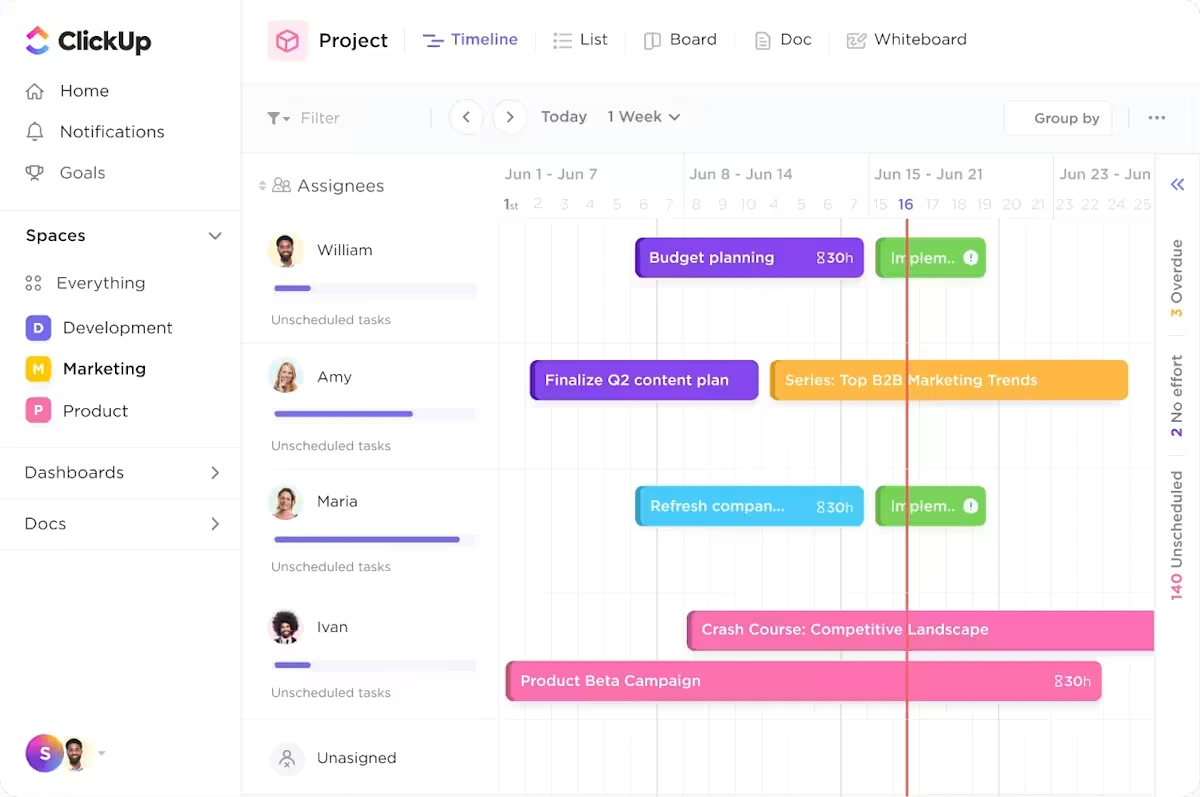
Empower Your ClickUp Project Teams with Full HubSpot Customer Context

Eliminate manual project setup and the risk of missed details. By syncing HubSpot deal and company data directly into ClickUp, you can automatically initiate projects with all the necessary information, ensuring your delivery teams have the context they need to execute flawlessly from day one.

Automated Project Kickoffs: Automatically create a new ClickUp task, list, or project from a template the moment a deal is marked 'Closed Won' in HubSpot.

Centralize Customer Information: Push key deal properties, contact details, and notes from HubSpot directly into ClickUp tasks and custom fields for easy access.

Standardize Delivery Workflows: Ensure every new client project follows a consistent process by automating the setup and handoff process.

ClickUp Dashboard

Eliminate manual project setup and the risk of missed details. By syncing HubSpot deal and company data directly into ClickUp, you can automatically initiate projects with all the necessary information, ensuring your delivery teams have the context they need to execute flawlessly from day one.

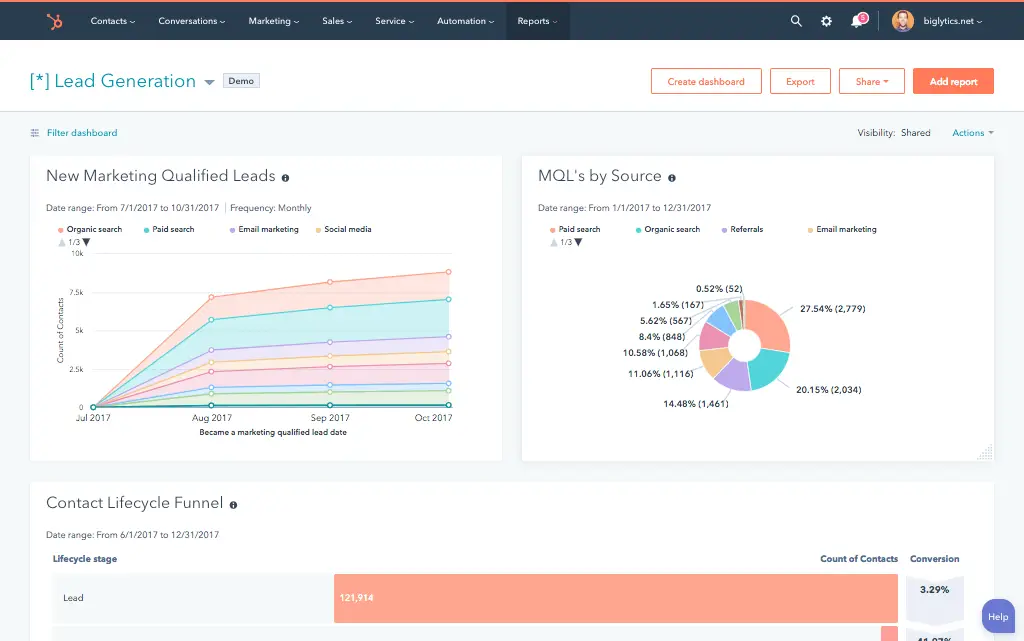
Unlock Real-Time ClickUp Project Visibility in Your HubSpot CRM

Give your sales, service, and account management teams a direct line of sight into project progress without ever leaving HubSpot. By syncing status updates and key milestones from ClickUp back to the CRM, your commercial teams can have more informed client conversations, manage expectations proactively, and strengthen relationships.

View Project Status in HubSpot: Track task progress and key project milestones from ClickUp directly on the associated HubSpot deal or company record.

Trigger Automated Client Updates: Use HubSpot workflows to send automated email updates to clients when their project's status changes in ClickUp.

Enhance Account Management: Equip account managers with real-time project data to provide better support, anticipate roadblocks, and identify upsell opportunities.

Hubspot Rept

Give your sales, service, and account management teams a direct line of sight into project progress without ever leaving HubSpot. By syncing status updates and key milestones from ClickUp back to the CRM, your commercial teams can have more informed client conversations, manage expectations proactively, and strengthen relationships.

A Flexible HubSpot ClickUp Sync Architecture

Our custom integrations are engineered for flexibility and scale, handling any business logic and data transformation you require.

Built for Your Business Process

Standard, out-of-the-box connectors force you into a rigid workflow that rarely matches your true operational needs. Our custom integration is engineered to map the data flow to your specific sales-to-delivery handoff, ensuring the technology supports your unique process—not the other way around.

  • Bi-Directional & Uni-Directional Sync: Control the flow of information precisely between HubSpot and ClickUp to keep your commercial and project teams perfectly aligned.
  • Real-time & Scheduled Syncs: Trigger task creation instantly based on a deal closing or run batch updates to sync project statuses on a schedule that fits your team's cadence.
  • Custom Sync Logic & Triggers: Define the exact conditions for automation, such as creating a project task only for deals of a certain size or product line.
  • High-Volume Data Handling: Our architecture is built to reliably manage a high volume of projects and tasks without compromising performance.

Comprehensive HubSpot and ClickUp Object & Field Mapping

We ensure seamless data translation between HubSpot and ClickUp by mapping CRM objects to your project management structure.

HubSpot

ClickUp

  • Deals
  • Tickets
  • Companies & Contacts
  • Deal/Ticket Properties
  • Tasks, Lists, or Folders
  • Tasks
  • Task Relationships
  • Custom Fields on Tasks
  • Deals Tasks, Lists, or Folders
  • Tickets Tasks
  • Companies & Contacts Task Relationships
  • Deal/Ticket Properties Custom Fields on Tasks

Trusted by High-Growth Companies

See why leaders at scaling companies partner with Integrate IQ's experts.

I've been working with Integrate IQ for over 2 years now. We've had several outside systems that we wanted integrated with our HubSpot instance. From project planning and scoping, through build, and after deployment support, the team at Integrate IQ has been exemplary to work with. They've delivered on all commitments, helped established reasonable time frames for deliverables, and kept lines of communication open.

Marohn, M

We've partnered with Integrate IQ for over five years to develop integrations between our complex and not-so-widely-known ERP. They understand HubSpot's strengths, weaknesses and limitations, and are able to easily adapt to our evolving needs. They had an ownership change a few years ago, but that did not impact their expertise/service. We really appreciate our relationship with IIQ and recommend them to anyone looking to embed HubSpot deeper into their organization's systems.

Craychee, A

Integrate IQ has been great to work with! As someone who can be intimidated when things get too technical, they made the process of outlining our integration very approachable and understandable. They're great to work with and built the integration that we asked for, and then continued to work with us to fine-tune the tool over time as we figured out exactly what we needed.

Lauren Little

Integrate has been fantastic to work with. They helped us implement our CRM, design a framework for our pipeline that works perfectly and they built out an integration between HubSpot and Netsuite which allows our data to flow seamlessly. They've been an invaluable partner in our growth.

Whipple, M

We worked with Integrate IQ on a complex integration and now we have a fantastic solution that makes HubSpot work even better!

Ben Donahower

What is a HubSpot ClickUp integration?

A HubSpot ClickUp integration connects your CRM to your project management platform, syncing deals, tasks, and project status so sales and delivery teams share visibility on a client’s engagement from close to completion.

How does the HubSpot ClickUp integration work?

The integration maps HubSpot deals, tickets, and companies to ClickUp tasks, lists, and custom fields. A Closed-Won deal can automatically create a project from a ClickUp template, while task status updates in ClickUp sync back to a custom property on the HubSpot deal.

for HubSpot

Turn HubSpot Into A Real-Time SMS Engine with Message IQ

chat icon Two-Way Conversations inbox icon Shared Team Inbox thunder icon Automation Triggers chart icon Advanced Reporting shield icon Compliance Tools
  • 98% SMS read within 3 min
  • 78% Buy from first responder
  • 21× More likely to qualify
Proven results
98% open rate 3–5 min avg response $45–$50 ROI / $1

*MessageIQ is an IntegrateIQ product – built natively for HubSpot by the same team.

Does HubSpot have a native ClickUp integration?

Yes, ClickUp offers a genuine two-way native integration, meaning ClickUp actions are available inside HubSpot’s workflow tool and HubSpot actions are available inside ClickUp automations. It handles standard use cases well but has real limits around custom field mapping and account tier requirements.

Does the native ClickUp integration support custom field mapping?

No. ClickUp’s own help documentation confirms that custom field mapping is not supported for HubSpot workflows in the native integration. For SLA data, custom statuses, or other specific fields to land in HubSpot as usable properties, a custom integration is required.

How long does a HubSpot ClickUp integration take to build?

A custom HubSpot ClickUp integration typically takes 8 weeks: 2 weeks of discovery, including mapping your specific Spaces, Folders, and Lists structure, 3 weeks of build and staging, and the remaining weeks for testing and go-live support.

What ClickUp plan do you need for the native HubSpot integration?

ClickUp’s native HubSpot integration is available on the Unlimited Plan and above, and only Workspace owners or admins can set it up; Guests and limited members can’t use it. A custom integration built against ClickUp’s API isn’t tied to that specific plan restriction in the same way.

How a HubSpot ClickUp Integration Actually Works

A HubSpot ClickUp integration works by starting from what the native two-way integration already does well, deal and task creation, and extending it where custom field mapping and nested data structures run into real, documented limits.

On the HubSpot-to-ClickUp side, a Closed-Won deal can create a project from a template, with custom logic routing it to the correct Space, Folder, or List based on pipeline or deal size.

On the ClickUp-to-HubSpot side, task and project status changes sync back as custom properties, with dropdown field values translated to readable labels rather than raw position indices.

Three Ways to Connect ClickUp and HubSpot

Not every team needs custom. Here is the honest comparison.

Factor Native ClickUp App Zapier / Make Custom Integration (Integrate IQ)
Best for Standard two-way task and deal syncing on qualifying ClickUp plans Teams needing more custom field flexibility than the native app offers Complex data models, nested Spaces/Folders/Lists, or true two-way sync with loop prevention
Custom field mapping Not supported in HubSpot workflows, per ClickUp’s own documentation Supported by Make; historically limited on Zapier Fully supported, including dropdown index-to-label translation
Plan / permission requirements Requires ClickUp Unlimited plan or above; only Workspace owners/admins can set up No ClickUp tier lock, but subject to Zapier/Make task limits No forced ClickUp tier upgrade required
Nested data model handling Flattened, limited support for Spaces/Folders/Lists hierarchy Basic, mapped per automation Full mapping using HubSpot custom objects to preserve hierarchy
Business logic Fixed within the app’s settings Custom logic possible, more so in Make than Zapier Custom rules, e.g. multi-pipeline routing, loop prevention
Volume handling Standard task and deal volume Subject to HubSpot’s 100 requests/10 seconds limit on Free/Starter tiers Built for high-volume syncs, paced within both platforms’ actual limits
Maintenance Vendor-managed You manage it Monitored, maintained, and supported


If you’re on a qualifying ClickUp plan and mainly need standard deal-to-task creation, the native integration covers that well. Once custom field mapping, nested Space and Folder structures, or plan-tier independence matter, a custom integration is what closes those gaps.

Delivery Workflows You Can Automate Once ClickUp Data Lives in HubSpot

  • Dropdown Field Value Translation. Since ClickUp’s dropdown custom fields return position indices rather than readable option names through the API, the integration translates these back to actual labels before they land in HubSpot, so a status property shows “In Progress” instead of a meaningless number.
  • Nested Space, Folder, and List Structure Mapping. For agencies or delivery teams organizing work across ClickUp’s nested Spaces, Folders, and Lists, the integration maps that hierarchy to HubSpot custom objects deliberately, preserving relationships that a flat, single-object sync would lose.
  • Support Ticket Field Completion Beyond Task Name. Since ClickUp’s native integration only auto-maps the Task Name field into a HubSpot ticket, a custom integration can populate the remaining ticket fields, priority, category, description, automatically from ClickUp Forms submissions, eliminating the manual cleanup step teams currently do.
  • Multi-Pipeline, Multi-List Dynamic Routing. For businesses running several HubSpot pipelines mapped to different ClickUp Lists, the integration dynamically routes a deal to the correct List based on pipeline, product line, or deal size, rather than a single fixed mapping.
  • Infinite Loop Prevention for True Two-Way Sync. A genuinely bi-directional sync risks update loops, ClickUp triggers a HubSpot update, which triggers a ClickUp update, and so on. The integration includes loop-detection logic so a single real change doesn’t cascade into repeated, unnecessary sync events.

What Breaks in a ClickUp HubSpot Sync, and How We Prevent It

  • Duplicate records and identity resolution. A deal already linked to a ClickUp task can create a second task if the connection between the two isn’t tracked with a stable reference ID. We store the ClickUp task ID directly on the HubSpot deal record, and vice versa, so re-syncs update the existing link instead of creating duplicates.
  • System-of-record conflicts. Sales may update a deal amount in HubSpot while the delivery team tracks a different project value in ClickUp. We define clear field ownership, deal and contract terms from HubSpot, project execution status from ClickUp, so simultaneous updates don’t silently overwrite each other.
  • Dropdown field values returned as position indices, not labels. ClickUp’s API returns custom dropdown field values as position indices rather than the actual option text, a real, documented gotcha. A naive sync displays a meaningless number in HubSpot instead of the actual status label. We translate these explicitly during the build.
  • Custom field mapping isn’t supported in native HubSpot workflows. ClickUp’s own help documentation confirms that custom field mapping is not supported for HubSpot workflows in the native integration, and the integration’s automatic ticket-field mapping is limited to the Task Name field alone. Teams needing SLA data, custom statuses, or other ClickUp fields to land in HubSpot as usable properties need a custom build.
  • API rate limits at bulk sync volume. HubSpot enforces a 100 requests per 10 seconds limit on Free and Starter tiers, and ClickUp’s own API has its own rate limits; bulk historical syncs across thousands of records can hit both. Across 300+ platform integrations moving 20 billion plus fields annually, we batch and pace requests within both platforms’ actual limits, not just retry blindly after hitting them.

Implementation Timeline: What to Expect

Most HubSpot ClickUp integrations ship in 8 weeks. The first 2 weeks cover discovery, including mapping your specific Spaces, Folders, and Lists structure. The next 3 weeks cover build and staging. The remaining weeks cover testing, historical data backfill, and go-live support. Our HubSpot integration process is the same repeatable framework behind our 98.5% client retention rate.

Free ROI Calculator

See your 12-month revenue impact with HubSpot CRM

Enter your current numbers — visitors, leads, deal size — and get a personalized projection based on real HubSpot customer benchmarks.

Calculate My ROI

ROI Calculator Preview

Connect the Rest of Your Delivery Stack

Custom object mapping for nested Spaces, Folders, and Lists, or loop-safe bi-directional logic beyond the standard build, often needs full-stack development support. Getting sales and delivery teams onto the new workflow goes faster with HubSpot training and HubSpot onboarding right after go-live. Migrating off a legacy CRM at the same time? Our CRM migration services cover that too. Not sure what any of this is worth to your team? Run the numbers on our Integration ROI Calculator.


Tim Ritchie

Tim Ritchie

CEO of Integrate IQ

An admitted HubSpot fanboy, Tim has been in the HubSpot ecosystem as a consumer of the platform from the beginning. Tim believes that Message IQ’s success begins and end with the success of our customers and partners.

Integration CTA Image Message IQ CTA Image
Frequently Asked Questions

HubSpot ClickUp Integration FAQs

While basic connectors can create a new task, our custom solution offers robust, bi-directional syncing. We can update existing tasks, map numerous custom fields, and build complex logic (e.g., if a deal stage changes, update a specific status on an existing task), providing a level of reliability essential for core business processes.

Yes. This is a key feature for standardization. We can configure the integration to automatically create a new project, list, or task from your designated ClickUp templates whenever a deal is won, ensuring every new project kicks off with the correct subtasks and structure.

Absolutely. The bi-directional sync allows ClickUp events to trigger updates in HubSpot. When you change a task status to 'Complete,' we can automatically update a custom 'Project Status' property on the HubSpot deal, keeping your sales and account teams informed in real-time.

Yes. Our solution can map any standard or custom property from a HubSpot record and sync that data to a designated custom field in ClickUp. This ensures your project team has all the unique details they need such as service level agreements or specific client requirements right where they work.

Cost depends on how many objects you're syncing, how complex your ClickUp Spaces, Folders, and Lists structure is, and whether true bi-directional sync is required. We scope every project after a discovery call rather than quoting blind. Run the Integration Cost Estimate tool for a ballpark before you talk to us.

Most builds ship in 8 weeks, covering discovery, build, and testing. We confirm your specific timeline during discovery.

ClickUp's nested data model, Spaces containing Folders, containing Lists, containing Tasks, doesn't map cleanly onto a flat HubSpot object structure. We typically use HubSpot custom objects to preserve those relationships, rather than flattening everything into a single object and losing the hierarchy.

Ready for a HubSpot ClickUp Integration Built for Your Delivery Process?

A successful HubSpot onboarding goes beyond the basics. It's about building a platform that your team loves to use and that drives real growth. Let's build it right, right from the start.

Book Your HubSpot Discovery Call!

Post You May Like

↑
Contact Us Book A Meeting





