





















HubSpot for Mortgage Lenders: The Encompass Integration Guide
HubSpot for mortgage lenders works best when it runs alongside Encompass, not instead of it. Encompass stays the system of record for the loan file, milestones,…
HubSpot Diamond Solutions Partner
Stop the endless tab-switching between your CRM and your files. This integration links your Dropbox documents directly to HubSpot records, giving your sales and service teams instant access to the right files at the right time.

Discover how top companies use their CRM to power marketing, sales & growth. No spam. No sales pitch. Just expert insights from certified HubSpot professionals.

Get personalized projections based on real HubSpot customer data — matched to your industry and region.
Visitors · Leads · Deals · Close Rate · Avg. Deal Size
Benchmarks that actually match your market
Leads · Pipeline · Revenue
Instant PDF, ready to share

Two guides that turn this integration into the business case your VP wants to hear, with the framing and numbers ready to go.
Forecast credibility, deal velocity, expansion revenue, in CRO language.
Attribution, budget defensibility, segmentation, in CMO language.
Cost per order, cycle time compression, team capacity at higher volume, in COO language.
ERPs, custom objects, legacy databases, real-time bi-directional sync. Every estimate is built by the same engineers who ship the integration.
60-second ballpark · No back-and-forth
Bi-directional sync
One-way or two-way, built to your data flow
Granular field mapping
Every property mapped, validated, tested
Real-time + scheduled
Instant triggers and batched syncs together
Custom sync logic
Your business rules, written into the build
Error handling
Monitoring, alerts, retry logic baked in
Year 1 continuity
License, maintenance, ongoing support
Stop making your team dig through nested folders like they’re searching for buried treasure. This integration aligns your Dropbox structure with your HubSpot sales pipeline, ensuring a clean, organized file system.
Automate Folder Creation: Automatically generate a new, standardized Dropbox folder structure (e.g., "Client Name - Deal Name") the moment a deal is created in HubSpot.
Centralize Project Assets: Store all customer-facing documents—from RFPs to signed contracts—in one secure Dropbox folder that is linked directly to the HubSpot company or deal record.
Sync File Updates: When a file is updated or added to a shared Dropbox folder, automatically notify the HubSpot deal owner via a task or note.

Stop making your team dig through nested folders like they’re searching for buried treasure. This integration aligns your Dropbox structure with your HubSpot sales pipeline, ensuring a clean, organized file system.


Integrate IQ has consistently shown they can be trusted with even the most complex projects. I know our customers are in great hands and that the job will always get done right.
Give your sales reps the tools they need to close deals faster, without ever leaving the CRM. This integration puts your most important collateral and signing tools right inside HubSpot.
Send Contracts for Signature: Use Dropbox Sign (formerly HelloSign) to send contracts directly from the HubSpot contact, deal, or company record.
Auto-Fill Templates: Populate Dropbox Sign templates with real-time data from HubSpot properties (like Name, Company, and Deal Amount).
Track Document Status: View the status of sent documents (Sent, Viewed, Signed) directly on the HubSpot CRM card.
Access Marketing Collateral: Allow sales reps to browse and attach marketing assets stored in Dropbox directly to their HubSpot sales emails.
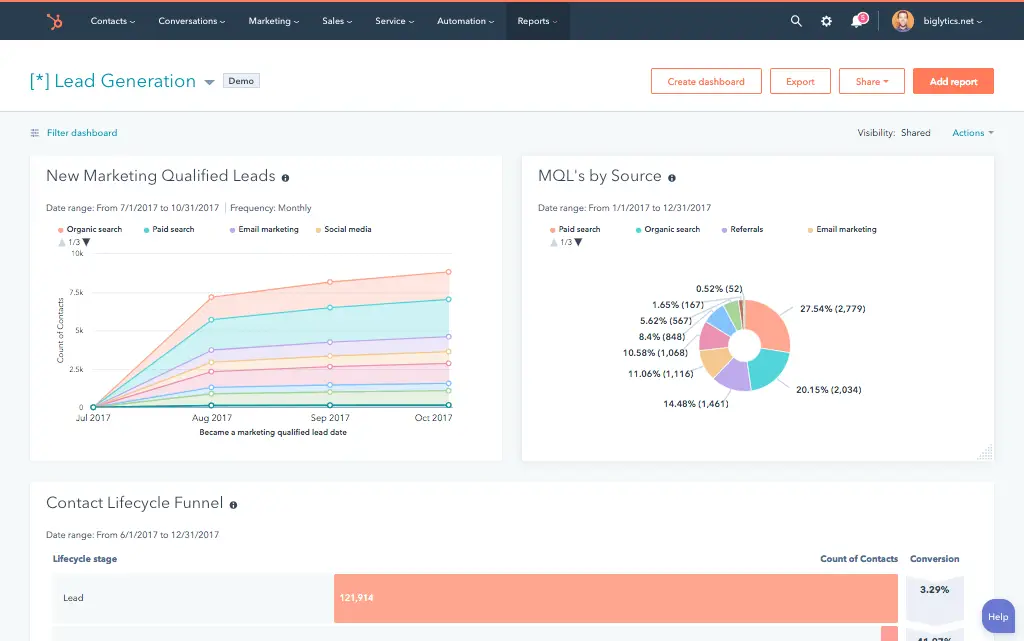
Give your sales reps the tools they need to close deals faster, without ever leaving the CRM. This integration puts your most important collateral and signing tools right inside HubSpot.
Our integrations are engineered for flexibility and scale, handling any business logic you require for the integration of Hubspot Dropbox.
Bi-directional & uni-directional sync, real-time & scheduled, custom triggers, and high-volume handling.
We ensure every piece of critical data, standard or custom, has its place in your connected Hubspot Dropbox ecosystem.
No surprises. Clear scope, clear acceptance tests. We believe in straightforward pricing so you know exactly what to expect before we begin.
A failed integration is more than a technical problem: it's a drain on time, budget, and morale. We are the specialists that leading companies like MetLife trust to handle their most mission-critical data flows. We don't rely on fragile connectors or simplistic platforms because we know they can't handle enterprise scale. Our approach is built on robust, custom development and a deep understanding of both HubSpot and the systems you need to connect it to. Partnering with us isn't just another attempt; it's an investment in certainty.
Our four pillars for delivering successful outcomes on complex projects.
We thrive on custom API integrations, multi-system migrations, and “messy data” that makes others pause. Full support for standard and custom objects across your stack is table stakes for us.
Real problems, shipped solutions. Our proprietary Smart Ramp apps were developed to fill gaps in HubSpot capabilities and solve real-world customer problems. The same practical mindset powers our HubSpot AI Accelerator: We focus on data readiness and shipped outcomes, not shiny features.
Complex projects demand clarity. Our Smart Process runs on an 8-12 week cadence with stage gates, transparent deliverables, and clear pricing. That’s how we maintain a 98.5% customer retention rate.
We’re a developer-led team of integration engineers, solution architects, and technical PMs. Clients describe us simply: 'the folks you call when something seems impossible.'

















See why leaders at scaling companies partner with Integrate IQ's experts.
Why Businesses Trust Integrate IQ for a Smarter HubSpot Experience

Yes. We can configure an automation that triggers when a deal is created (or reaches a specific stage), automatically creating a dedicated folder in Dropbox and saving the link to the HubSpot record.
Yes. The integration supports Dropbox Sign. You can send, track, and sign documents directly from HubSpot, with signed copies automatically saved back to the record.
Absolutely. We can map HubSpot contact, company, and deal properties to text fields in your Dropbox Sign templates. This allows you to generate custom contracts with one click.
For advanced folder automation (like creating custom folder trees based on deal logic), middleware is often used. However, for e-signatures and basic file linking, the native integration is sufficient. We will recommend the best architecture for your needs.
Your files should work for you, not against you. Schedule a free discovery call, and we will map out your document workflow and show you how to connect HubSpot and Dropbox to save your team hours every week.
Schedule Your Integration Discovery Call
HubSpot for mortgage lenders works best when it runs alongside Encompass, not instead of it. Encompass stays the system of record for the loan file, milestones,…
The best calling tools for HubSpot in 2026 are Aircall, JustCall, Dialpad and RingCentral and each one wins for a different kind of team. Aircall gives…

Teams that automate HubSpot workflows well typically save 5-20 hours per person per week. A 10-person revenue team automating lead routing, follow-ups, and data entry together…
