















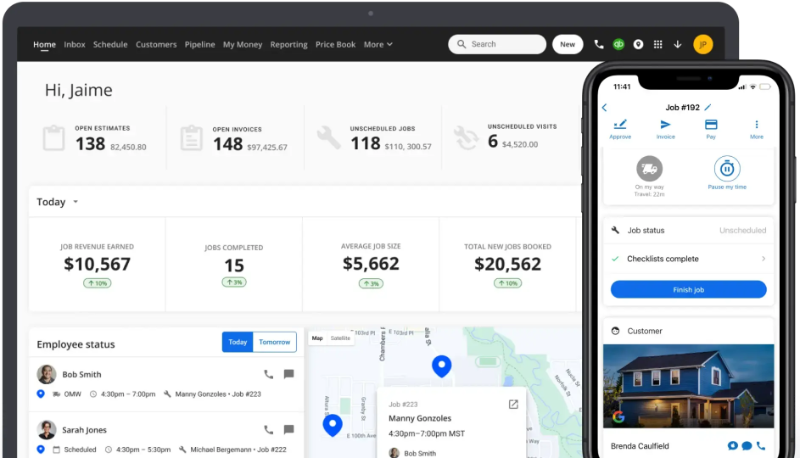



























What is a HubSpot Housecall Pro integration?
A HubSpot Housecall Pro integration connects your home service scheduling and dispatch platform to your CRM, syncing customers, jobs, estimates, and invoices so sales and marketing teams can act on real field service data.
How does the HubSpot Housecall Pro integration work?
The integration maps HubSpot contacts, deals, and line items to Housecall Pro customers, jobs, estimates, and price book services. A job marked “Finished” can trigger a HubSpot follow-up workflow, while paid invoices sync back for revenue reporting.

Turn HubSpot Into A Real-Time SMS Engine with Message IQ
 Two-Way Conversations
 Shared Team Inbox
 Automation Triggers
 Advanced Reporting
 Compliance Tools
- 98% SMS read within 3 min
- 78% Buy from first responder
- 21× More likely to qualify

*MessageIQ is an IntegrateIQ product – built natively for HubSpot by the same team.
Does HubSpot have a native Housecall Pro integration?
No. HubSpot’s own community forum confirms there’s no native integration between HubSpot and Housecall Pro; a HubSpot representative has stated it doesn’t align with features HubSpot prioritizes building natively. Zapier is the most common path for basic automation, and a custom integration is standard for anything deeper.
Is a Zapier-based Housecall Pro-HubSpot sync actually real-time?
Not exactly. Zapier’s free plan checks for new Housecall Pro data as infrequently as every 15 minutes, and even paid Zapier plans carry a 1 to 2 minute delay. For time-sensitive workflows like lead routing, that delay can be the difference between booking the job and losing it to a competitor.
How long does a HubSpot Housecall Pro integration take to build?
A custom HubSpot Housecall Pro integration typically takes 8 weeks: 2 weeks of discovery and field mapping, 3 weeks of build and staging, and the remaining weeks for testing and go-live support.
Can HubSpot and Housecall Pro sync bi-directionally?
Yes. A custom integration can sync new jobs, estimates, and invoice status from Housecall Pro into HubSpot, and push new leads and updated contact information from HubSpot back into Housecall Pro. Direction and timing are configurable per object.
Three Ways to Connect Housecall Pro and HubSpot
Not every team needs custom. Here is the honest comparison, currently absent from the page.
| Factor | Zapier / Generic iPaaS | No Native Connector, Manual | Custom Integration (Integrate IQ) |
|---|---|---|---|
| Best for | Simple, low-volume automation for non-time-sensitive workflows | Occasional manual exports for a small book of business | Time-sensitive workflows like lead routing, and businesses needing custom objects or historical data |
| Sync timing | As infrequent as every 15 minutes on free plans, 1 to 2 minute delay even on paid plans | Not applicable, manual | True real-time, webhook-driven |
| Available trigger events | Limited to 7 native Housecall Pro triggers | Not applicable | Full access to Housecall Pro’s API, not limited to a pre-built trigger list |
| Historical data | Forward-looking only from activation | Whatever you remember to export | Full historical backfill included |
| Business logic | Basic conditional logic per Zap | None | Custom rules, e.g. commercial account escalation, estimate-value-based follow-up sequencing |
| Volume handling | Task limits and throttling at scale | Manual, doesn’t scale | Built for high job volume across multiple technicians without timeouts |
| Maintenance | You manage it | None needed, but no value either | Monitored, maintained, and supported |
If speed-to-lead doesn’t make or break your booking rate, Zapier is a reasonable, low-cost starting point. Once a 15-minute-or-longer delay is actually costing you jobs, or you need trigger events and business logic the standard automation path doesn’t expose, a custom integration is what closes that gap.
Field Service Workflows You Can Automate Once Housecall Pro Data Lives in HubSpot
- Real-Time Lead Routing Beyond Zapier’s Delay. Since Zapier-based Housecall Pro syncs check for new data as infrequently as every 15 minutes on free plans and carry a 1 to 2 minute delay even on paid plans, a custom integration uses webhook-driven triggers for time-sensitive events like new leads, so routing happens in seconds, not minutes, when speed-to-lead affects whether the job gets booked at all.
- Trigger Event Expansion Beyond Housecall Pro’s Native 7. Since Housecall Pro’s own Zapier integration only exposes 7 trigger events, a custom integration built against Housecall Pro’s full API can surface additional job, estimate, and customer state changes as HubSpot triggers that the standard automation path simply doesn’t expose.
- Commercial and Parent-Child Account Escalation. For businesses using Housecall Pro’s Parent Customer or Commercial Account structure, a service issue at one child location can trigger an alert to the account manager responsible for the parent relationship, not just the individual site contact.
- Estimate Follow-Up Sequencing by Dollar Threshold. Beyond a generic estimate-sent notification, HubSpot can apply different follow-up urgency and sales involvement based on the estimate’s dollar value, treating a large commercial estimate differently than a small residential one.
- Cross-Sell Detection from Price Book Service Gaps. Using Housecall Pro’s Price Book Services data against a customer’s actual service history, HubSpot can identify customers who’ve never purchased specific add-on services and target them accordingly, rather than promoting services uniformly to the whole list.
What Breaks in a Housecall Pro HubSpot Sync, and How We Prevent It
- Duplicate records and identity resolution. A customer booking through the Housecall Pro app, website, or a phone call logged manually can create duplicate HubSpot contacts if matching relies on name alone. We match on multiple identifiers and existing associations, not name matching.
- System-of-record conflicts. A technician may update a customer note directly in Housecall Pro while HubSpot separately reflects sales-side notes, and without an explicit source-of-truth rule, either system’s update can silently overwrite the other’s. We define field-level ownership explicitly, as this page’s own existing FAQ already promises, rather than leaving it as an afterthought.
- Zapier’s sync latency is real and quantified. Free Zapier plans check for new Housecall Pro data as infrequently as every 15 minutes, and even paid plans carry a 1 to 2 minute delay. For time-sensitive workflows like lead routing, that delay can genuinely cost a booked job. A custom integration uses webhook-driven, real-time triggers instead of polling on a delay.
- Housecall Pro’s own trigger library is narrow. Housecall Pro’s Zapier integration exposes only 7 trigger events, a small fraction of the job, estimate, and customer state changes that actually happen in the platform. Many of the workflows a business wants to automate simply aren’t reachable through the standard automation path. A custom integration built against Housecall Pro’s full API can surface event types the trigger library doesn’t expose.
- API rate limits at high job volume. Home service businesses processing dozens of jobs and estimates daily across multiple technicians can hit API limits during bulk syncs, especially during seasonal demand spikes. Across 300+ platform integrations moving 20 billion plus fields annually, we batch and throttle high-volume syncs by design, not by accident.
Implementation Timeline: What to Expect
Most HubSpot Housecall Pro integrations ship in 8 weeks. The first 2 weeks cover discovery and field mapping, including which trigger events and commercial account structures are in scope. The next 3 weeks cover build and staging. The remaining weeks cover testing, historical data backfill, and go-live support. Our HubSpot integration process is the same repeatable framework behind our 98.5% client retention rate.
See your 12-month revenue impact with HubSpot CRM
Enter your current numbers — visitors, leads, deal size — and get a personalized projection based on real HubSpot customer benchmarks.
Calculate My ROI
Connect the Rest of Your Field Service Stack
Instant lead-response texting works well paired with Message IQ, our own HubSpot SMS solution, especially given how much a delayed response can cost a home service business. Custom commercial-account logic or estimate-based sequencing beyond the standard build often needs full-stack development support. Getting sales and dispatch teams onto the new workflow goes faster with HubSpot training. Migrating off a legacy CRM at the same time? Our CRM migration services cover that too. Not sure what any of this is worth to your team? Run the numbers on our Integration ROI Calculator.



Table of Contents
- What is a HubSpot Housecall Pro integration?
- How does the HubSpot Housecall Pro integration work?
- Does HubSpot have a native Housecall Pro integration?
- Is a Zapier-based Housecall Pro-HubSpot sync actually real-time?
- How long does a HubSpot Housecall Pro integration take to build?
- Can HubSpot and Housecall Pro sync bi-directionally?
- Three Ways to Connect Housecall Pro and HubSpot
- Field Service Workflows You Can Automate Once Housecall Pro Data Lives in HubSpot
- What Breaks in a Housecall Pro HubSpot Sync, and How We Prevent It
- Implementation Timeline: What to Expect
- Connect the Rest of Your Field Service Stack




