
























What is a HubSpot Power BI integration?
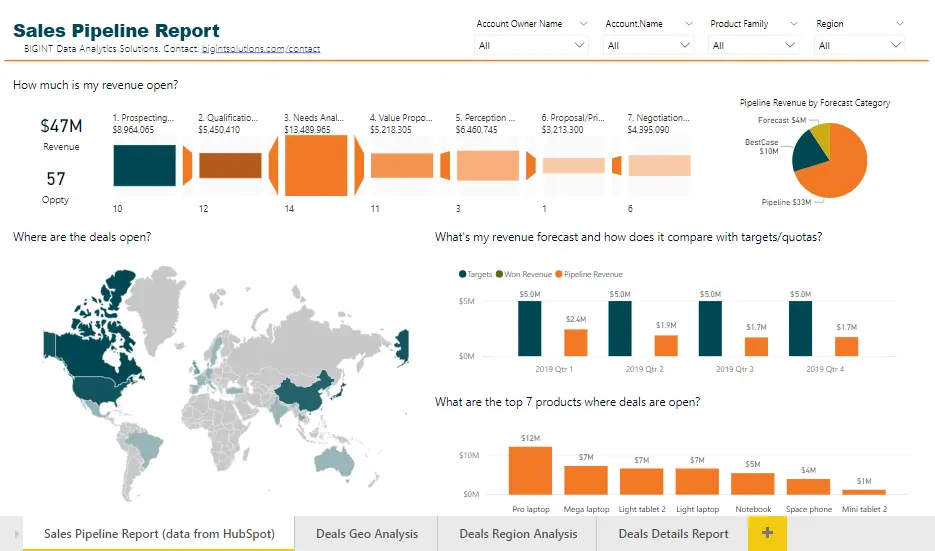
A HubSpot Power BI integration connects your CRM data to Microsoft’s business intelligence platform, letting analytics teams build dashboards and reports that blend HubSpot marketing, sales, and service data with other business systems like finance or product data.
How does the HubSpot Power BI integration work?
The integration extracts HubSpot objects, contacts, companies, deals, tickets, custom objects, and loads them into a Power BI data model on a scheduled refresh. Analysts then build reports, DAX measures, and visualizations on top of that data, blended with other data sources as needed.

Turn HubSpot Into A Real-Time SMS Engine with Message IQ
 Two-Way Conversations
 Shared Team Inbox
 Automation Triggers
 Advanced Reporting
 Compliance Tools
- 98% SMS read within 3 min
- 78% Buy from first responder
- 21× More likely to qualify

*MessageIQ is an IntegrateIQ product – built natively for HubSpot by the same team.
Does HubSpot have a native Power BI integration?
No. Neither HubSpot nor Microsoft offers a native, built-in connector between the two platforms, confirmed directly by both companies’ own community forums. Several third-party connectors exist, including HubSpot-certified marketplace apps, but “native” isn’t accurate for any of them.
How long does a HubSpot Power BI integration take to build?
A custom HubSpot Power BI integration typically takes 4 to 6 weeks, shorter than a bi-directional operational integration since this is a one-way data extraction: 1 to 2 weeks of discovery and object scoping, 2 weeks of build, and the remaining time for testing and refresh-schedule tuning.
Can Power BI push data back into HubSpot?
No, and it generally shouldn’t. This integration is a one-way data flow from HubSpot into Power BI for reporting purposes. Power BI is a business intelligence tool, not a system of record, so there’s rarely a reason to push data back into HubSpot from it.
What data refresh rate can I get from HubSpot to Power BI?
It depends on your reporting needs, not a fixed platform limit. Strategic leadership dashboards often run on a daily refresh, while operational reports for front-line managers can refresh hourly or more frequently, balanced against HubSpot’s API rate limits at higher frequencies.
How a HubSpot Power BI Integration Actually Works
A HubSpot Power BI integration works as a one-way data pipeline: HubSpot remains the system of record for CRM data, while Power BI becomes the analytics layer where that data gets modeled, blended, and visualized.
The integration extracts HubSpot objects on a scheduled refresh, respecting HubSpot’s API rate limits, and loads them into a Power BI data model with relationships between objects, contacts to companies to deals, mapped explicitly rather than assumed.
From there, analysts build reports and DAX measures on top of that data, often blended with data from other systems, finance, product usage, HR, that HubSpot alone could never join.
Three Ways to Connect Power BI and HubSpot
Not every team needs custom. Here is the honest comparison.
| Factor | Third-Party Connector (CData / DataWarehouse.io-style) | Manual Export / CSV | Custom Integration (Integrate IQ) |
|---|---|---|---|
| Best for | Standard objects, quick setup for smaller reporting needs | One-off reports, no ongoing reporting need | Enterprise reporting blending HubSpot with other systems at scale |
| Custom object support | Varies by connector, often limited | Whatever you remember to export | Full extraction of any standard or custom object |
| API rate-limit handling | Varies; some documented parsing and reliability issues | Not applicable | Architected around HubSpot’s actual limits from the start |
| Refresh scheduling | Fixed tiers, often subscription-gated | Whenever someone remembers | Configured to your actual reporting cadence, hourly to daily |
| Data blending with other sources | Limited to what the connector supports | Manual joins in Excel | Modeled relationships across HubSpot, finance, product, and HR data |
| Maintenance | Vendor-managed subscription | Falls on whoever remembers to run it | Monitored, maintained, and supported |
If you need standard objects refreshed on a fixed schedule, a certified third-party connector like DataWarehouse.io is a reasonable, fast starting point. Once your reporting needs custom objects, careful handling of HubSpot’s API limits, or blending with finance and product data that a generic connector wasn’t built for, a custom integration is what keeps your dashboards accurate instead of quietly wrong.
Reports and Analyses You Can Build Once Power BI Has Live HubSpot Data
- Lead Source ROI by Channel, Blended with Ad Spend. Join HubSpot’s original source data with actual ad spend data, from ad platforms or finance systems, in Power BI to calculate true cost-per-acquisition and ROI by channel, not just lead volume by source.
- Sales Cycle Length Variance Analysis by Segment. Build a report comparing deal cycle length across different customer segments, deal sizes, or lead sources, surfacing which segments close fastest and which stall, informing where to focus sales enablement.
- Pipeline Coverage Ratio Tracking Over Time. Calculate and trend pipeline coverage ratio, open pipeline value versus quota, week over week using DAX measures, giving sales leadership an early warning system for coverage gaps months before quarter-end.
- Customer Health Score Blending CRM and Product Usage Data. For SaaS businesses, blend HubSpot engagement and support ticket data with product usage data from a data warehouse or product analytics tool to build a composite customer health score that flags churn risk earlier than either data source alone.
- Historical Trend Reports Beyond HubSpot’s Native Retention Window. Since Power BI can retain and model historical data indefinitely, build multi-year trend analyses and year-over-year comparisons that go back further than what’s practical to view natively in HubSpot.
What Breaks in a Power BI HubSpot Sync, and How We Prevent It
- Data type and custom property parsing errors. Generic third-party connectors can misinterpret HubSpot custom property types during import, a real, documented issue with at least one popular connector. We validate every custom property’s data type explicitly during setup instead of trusting automatic detection.
- API rate limits during large extracts. HubSpot’s API caps results per call and enforces a requests-per-second limit; a real developer report documented failures and automatic retries when pulling a large dataset into Power BI without accounting for this. We architect extraction to batch and pace requests within HubSpot’s actual limits, not just retry blindly after hitting them.
- Stale or inconsistent data from manual exports. Relying on CSV exports or ad hoc scripts, as many teams do without a live connector, means reports are only as current as the last manual pull, and no one’s ever quite sure when that was. We set up a scheduled, automated refresh so “as of” dates in reports are trustworthy.
- No native connector, and a genuinely crowded field of third-party options. Neither HubSpot nor Power BI has built a native connector, per confirmation from both companies’ own community forums, leaving a crowded field of third-party options, CData, DataWarehouse.io, Windsor.ai, Skyvia, and others, each with different pricing, refresh limits, and object coverage. We evaluate what’s actually needed for your reporting instead of defaulting to whichever connector shows up first in a search.
- Object association and relationship mapping gaps. HubSpot’s object associations, which contact belongs to which company, which deal, don’t always map cleanly into Power BI’s relational model by default, and getting this wrong silently produces incorrect rollups and totals. We model these relationships deliberately so higher-level reports aggregate correctly.
Implementation Timeline: What to Expect
Most HubSpot Power BI integrations ship in 4 to 6 weeks, shorter than a bi-directional operational integration. The first 1 to 2 weeks cover discovery and object scoping, including which other data sources need to be blended in. The next 2 weeks cover build, respecting HubSpot’s API rate limits by design. The remaining time covers testing and refresh-schedule tuning. Our HubSpot integration process is the same repeatable framework behind our 98.5% client retention rate.
See your 12-month revenue impact with HubSpot CRM
Enter your current numbers — visitors, leads, deal size — and get a personalized projection based on real HubSpot customer benchmarks.
Calculate My ROI
Connect the Rest of Your Analytics Stack
HubSpot data is most useful in Power BI when it’s blended with other systems. Finance teams already leaning on BI often pair this with a HubSpot NetSuite integration to bring ERP data into the same model, or see our banking and finance industry work for the broader picture. Custom DAX measures or data model work beyond the standard build often needs full-stack development support. Getting analysts and leadership onto the new dashboards goes faster with HubSpot training. Not sure what any of this is worth to your team? Run the numbers on our Integration ROI Calculator.



Table of Contents
- What is a HubSpot Power BI integration?
- How does the HubSpot Power BI integration work?
- Does HubSpot have a native Power BI integration?
- How long does a HubSpot Power BI integration take to build?
- Can Power BI push data back into HubSpot?
- What data refresh rate can I get from HubSpot to Power BI?
- How a HubSpot Power BI Integration Actually Works
- Three Ways to Connect Power BI and HubSpot
- Reports and Analyses You Can Build Once Power BI Has Live HubSpot Data
- What Breaks in a Power BI HubSpot Sync, and How We Prevent It
- Implementation Timeline: What to Expect
- Connect the Rest of Your Analytics Stack




