















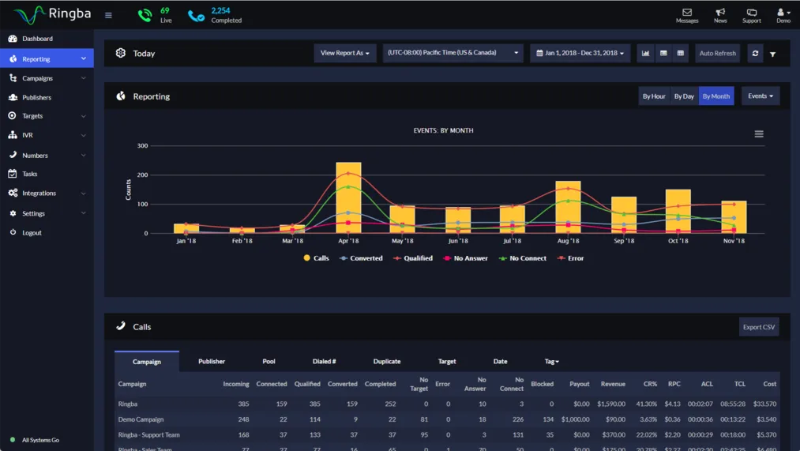



























What is a HubSpot Ringba integration?
A HubSpot Ringba integration connects your call tracking and attribution platform to your CRM, syncing caller metadata, call outcomes and revenue data so marketing and sales teams can prove which campaigns and partners actually drive phone revenue.
How does the HubSpot Ringba integration work?
The integration maps Ringba callers, calls, and buyer or target data to HubSpot contacts, deals, and marketing event properties. Caller metadata like UTM source and campaign ID can populate a rep’s screen the moment a call connects, while final call outcomes and revenue sync back to HubSpot for attribution reporting.

Turn HubSpot Into A Real-Time SMS Engine with Message IQ
 Two-Way Conversations
 Shared Team Inbox
 Automation Triggers
 Advanced Reporting
 Compliance Tools
- 98% SMS read within 3 min
- 78% Buy from first responder
- 21× More likely to qualify

*MessageIQ is an IntegrateIQ product – built natively for HubSpot by the same team.
Does HubSpot have a native Ringba integration?
No. There’s no dedicated native app in HubSpot’s marketplace for Ringba. A generic developer workflow tool, Pipedream, offers basic connectivity for building custom serverless automations, but most businesses wanting reliable, high-volume call attribution build a dedicated custom integration.
Can HubSpot natively receive Ringba’s webhook to confirm call attribution?
Not on its own. HubSpot’s own community forum confirms directly that HubSpot’s webhook functionality is built for outgoing events, triggering a webhook when something changes in HubSpot, not for receiving an inbound webhook from an external system. Ringba’s own call-attribution process requires exactly that: an inbound pixel fire followed by a payout amount sent back to Ringba’s webhook URL. A custom integration builds the middleware endpoint HubSpot doesn’t natively provide.
How long does a HubSpot Ringba integration take to build?
A custom HubSpot Ringba integration typically takes 6 to 8 weeks: 1 to 2 weeks of discovery and webhook architecture design, 3 weeks of build and staging, and the remaining weeks for testing and go-live support.
What is DNI, and how does it relate to a HubSpot Ringba integration?
Dynamic Number Insertion, DNI, is the technology Ringba uses to attribute a specific inbound call to the web session and campaign that generated it. A HubSpot integration can roll up performance by the specific DNI tracking number, showing which ad creative or landing page is actually driving the highest-value calls.
Additional Attribution Workflows You Can Automate Once Ringba Data Lives in HubSpot
This page already covers contextual handoffs, revenue matching, compliance logs, smart retargeting, automated nurture, and attribution clarity. The five below are deliberately new.
- Custom Webhook Bridge for Ringba’s Two-Step Handshake. Since HubSpot’s native webhook functionality can’t generate an inbound endpoint to receive Ringba’s call-ID pixel and then post back a payout amount to Ringba’s own webhook URL, a custom integration builds that bridge explicitly, since this is a documented, confirmed gap in HubSpot’s native capabilities, not an assumption.
- Real-Time Bidding (Ping Tree) Outcome Attribution. Since Ringba routes calls through a real-time bidding “ping tree” among multiple buyers, HubSpot can capture which specific buyer ultimately won and paid for a given call, giving affiliate managers visibility into buyer-level performance, not just aggregate call volume.
- Dynamic Number Insertion Campaign-Level Rollup. Beyond individual call attribution, HubSpot can roll up performance by the specific DNI tracking number and source campaign, showing which specific ad creative or landing page number is driving the highest-value calls.
- Caller Lookup Enrichment Before First Contact. Using Ringba’s real-time caller lookup and enrichment data, HubSpot can pre-populate a contact record with available caller information before a rep even answers, rather than starting the conversation from a blank record.
- Non-Billable Call Filtering Before CRM Entry. Since not every inbound call in a pay-per-call environment is considered valuable or billable, HubSpot can apply the same qualification logic Ringba uses to exclude non-billable calls from cluttering the CRM with low-value or invalid contact records.
What Breaks in a Ringba HubSpot Sync and How We Prevent It
This section is currently absent from the page entirely.
- Duplicate records and identity resolution. A caller reaching out through multiple tracking numbers or campaigns can create duplicate HubSpot contacts if matching relies on a single identifier. We use a hierarchy of stable identifiers, not phone number alone.
- System-of-record conflicts. A buyer’s payout amount may be adjusted in Ringba after initial attribution, while HubSpot’s revenue record still reflects the original figure. We define Ringba as the source of truth for final payout amounts, with a defined refresh process for adjustments.
- HubSpot cannot natively receive Ringba’s inbound webhook handshake. HubSpot’s own community forum confirms directly that HubSpot’s webhook functionality is built for outgoing events only, triggering a webhook when something changes in HubSpot, not for generating an inbound endpoint that an external system like Ringba can post to. Ringba’s own documented call-attribution mechanism requires exactly this: firing a pixel with a call ID to an endpoint, then receiving a payout amount back at Ringba’s own webhook URL. This two-step handshake is not possible using HubSpot’s native functionality alone; a custom integration builds the middleware endpoint HubSpot doesn’t natively provide.
- Field mapping and disposition drift. Ringba’s call outcome statuses and buyer-routing data don’t map cleanly onto a generic HubSpot property scheme by default. We build the mapping deliberately against your actual ping tree and buyer structure, not a generic assumed set.
- API rate limits at high call-traffic volume. Pay-per-call and affiliate marketing campaigns can generate thousands of inbound calls during a single traffic push. Across 300+ platform integrations moving 20 billion plus fields annually, we design for these traffic-driven volume spikes, not average daily call counts.
See your 12-month revenue impact with HubSpot CRM
Enter your current numbers — visitors, leads, deal size — and get a personalized projection based on real HubSpot customer benchmarks.
Calculate My ROI
Connect the Rest of Your Performance Marketing Stack
Custom ping-tree attribution or non-billable filtering logic beyond the standard build often needs full-stack development support. Getting marketing and sales teams aligned on the new workflow goes faster with HubSpot marketing operations and HubSpot training support. Migrating off a legacy CRM at the same time? Our CRM migration services cover that too. Not sure what any of this is worth to your team? Run the numbers on our Integration ROI Calculator.



Table of Contents
- What is a HubSpot Ringba integration?
- How does the HubSpot Ringba integration work?
- Does HubSpot have a native Ringba integration?
- Can HubSpot natively receive Ringba’s webhook to confirm call attribution?
- How long does a HubSpot Ringba integration take to build?
- What is DNI, and how does it relate to a HubSpot Ringba integration?
- Additional Attribution Workflows You Can Automate Once Ringba Data Lives in HubSpot
- What Breaks in a Ringba HubSpot Sync and How We Prevent It
- Connect the Rest of Your Performance Marketing Stack




