















HubSpot Tettra Integration: Connecting Your CRM to Your Internal Knowledge Base
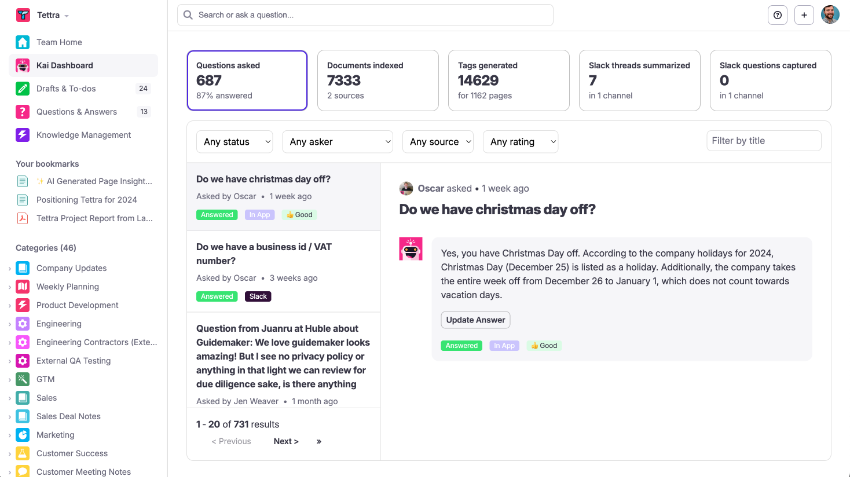
Tettra is an AI-powered internal knowledge base built for teams who need documentation, process guides, and sales playbooks to stay current without constant manual upkeep. Its AI bot Kai answers questions in Slack from the knowledge base instantly. When content is outdated, Tettra prompts the right person to fix it. HubSpot holds your deals, contacts, and customer lifecycle data.
Without a connection between them, the knowledge management lag is real: a deal closes in HubSpot and someone manually creates an onboarding page in Tettra. A new product tier launches and a sales enablement manager has to remember to update the playbook. Support tickets surface repeated questions that should be in Tettra but nobody has time to write. The work that should be automatic stays on someone’s mental checklist.
No native HubSpot connector for Tettra exists in HubSpot’s App Marketplace. Zapier connects the two for basic flows. For structured page creation with HubSpot deal data, conditional routing, and bidirectional knowledge-gap automation, a custom integration is the right path. We’re Integrate IQ, a HubSpot Diamond Solutions Partner with custom integration accreditation. Here’s what each option delivers.
What Tettra Does and How It Fits With HubSpot
| Tettra Capability | HubSpot Integration Opportunity |
| Organised internal wiki onboarding guides, sales playbooks, process docs, product FAQs | HubSpot deal close events auto-create structured Tettra pages pre-populated with deal data |
| AI Q&A (Kai) answers team questions from the knowledge base via Slack | Knowledge gaps Kai can’t answer feed back to HubSpot as tasks for subject matter experts |
| Knowledge maintenance prompts experts to verify outdated pages, flags gaps | HubSpot deal stage changes and pipeline activity flag which playbook sections need updating |

Turn HubSpot Into A Real-Time SMS Engine with Message IQ
 Two-Way Conversations
 Shared Team Inbox
 Automation Triggers
 Advanced Reporting
 Compliance Tools
- 98% SMS read within 3 min
- 78% Buy from first responder
- 21× More likely to qualify

*MessageIQ is an IntegrateIQ product – built natively for HubSpot by the same team.
Does a Native HubSpot Tettra Integration Exist?
No. Tettra doesn’t appear in HubSpot’s App Marketplace as a native connector. Zapier supports both platforms you can find HubSpot-Tettra Zapier templates for trigger-action flows. For structured page creation using HubSpot deal properties and bidirectional knowledge gap routing, a custom API integration is required.
Zapier for HubSpot Tettra: What It Covers and Where It Falls Short
Zapier works for simple automations between the two platforms:
- HubSpot deal moves to ‘Closed Won’ triggers Tettra page creation
- New HubSpot contact tagged ‘Enterprise’ creates a Tettra research page
- HubSpot form submission (new employee onboarding form) creates a Tettra checklist page
| Capability | Zapier | Custom Integration |
| Page creation from HubSpot events | Basic title + body text only | Full structured templates with multiple HubSpot properties mapped to specific page sections |
| Conditional routing (different page types by deal type) | Not supported | Full conditional logic by deal type, industry, pipeline, value |
| Bidirectional (Tettra gaps to HubSpot tasks) | Requires separate Zap; limited trigger options | Full Kai knowledge gaps create HubSpot tasks with original question as task description |
| Real-time sync | Polling (15-min on free plans) | Webhook-driven fires instantly |
| Template-based page structure | Not supported | Custom Tettra page templates with sections pre-populated from deal data |
The template gap is the critical one: Zapier creates basic Tettra pages with a title and a body. For onboarding pages that need pre-structured sections Client Overview, Key Stakeholders, Contract Details, Implementation Timeline with data from multiple HubSpot deal properties filling each section, Zapier’s data mapping isn’t sophisticated enough. A custom integration builds that structured template logic.
Custom Integration: What Each Direction Connects
HubSpot to Tettra
| HubSpot Event | Tettra Action |
| Deal moves to ‘Closed Won’ | Structured onboarding page created: Company name, deal owner, primary contacts, product tier, contract start date, implementation notes all populated from HubSpot deal and company properties |
| Deal moves to ‘Demo Scheduled’ | Tettra task created: ‘Update [Industry] sales playbook’ routed to sales enablement for documentation before next demo |
| HubSpot contact tagged ‘Key Account’ | Tettra account page created: Stakeholder map, relationship history, renewal dates pre-populated from HubSpot company properties |
| Repeated HubSpot support ticket category | Page review requested: route ticket category to relevant Tettra article owner for content update |
Tettra to HubSpot
| Tettra Event | HubSpot Action |
| Kai AI can’t answer a question (knowledge gap detected) | HubSpot task created, assigned to relevant subject matter expert, with the original question as the task description |
| Onboarding page published for a new customer | HubSpot deal timeline updated: ‘Onboarding documentation complete [Tettra page link]’ |
| Onboarding page marked complete by CS team | HubSpot contact property ‘Onboarding Status’ updated triggers next CRM lifecycle stage |
| New sales playbook page published | HubSpot notification: all contacts in relevant open deals notified about new playbook resource |
Three Use Cases That Justify the Build
Automated Customer Onboarding Documentation
A CS team managing 25+ new customers per month spends significant time creating the initial Tettra onboarding page for each copying company details, contract specifics, and contact names from HubSpot manually. A custom integration fires the moment a deal closes: a structured Tettra onboarding page creates with all available deal data in the right sections. The CS team opens Tettra and finds the page pre-built; they add their notes and kickoff plan rather than starting from a blank template. That’s 20-30 minutes saved per onboarding, compounding across every new customer.
Knowledge Gap Detection From the Sales Floor
When Tettra’s Kai AI encounters a question it can’t answer someone asks about a pricing edge case, a product capability, or a competitor comparison that gap feeds back to HubSpot as a task. The relevant product manager or sales engineer gets a task with the original question as the description. They document the answer in Tettra. The knowledge base builds organically from real team questions rather than from a quarterly documentation sprint.
Playbook Maintenance Tied to Deal Data
When deals in a specific industry or segment start closing at higher rates, HubSpot has that data. The integration can detect that new deal activity has outpaced the matching Tettra playbook no playbook exists for this segment, or the existing one hasn’t been reviewed in six months and create a documentation task. Sales enablement keeps playbooks current based on what’s actually winning deals, not on a fixed review calendar.
Tettra vs HubSpot Knowledge Base: Different Tools for Different Purposes
Some teams evaluate Tettra versus HubSpot’s Service Hub knowledge base before deciding whether to integrate or consolidate. The distinction is straightforward:
- HubSpot Service Hub knowledge base: Customer-facing. Articles visible to external users. Integrated with chatbots, support tickets, and customer-facing SEO. Best for customer self-service and support deflection.
- Tettra: Internal-facing. Company wiki for teams. AI-powered Q&A via Slack for internal team use. Best for onboarding documentation, sales playbooks, process guides, and internal knowledge management.
Most companies using both have a customer-facing HubSpot knowledge base AND an internal Tettra wiki. The HubSpot-Tettra integration connects the internal knowledge layer to CRM events it doesn’t replace either tool.
See your 12-month revenue impact with HubSpot CRM
Enter your current numbers — visitors, leads, deal size — and get a personalized projection based on real HubSpot customer benchmarks.
Calculate My ROI
What to Expect from the Build
- Weeks 1-2: Mapping. Define trigger events (which HubSpot deal stages create which Tettra page types). Design the page templates with section structures and property mappings. Confirm Tettra API access.
- Weeks 3-4: Build and sandbox testing. Build against Tettra’s API and HubSpot’s webhook API. Test structured page creation with real deal data. Validate note formatting and property mapping.
- Weeks 5-6: UAT. CS team validates onboarding pages are creating correctly with accurate deal data. Sales team validates playbook task routing. Confirm Tettra-to-HubSpot task creation from knowledge gaps.
- Weeks 7-8: Go-live and monitoring. Production deployment with monitoring. Page creation confirmed for every qualifying deal close.
For teams evaluating other knowledge base integrations alongside Tettra, we also build HubSpot Notion integration for companies using Notion as their internal wiki.



Table of Contents
- HubSpot Tettra Integration: Connecting Your CRM to Your Internal Knowledge Base
- What Tettra Does and How It Fits With HubSpot
- Does a Native HubSpot Tettra Integration Exist?
- Zapier for HubSpot Tettra: What It Covers and Where It Falls Short
- Custom Integration: What Each Direction Connects
- Three Use Cases That Justify the Build
- Tettra vs HubSpot Knowledge Base: Different Tools for Different Purposes
- What to Expect from the Build































