





































HubSpot Diamond Solutions Partner

HubSpot Fullbay Integration: Connect Your Shop Management to Your GTM Engine

Stop the disconnect between your service bay and your sales team. This integration syncs Fullbay's shop data directly with HubSpot, giving you a 360-degree view from lead to final invoice.

98.5%
Client Retention
300+
Platforms Integrated
20B+
Fields Synced Annually
HubSpot Diamond Partner

Get Your Free HubSpot Consultation + Claim The 2026 CRM Growth Playbook Instantly for FREE

Discover how top companies use their CRM to power marketing, sales & growth. No spam. No sales pitch. Just expert insights from certified HubSpot professionals.

  • Proven Playbooks from top-performing companies
  • Strategies to drive more leads, pipeline & revenue
  • Actionable insights from HubSpot experts
🎁Bonus: Submit the form to Instantly download The 2026 CRM Growth Playbook for highest ROI
(Offer valid for Limited Time Only)

Your 12-Month Revenue Impact with HubSpot CRM

Get personalized projections based on real HubSpot customer data — matched to your industry and region.

1
Add Your Current Numbers

Visitors · Leads · Deals · Close Rate · Avg. Deal Size

2
Choose Your Industry & Region

Benchmarks that actually match your market

3
See Your Projected Growth

Leads · Pipeline · Revenue

4
Download Your ROI Report

Instant PDF, ready to share

ROI Calculator Preview

Make the case to your leadership

Two guides that turn this integration into the business case your VP wants to hear, with the framing and numbers ready to go.

Pitch your Sales Leadership

Forecast credibility, deal velocity, expansion revenue, in CRO language.

Read the sales guide

Pitch your Marketing Leadership

Attribution, budget defensibility, segmentation, in CMO language.

Read the marketing guide

Pitch your Operations Leadership

Cost per order, cycle time compression, team capacity at higher volume, in COO language.

Read the operations guide
HubSpot Diamond Partner

Get a scoped estimate not a guess

ERPs, custom objects, legacy databases, real-time bi-directional sync. Every estimate is built by the same engineers who ship the integration.

  • Scope-based pricing. From $3,450 - scales with actual complexity, never padded flat fees.
  • 98.5% year-one retention. The engineers who quote it are the ones who build it.
  • 300+ platforms shipped. Your edge case is likely already in production somewhere in our library.
Build your estimate

60-second ballpark · No back-and-forth

Standard on every build

Every estimate already includes all six

Bi-directional sync

One-way or two-way, built to your data flow

Granular field mapping

Every property mapped, validated, tested

Real-time + scheduled

Instant triggers and batched syncs together

Custom sync logic

Your business rules, written into the build

Error handling

Monitoring, alerts, retry logic baked in

Year 1 continuity

License, maintenance, ongoing support

Give Your Service Managers Marketing & Sales Context

Stop making your service managers guess where a new customer came from. This integration pipes critical HubSpot marketing and sales data directly into Fullbay, giving your shop floor the context they need.

See the Marketing Source: Automatically sync a customer's original HubSpot lead source (e.g., "Google Ads," "Email Campaign") to their Fullbay customer record.

Identify High-Value Leads: Flag new customers in Fullbay that came from a "Request a Fleet Demo" form in HubSpot, so your service writers can provide a high-touch experience.

Sync Sales Notes: Push key notes from the HubSpot deal record (like "Customer has 50+ trucks") to the Fullbay customer portal, giving your techs and managers instant context.

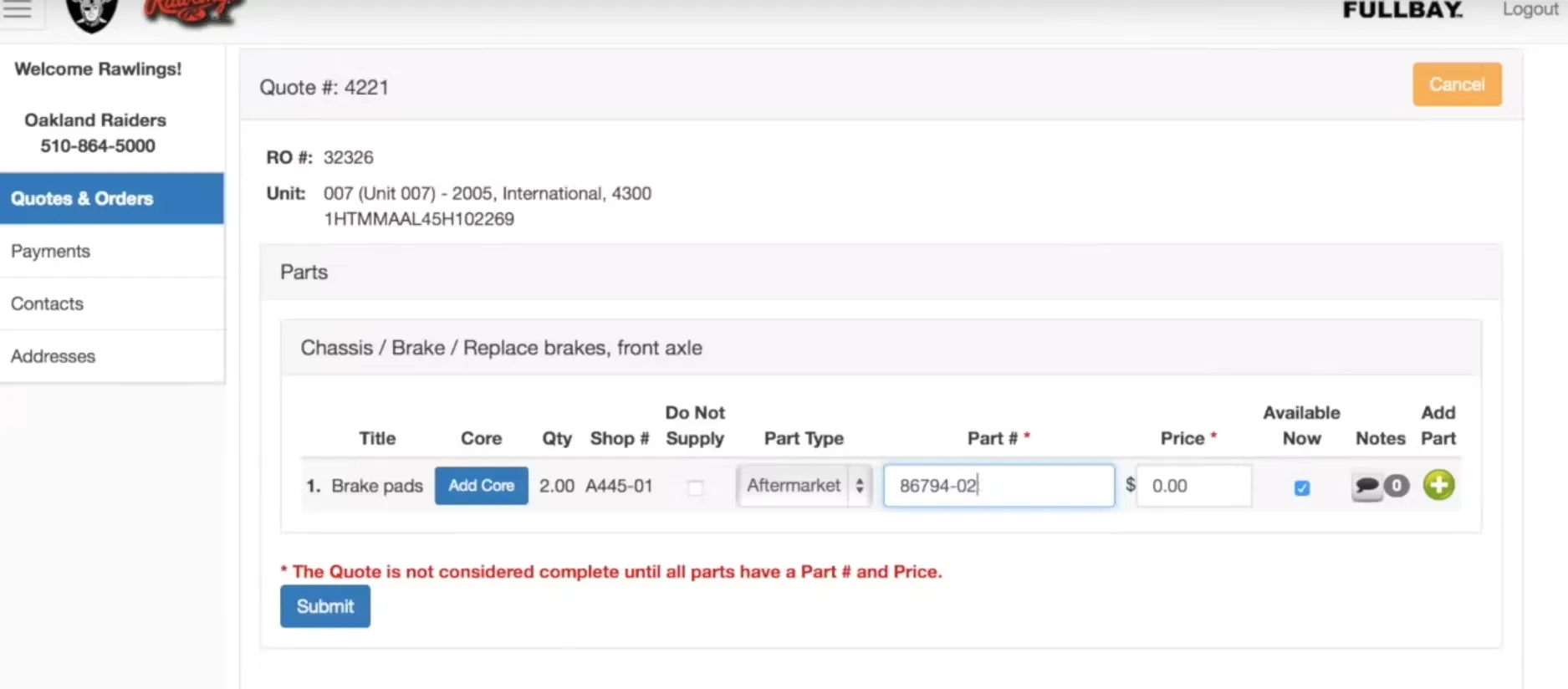
Fullbay dashboard

Stop making your service managers guess where a new customer came from. This integration pipes critical HubSpot marketing and sales data directly into Fullbay, giving your shop floor the context they need.

Integrate IQ has consistently shown they can be trusted with even the most complex projects. I know our customers are in great hands and that the job will always get done right.

Kathleen Rush

Manager, Strategic Partner Development Team at HubSpot

Turn Your Shop Data into a Revenue-Driving Asset

Your Fullbay instance is a goldmine of GTM data. This integration unlocks it, piping service history, invoices, and customer data back into HubSpot to power your sales, marketing, and service teams.

Automate Customer Loyalty Programs: Use Fullbay data to build the loyalty programs HubSpot recommends. Create lists in HubSpot for customers who have spent over $10,000, and automatically send them a "thank you" email with a 10% off coupon.

Trigger Service Reminders: Automatically enroll customers in HubSpot workflows based on their "Preventive Maintenance" (PM) schedule from Fullbay. Send "Time for your service" emails 30 days before it's due.

Re-engage Lost Customers: Create a "Lost Customer" workflow in HubSpot that automatically emails any customer who hasn't had an invoice in Fullbay in the last 6 months.

Give Sales Full Visibility: Let your sales team see a fleet's complete service history and total revenue from Fullbay directly on the HubSpot company record, so they can have smarter sales conversations.

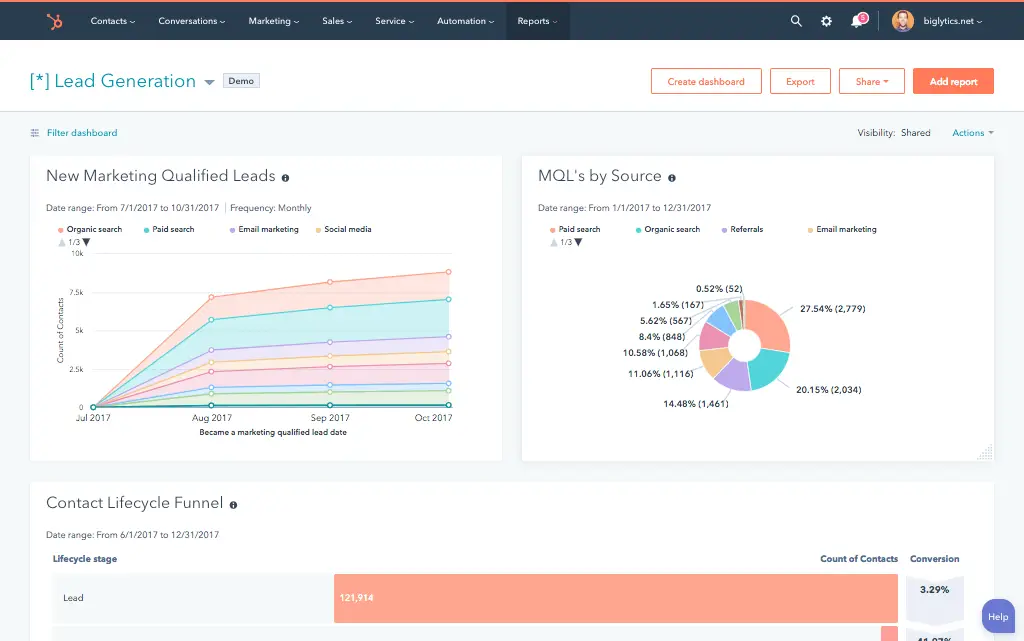
Hubspot Rept

Your Fullbay instance is a goldmine of GTM data. This integration unlocks it, piping service history, invoices, and customer data back into HubSpot to power your sales, marketing, and service teams.

A Flexible Sync Built for Your Repair Shop Workflow

Our custom integrations are engineered for flexibility and scale, handling any business logic and data transformation you require.

Built for Your Business Process

Simple connectors can't handle the complexity of a heavy-duty repair shop. They can't map your service orders to a sales pipeline or sync your inventory. We build a custom integration using Fullbay's open API that maps to your unique workflow, from first call to final invoice.

  • Bi-Directional & Uni-Directional Sync: We sync new customers from HubSpot to Fullbay, then sync their service orders, invoices, and vehicle data back to HubSpot as the source of truth for all GTM reporting.
  • Real-time & Scheduled Syncs: Sync new "Contact Us" leads from HubSpot to Fullbay in real-time. We also run scheduled, nightly syncs to update all customer revenue totals and service histories in HubSpot.
  • Custom Sync Logic & Triggers: We build the rules your shop needs. Only sync a new customer to Fullbay if their HubSpot lifecycle stage is "Sales Qualified Lead." Automatically create a new HubSpot deal when a new "Estimate" is created in Fullbay.
  • High-Volume Data Handling: Whether you're syncing a backlog of 10,000 service records or handling hundreds of new invoices every day, our integration is built for scale and reliability.

Comprehensive Object & Field Mapping

We connect your entire shop workflow, from HubSpot leads to Fullbay invoices.

HubSpot

Fullbay

  • Contacts
  • Companies
  • Deals (Sales Pipeline)
  • Deals (Revenue Pipeline)
  • Custom Objects
  • Products
  • Tickets
  • Customers (Contact Person)
  • Customers (Fleets)
  • Estimates / Service Orders
  • Invoices
  • Vehicles / Units
  • Parts & Labor Items
  • Customer Portal Service Requests
  • Contacts Customers (Contact Person)
  • Companies Customers (Fleets)
  • Deals (Sales Pipeline) Estimates / Service Orders
  • Deals (Revenue Pipeline) Invoices
  • Custom Objects Vehicles / Units
  • Products Parts & Labor Items
  • Tickets Customer Portal Service Requests
Free AI Scan

Stop Guessing What’s Broken. Get Your Free AI Growth Snapshot in 60 Seconds.

An instant AI-powered scan that shows where your brand, funnel, and CRM are leaking revenue and exactly what to fix first.

What You'll Get
  • CRM Alignment Score 0-100
  • Revenue Leakage Risks Top-3
  • Automation Opportunities
  • Integration Ideas Industry-specific
  • Conversion Optimization Wins
  • CRM ROI Opportunity Zones
65%

Most companies score between 52–71. Where do you stand?

Transparent, Project-Based Pricing

No surprises. Clear scope, clear acceptance tests. We believe in straightforward pricing so you know exactly what to expect before we begin.

We fix what others can't: 50% Of our customers hired us to fix a failed integration.

A failed integration is more than a technical problem: it's a drain on time, budget, and morale. We are the specialists that leading companies like MetLife trust to handle their most mission-critical data flows. We don't rely on fragile connectors or simplistic platforms because we know they can't handle enterprise scale. Our approach is built on robust, custom development and a deep understanding of both HubSpot and the systems you need to connect it to. Partnering with us isn't just another attempt; it's an investment in certainty.

Trusted by Leaders, Proven by Results

Trusted by High-Growth Companies

See why leaders at scaling companies partner with Integrate IQ's experts.

I've been working with Integrate IQ for over 2 years now. We've had several outside systems that we wanted integrated with our HubSpot instance. From project planning and scoping, through build, and after deployment support, the team at Integrate IQ has been exemplary to work with. They've delivered on all commitments, helped established reasonable time frames for deliverables, and kept lines of communication open.

Marohn, M

We've partnered with Integrate IQ for over five years to develop integrations between our complex and not-so-widely-known ERP. They understand HubSpot's strengths, weaknesses and limitations, and are able to easily adapt to our evolving needs. They had an ownership change a few years ago, but that did not impact their expertise/service. We really appreciate our relationship with IIQ and recommend them to anyone looking to embed HubSpot deeper into their organization's systems.

Craychee, A

Integrate IQ has been great to work with! As someone who can be intimidated when things get too technical, they made the process of outlining our integration very approachable and understandable. They're great to work with and built the integration that we asked for, and then continued to work with us to fine-tune the tool over time as we figured out exactly what we needed.

Lauren Little

Integrate has been fantastic to work with. They helped us implement our CRM, design a framework for our pipeline that works perfectly and they built out an integration between HubSpot and Netsuite which allows our data to flow seamlessly. They've been an invaluable partner in our growth.

Whipple, M

We worked with Integrate IQ on a complex integration and now we have a fantastic solution that makes HubSpot work even better!

Ben Donahower

HubSpot Is the Platform. We Make It Perform

Why Businesses Trust Integrate IQ for a Smarter HubSpot Experience

Category
HubSpot Direct
Integrate IQ
Setup Approach
Guided setup with best-practice coaching.
Done-for-you configuration — we build and optimize everything for you.
Integrations
Standard native apps and limited connectors.
Custom integrations with 300+ platforms — fully tested and supported.
CRM Migrations
Basic import support.
Complete migration from any CRM — clean data, mapped fields, zero downtime.
Technical Capability
Advisory-focused.
Engineer-led builds with API, automation, and custom object expertise.
Ongoing Support
Ticket-based, reactive
Dedicated partner support, proactive optimization & monitoring
Team Expertise
Generalists across thousands of accounts
Senior HubSpot engineers with 300+ complex integrations delivered

What is a HubSpot Fullbay integration?

A HubSpot Fullbay integration is a two-way data connection that syncs customers, Units, Estimates, Service Orders and Invoices between HubSpot and Fullbay in near real time. It keeps shop floor activity visible inside HubSpot and pushes marketing and sales context back into Fullbay, so both teams work from the same customer record.

How does the HubSpot Fullbay integration work?

It works through the HubSpot and Fullbay open REST APIs, with field mapping, deduplication and a defined system of record for every object. When a Service Order or Invoice updates in Fullbay, the sync writes the change to HubSpot within minutes, and bi-directional rules control which fields flow which direction.

for HubSpot

Turn HubSpot Into A Real-Time SMS Engine with Message IQ

chat icon Two-Way Conversations inbox icon Shared Team Inbox thunder icon Automation Triggers chart icon Advanced Reporting shield icon Compliance Tools
  • 98% SMS read within 3 min
  • 78% Buy from first responder
  • 21× More likely to qualify
Proven results
98% open rate 3–5 min avg response $45–$50 ROI / $1

*MessageIQ is an IntegrateIQ product – built natively for HubSpot by the same team.

Does HubSpot have a native Fullbay integration?

No. HubSpot does not maintain a first-party Fullbay integration, and Fullbay’s own marketplace does not list a native HubSpot connector either. Shops typically rely on Zapier for very basic one-way contact sync. Teams that need Service Order, Invoice, or Unit data in HubSpot move to a custom built integration instead.

How long does a HubSpot Fullbay integration take to build?

A custom HubSpot Fullbay integration takes about 8 weeks from kickoff to production. Discovery runs two weeks, build and staging tests run three, historical backfill runs one, and cutover with hypercare covers the final two weeks. Timelines extend for shops with multiple locations or heavy custom object use.

Can HubSpot and Fullbay sync bi-directionally?

Yes. Bi-directional sync is standard in a custom HubSpot Fullbay integration. You define system of record at the field level, so service and invoice data flows from Fullbay to HubSpot, while marketing engagement and lifecycle stage flow the other way. Conflicts resolve by rule, not by whoever updated last.

What data can sync between HubSpot and Fullbay?

Customers, Units and vehicles, Estimates, Service Orders, Invoices, and Parts and Labor Items, plus HubSpot marketing activity, lifecycle stage, and lead score. Field mapping is configured per project so only relevant data flows and each field has a clear owner. Custom Fullbay fields are supported through Fullbay’s open API.

How a HubSpot Fullbay Integration Actually Works

A HubSpot Fullbay integration connects your shop management platform to your CRM so sales, marketing, and service all see the same customer. Fullbay owns the truth for service orders, invoices, and vehicle history. HubSpot owns the truth for marketing engagement, deal stage, and lifecycle stage. Neither system tries to do the other’s job.

New customers created in HubSpot flow to Fullbay automatically, arriving ready for a service writer to open a work order. In the other direction, closed invoices, PM schedules, and fleet size sync back to HubSpot so sales and marketing can act on real shop activity instead of guessing.

Field-level rules decide exactly what moves. A new Estimate can trigger a HubSpot deal without dragging every line item over. Nightly syncs update revenue totals and service history, while real-time triggers handle new leads the moment they hit Fullbay. You control what syncs, when, and in which direction.

Three Ways to Connect Fullbay and HubSpot

Not every team needs custom. Here is the honest comparison.

Factor Native Marketplace App Zapier / iPaaS Custom (Integrate IQ)
Best for No native app exists for Fullbay Basic one-way contact sync for very small shops Full quote-to-invoice GTM data flow
Sync direction Not applicable One-way per Zap; two-way needs multiple Zaps stacked together True bi-directional sync with a field-level system of record
Custom objects/fields Not applicable Limited; every custom field needs its own Zap step Full support for Units, Estimates, and any custom Fullbay field
Job and route sync Not applicable Breaks down at real shop volume (rate limits, missed triggers) Service order and job data synced with smart filtering, so HubSpot stays clean
Business logic Not applicable Basic if/then triggers only Your rules: sync only SQLs to Fullbay, auto-create a deal on every new Estimate
Volume handling Not applicable Not built for daily invoice and service order volume Built for thousands of service records moving every week
Historical backfill Not applicable Manual, one record at a time Full historical backfill included in every build
Maintenance Not applicable You maintain every Zap yourself Monitoring, alerts, retry logic, and year-one support included


Zapier works if you only want new Fullbay customers logged as HubSpot contacts. It breaks down once you need Service Order data, Invoice totals, or PM schedules flowing into HubSpot at real shop volume. That’s when a custom HubSpot integration pays off.

Revenue Workflows You Can Automate Once Fullbay Data Lives in HubSpot

  • Estimate-to-deal pipeline. When a technician creates a new Estimate in Fullbay, we auto-create a HubSpot deal in the right pipeline stage with the estimate amount attached, so sales can follow up on quotes that are sitting unapproved.
  • Fleet account health scoring. We roll up total spend, open Estimates, and days since last invoice onto the HubSpot company record, so account managers spot fleets quietly slipping away before it shows up as lost revenue.
  • Parts pattern alert to sales. When Fullbay logs a spike in a specific part or labor category across a fleet, we trigger a HubSpot task for the account owner to pitch a maintenance contract before the next breakdown.
  • New vehicle, cross-sell trigger. When a new Unit is added to an existing customer’s fleet in Fullbay, we notify the account owner in HubSpot so they can pitch additional service coverage for it.
  • Shop capacity to sales calendar. We sync open job backlog from Fullbay into HubSpot so sales knows when to slow promotional pushes the shop floor can’t fulfill on time.

What Breaks in a Fullbay HubSpot Sync, and How We Prevent It

  • Duplicate records and identity resolution. A Fullbay customer created from a phone call and the same customer later filling out a HubSpot form can create two records. We match on phone, email, and company name before either system creates anything new.
  • System-of-record conflicts. Fullbay owns the truth for service and billing status. HubSpot owns the truth for marketing engagement and lifecycle stage. We define that split at the field level so updates never overwrite each other.
  • Field mapping and status value drift. Fullbay’s Estimate and Invoice statuses don’t share names with HubSpot deal stages. We build a translation layer so a status change in Fullbay always lands on the correct HubSpot stage, not a guess.
  • Recurring service and route data volume. A single shop can generate hundreds of service orders a week. Left unfiltered, that volume floods HubSpot with operational noise that drowns out marketing signal. We filter and batch what syncs so only GTM-relevant events reach HubSpot.
  • API rate limits at volume. Across our client base we move 20 billion plus fields annually, so we batch, checkpoint, and throttle by design instead of by accident.

Implementation Timeline: What to Expect

Most HubSpot Fullbay integrations complete inside eight weeks of kickoff. The first two weeks cover discovery: object inventory in both systems, field-by-field mapping, system of record decisions, and confirming how Fullbay’s Units, Estimates, and Invoices should map to HubSpot deals and custom objects. Weeks three to five are build and unit testing against a staging Fullbay instance and a HubSpot sandbox. Week six runs the historical backfill and reconciliation. Weeks seven and eight cover user acceptance testing, cutover, and hypercare. Post-launch monitoring is included, so if Fullbay changes its API or HubSpot pushes an update, we see it before your reports do. Full detail is on our HubSpot integration process page and 98.5% of clients renew for a follow-on scope.

Free ROI Calculator

See your 12-month revenue impact with HubSpot CRM

Enter your current numbers — visitors, leads, deal size — and get a personalized projection based on real HubSpot customer benchmarks.

Calculate My ROI

ROI Calculator Preview

Connect the Rest of Your Revenue Stack

If Fullbay is one piece of a bigger revenue stack, we can connect the rest. Shops running QuickBooks for accounting benefit from a HubSpot QuickBooks integration so invoice data lines up on both sides. Multi-location shops running an ERP get the same treatment with a HubSpot NetSuite integration. For service reminder and dispatch alerts, a HubSpot Twilio integration adds SMS to the workflows above. Curious how a Fullbay build compares to other native, middleware, and custom options? Our guide to the best HubSpot integrations breaks down all three approaches. And to see the size of the problem before you fix it, run your numbers through our Integration ROI Calculator .


Tim Ritchie

Tim Ritchie

CEO of Integrate IQ

An admitted HubSpot fanboy, Tim has been in the HubSpot ecosystem as a consumer of the platform from the beginning. Tim believes that Message IQ’s success begins and end with the success of our customers and partners.

Integration CTA Image Message IQ CTA Image
Frequently Asked Questions

HubSpot Fullbay Integration FAQs

The QuickBooks integration is crucial for financial accounting. Our HubSpot integration is built for your GTM teams. It connects service data to marketing campaigns and sales activities, not just your general ledger.

Yes. This is a primary benefit. When a customer pays an invoice in Fullbay, we sync that revenue to a deal in HubSpot. This allows you to tie closed-won revenue directly back to the original HubSpot marketing campaign.

We map Fullbay's "Units" or vehicles to a custom object in HubSpot. This allows you to associate contacts with their specific vehicles and see a vehicle's full service history right from the HubSpot record.

Yes. We sync PM schedules and last-service dates from Fullbay to HubSpot. You can then use HubSpot workflows to automatically email customers when their vehicles are due for service.

About 8 weeks from kickoff to go-live: two weeks of discovery, three weeks of build and staging, one week of historical backfill, and two weeks of user acceptance testing and cutover. Shops with multiple locations or heavier customization should plan for the higher end of that range

Every build includes monitoring, error alerts, and retry logic from day one. If Fullbay changes its API or HubSpot updates a field type, we catch it before your reports break. That ongoing support is a big reason our client retention sits at 98.5% year over year

Ready for a HubSpot Fullbay Integration? See Your Connected Shop

Ready to stop guessing at your marketing ROI and start using your shop data to grow? Schedule a free, no-obligation discovery call. We'll map out your current data flow and show you exactly how to connect Fullbay and HubSpot.

Book Your Free Integration Consultation

Post You May Like

Contact Us Book A Meeting





