













Explore this article with AI:
If you’re searching for the best CRM for customer management, you already know the problem: customer data doesn’t live in one place. It’s in someone’s email. It’s in a spreadsheet a sales rep built in 2022. It’s in a support ticket tool that the service team uses but sales never sees. And somewhere in a WhatsApp chat, there’s context that no one transferred to any system.
This is the real customer management problem. Most businesses don’t lack data they lack a single place where that data is useful.
After integrating 300+ platforms into HubSpot and processing 20 billion+ records annually, we’ve seen what happens when teams pick a CRM based on a demo and discover six months later that it doesn’t talk to their billing tool, their support desk, or their email marketing platform. The CRM becomes another silo dressed up in a nicer interface.
This list covers 5 CRMs for customer management, evaluated not on feature count but on how well each one actually centralizes customer data, connects to the tools your team already uses, and scales without creating new data problems.
Free estimator
Know what your HubSpot project costs before the first call.
Select your services and get a transparent price range in minutes. No sales call needed to get a number.
Connect HubSpot to your ERP, billing platform, or database field mapping, custom logic, and support included.
Pipelines, workflows, email templates, and reporting configured for how your team actually works.
Live, role-based sessions with recordings and written guides built around a custom plan for your team.
HubSpot Partner
Client retention
Platforms integrated
What Makes a CRM Actually Good at Customer Management?
A CRM for customer management is different from a sales-only pipeline tool. You’re not just tracking deals you’re tracking the full arc of the customer relationship: acquisition, onboarding, support, renewal, and expansion. That changes what matters.
Unified Contact Records Across Every Team
The most common integration problem we see: sales has contact data in the CRM, support has ticket history in a helpdesk, and marketing has email engagement data in a separate tool and none of them sync reliably. A CRM built for customer management needs one contact record that every team reads and writes to. When a support ticket comes in, sales should see it. When a deal closes, support should know the customer’s expectations.
Automation That Covers the Full Customer Lifecycle
Lead nurturing automation is table stakes. What separates a customer management CRM from a sales CRM is automation that extends post-sale renewal reminders, satisfaction surveys triggered by support ticket resolution, re-engagement sequences for churned contacts. If the automation only fires before the deal closes, the CRM treats customers as transactions, not relationships.
Integration Depth With Your Existing Stack
The CRM you pick will need to connect to something: your email marketing platform, your billing or accounting tool, your support desk, your ERP, or your industry-specific software. Native connectors are a starting point, but field-level mapping, bidirectional sync, and data transformation depth determine whether that integration actually works at scale. We’ve seen “native integrations” that sync 3 fields and call it done.
Reporting That Shows Customer Health, Not Just Pipeline Volume
Deal volume reporting tells you how sales is performing. Customer health reporting tells you whether your customers are staying, engaging, and expanding. You need both. Look for CRMs that give you retention dashboards, customer activity timelines, and the ability to build custom reports that pull from contact history not just deal data.
Access Controls for Cross-Team Use
When marketing, sales, and support all live in the same CRM, permissions matter. Reps shouldn’t be editing customer support tickets. Support agents shouldn’t see deal pricing. Look for role-based access controls that let you share the data without sharing everything.
1. HubSpot — Best CRM for Customer Management When You Need Sales, Marketing, and Service in One Place
HubSpot earns the top spot here for one reason that no other tool on this list matches: Sales Hub, Marketing Hub, and Service Hub share the same contact record. There’s no sync job running between them. There’s no field mapping to set up. When a customer submits a support ticket, the sales rep sees it in the same system where the deal closed. That’s not a feature it’s an architectural decision that changes how teams actually work.
We’ve helped businesses migrate from Salesforce, Pipedrive, and Dynamics to HubSpot, and the feedback we hear most consistently is that the cross-team visibility is what they didn’t know they were missing. When every interaction email opens, calls, meetings, support tickets, deal stages lives on one timeline, customer management stops being a coordination problem.
Why HubSpot Works for Customer Management
- Contact timeline shows every interaction across sales, marketing, and support no toggling between tools
- Workflow automation covers the full lifecycle: lead nurturing, deal follow-ups, onboarding sequences, renewal triggers, and re-engagement
- Service Hub adds ticket management, customer portals, and SLA tracking directly connected to the same contact records sales uses
- 1,500+ native integrations plus a robust API for custom builds making HubSpot the hub, not another silo
- Operations Hub handles data sync, data quality automation, and field mapping when you need to connect external systems
Honest Limitation
The free plan is genuinely generous unlimited users, contacts, and pipelines. But the jump to paid tiers is steep, especially when you start adding Marketing Hub for larger contact lists. If you’re a 3-person team with 500 contacts, HubSpot’s free CRM is enough. If you’re running email marketing to 10,000+ contacts and need advanced automation, you’re looking at a real investment.
Pricing
Free CRM with unlimited users and contacts. Starter plans from $15/user/month. Professional tiers (where most businesses land) start at $90/user/month for Sales and Service Hubs, with Marketing Hub priced by contact volume starting at $800/month for 2,000 contacts.
Integrate IQ Note
As a HubSpot Diamond Solutions Partner with custom integration accreditation, we’ve migrated businesses from Salesforce, Dynamics, Zoho, and Pipedrive to HubSpot handling contact migration, deal history transfer, integration rebuilds, and team onboarding in a standard 8-week delivery window. If you want to see exactly what that process looks like, read how our HubSpot integration process works.

Turn HubSpot Into A Real-Time SMS Engine with
Message IQ

Two-Way Conversations

Shared Team Inbox

Automation Triggers

Advanced Reporting

Compliance Tools
-
98%
SMS read within 3 min -
78%
Buy from first responder -
21×
More likely to qualify
3–5 min avg response
$45–$50 ROI / $1

*MessageIQ is an IntegrateIQ product – built natively for HubSpot by the same team.
2. Salesforce — Best CRM for Customer Management at Enterprise Scale
Salesforce is the market leader for a reason. For large organizations managing thousands of customer accounts with complex hierarchies, multi-region teams, and demanding compliance requirements, it’s the most configurable customer management platform available. The AppExchange ecosystem alone has thousands of add-ons for industry-specific workflows that no other CRM matches.
Where Salesforce wins is depth. You can model almost any customer relationship structure parent accounts, sub-accounts, custom relationship types, complex deal objects and build automation around it. Einstein AI adds predictive scoring, conversation intelligence, and sales forecasting that gets meaningfully better as your data volume grows.
Why Salesforce Works for Customer Management
- Account hierarchy management handles complex B2B customer structu
- res that simpler CRMs can’t model
- AppExchange has 7,000+ integrations, including deep vertical-specific tools for healthcare, financial services, and manufacturing
- Einstein AI for lead scoring, forecasting, and next-best-action recommendations at scale
- Granular reporting and dashboard customization that matches the complexity of enterprise reporting needs
- Strong compliance tooling for regulated industries (HIPAA, GDPR, SOC 2)
Honest Limitation
Salesforce is a project, not a product you set up in a weekend. Implementation typically requires a Salesforce partner or dedicated internal admin. Pricing escalates quickly as you add features, users, and storage and the core plan at $25/user/month leaves out most of what makes Salesforce actually powerful. Budget for implementation costs and ongoing admin alongside the license fees.
Pricing
Starter Suite at $25/user/month. Pro Suite at $100/user/month. Enterprise at $165/user/month. Most mid-market organizations deploying Salesforce for real customer management land in the $100–$165/user range before add-ons.
Integrate IQ Note
If you’re running Salesforce alongside HubSpot (a common setup where one team uses each), we build that sync. See how we handle the HubSpot Salesforce integration including bidirectional contact sync, deal stage mapping, and activity logging across both systems.
3. Zoho CRM — Best CRM for Customer Management on a Tight Budget
Zoho CRM packs a serious feature set for the price. For SMBs that need contact management, pipeline tracking, multichannel communication (email, phone, social), and marketing automation without paying HubSpot or Salesforce rates, Zoho is a legitimate contender. Zia, Zoho’s AI assistant, adds lead scoring, anomaly alerts, and conversation intelligence that you’d normally find only in higher-cost platforms.
The free tier supports up to 3 users with core CRM features enough to validate whether the tool fits before committing. The Standard plan at $14/user/month adds scoring rules, custom dashboards, and mass email, which covers most small business needs for customer management.
Why Zoho CRM Works for Customer Management
- Zia AI assistant flags unusual activity, scores leads, and surfaces conversation insights without a premium add-on
- Multichannel communication hub lets teams manage email, calls, live chat, and social from one interface
- Canvas visual editor lets non-technical users customize the CRM interface to match their workflow
- Strong automation builder for lead assignment, follow-up sequences, and approval workflows
- Zoho One ecosystem offers 40+ connected apps (Zoho Books, Zoho Desk, Zoho Campaigns) if you want an all-Zoho stack
Honest Limitation
Zoho CRM at scale feels different from Zoho CRM for 5 people. The interface can get cluttered as you add modules, and some integrations especially with non-Zoho tools have reliability issues that only surface when you’re pushing real data volumes. If your stack includes complex third-party tools, test the integrations before committing.
Pricing
Free for up to 3 users. Standard at $14/user/month. Professional at $23/user/month. Enterprise at $40/user/month. The Professional plan is where Zoho CRM becomes genuinely powerful for customer management, adding SalesSignals (real-time activity alerts), inventory management, and advanced workflow rules.
4. Pipedrive — Best CRM for Customer Acquisition Tracking (With a Clear Gap After the Sale)
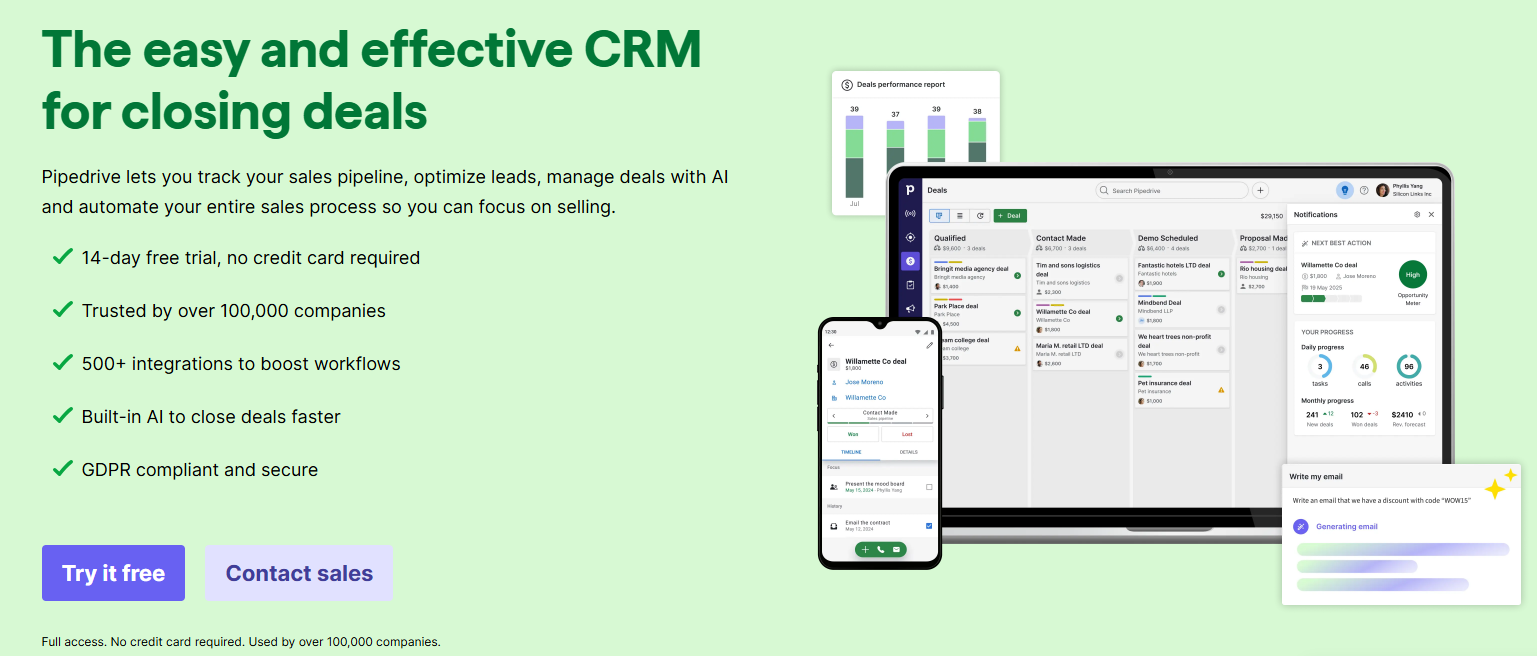
Pipedrive built its reputation on one thing: making sales pipeline management so visual and fast that reps actually use it. The Kanban-style deal board, drag-and-drop pipeline stages, and activity-driven selling philosophy mean Pipedrive has one of the highest CRM adoption rates in the SMB market. If you’ve had CRMs that collect dust because reps find them slow to update, Pipedrive tends to solve that problem quickly.
The limitation is in the name: Pipedrive manages deals, not the full customer relationship. Post-sale customer management ticket tracking, renewal automation, customer health scoring requires integrations with other tools, which adds complexity and cost.
Why Pipedrive Works for Customer Management
- Visual pipeline board gives sales teams immediate visibility into where every deal and customer relationship stands
- Activity reminders and deal rotting alerts keep reps from losing track of follow-ups
- LeadBooster add-on adds chatbot, forms, and prospecting tools for customer acquisition workflows
- Smart Docs lets teams send quotes and proposals from within the CRM, keeping deal history in one place
- Marketplace has 400+ integrations for extending into post-sale tools
Honest Limitation
Pipedrive treats customers as deals that either closed or didn’t. There’s no native service desk, no customer portal, no renewal pipeline that works separately from the sales pipeline. If your customer management spans the full post-sale lifecycle onboarding, support, upsell you’ll need to integrate Pipedrive with additional tools, and that adds the data sync complexity you’re probably trying to avoid.
Pricing
Essential at $14/user/month. Advanced at $29/user/month. Professional at $59/user/month. The Professional plan adds AI-powered features, revenue forecasting, and team management tools. Most sales-focused teams start at Advanced.
IntegrateIQ Note
If your team has outgrown Pipedrive’s post-sale limitations and wants to move to HubSpot without losing deal history, we handle that migration. See how we migrate from Pipedrive to HubSpot, including deal stage mapping, contact record transfer, and activity history preservation.
5. Microsoft Dynamics 365 — Best CRM for Customer Management Inside the Microsoft Ecosystem

If your organization runs on Microsoft 365 Teams, Outlook, SharePoint, Power BI Dynamics 365 CRM fits in ways that HubSpot or Salesforce don’t match natively. Copilot AI in Dynamics 365 Sales generates meeting summaries, drafts email follow-ups, and surfaces customer insights directly in Teams conversations. That native integration removes the context-switching friction that kills CRM adoption in Microsoft-first organizations.
Dynamics 365 is an enterprise play. The licensing model is complex, implementation takes months for a full deployment, and you’ll almost certainly need a Microsoft partner (or a dedicated internal team) to set it up correctly. But for large B2B organizations with complex account structures, multi-currency requirements, and existing Power Platform investments, it’s the most cohesive option on this list.
Why Dynamics 365 Works for Customer Management
- Native Teams integration surfaces customer data and Copilot AI assistance directly in meeting and chat workflows
- Power Platform connection (Power Apps, Power Automate, Power BI) lets organizations build custom apps and automation on top of CRM data without custom code
- Strong account and contact hierarchy management for B2B organizations managing multiple stakeholders per customer
- Deep integration with Microsoft 365 data emails, calendar events, and documents automatically associated with customer records
- Enterprise-grade compliance and data residency controls for regulated industries
Honest Limitation
Dynamics 365 isn’t a tool you trial on a Friday and deploy on Monday. The licensing structure is genuinely confusing (Sales Professional vs. Sales Enterprise vs. Customer Service vs. Customer Engagement bundle), and initial setup without an experienced implementation partner usually means data structure decisions you’ll regret later. This one requires real budget for implementation alongside the license.
Pricing
Sales Professional starts at $65/user/month. Sales Enterprise at $95/user/month. Customer Service Professional at $50/user/month. Most organizations combine multiple Dynamics modules, and Microsoft offers Customer Engagement Plans that bundle them worth requesting a custom quote for any deployment over 25 seats.
IntegrateIQ Note
For organizations running Dynamics alongside HubSpot (or planning to migrate from Dynamics to HubSpot), we build and maintain that integration. See our HubSpot Dynamics 365 integration work, including contact sync, deal stage mapping, and activity data alignment across both platforms.
How These 5 CRMs Compare for Customer Management
| CRM | Best For | Contact Depth | Sales + Service Unified | Starting Price | AI Features | IQ Integration |
| HubSpot | Full lifecycle management | Full (all Hubs) | Yes, native | Free / $15/user/mo | Breeze AI | Core platform |
| Salesforce | Enterprise scale | Deep (with config) | Yes, with add-ons | $25/user/mo | Einstein AI | Yes, integration page |
| Zoho CRM | SMB on a budget | Good | With Zoho Desk | Free / $14/user/mo | Zia AI | Yes, integration page |
| Pipedrive | Sales pipeline focus | Deal-centric | No (integration req.) | $14/user/mo | Basic AI sales assist | Yes, integration page |
| Dynamics 365 | Microsoft ecosystem | Deep (enterprise) | Yes, with modules | $65/user/mo | Copilot AI | Yes, integration page |
How to Choose the Right CRM for Your Customer Management Needs
The right CRM depends on where your customer management actually breaks down and what your team will realistically adopt and use. Here’s a decision framework based on the four most common situations we see:
You’re a small team (under 10 people) moving off spreadsheets
Start with HubSpot’s free CRM or Zoho CRM’s free tier. Both give you contact management, deal pipelines, and basic automation without a budget commitment. HubSpot wins here if you plan to run email marketing to those contacts the Marketing Hub connection is native and doesn’t require a separate tool. Zoho wins if you want the full Zoho ecosystem (accounting, support, marketing) under one vendor contract.
You’re a growing SMB (10–100 people) that needs sales and service aligned
HubSpot is the clearest fit. The combination of Sales Hub and Service Hub on one contact record solves the cross-team visibility problem that every growing business hits. Freshsales is a viable budget alternative if HubSpot’s paid tiers are out of range though you’ll need Freshdesk alongside it for service management, which adds complexity.
You’re an enterprise with complex account hierarchies and compliance requirements
Salesforce or Microsoft Dynamics 365. The decision between them comes down to your existing stack: if you’re Microsoft-first (Teams, Azure, Power BI), Dynamics 365 integrates more naturally. If you need the broadest app ecosystem and the deepest customization, Salesforce’s AppExchange and developer tooling win. Budget 3–6 months for implementation regardless of which you choose.
Your team lives in project management tools and finds traditional CRMs rigid
Monday CRM reduces adoption friction significantly for teams already on Monday.com. Understand that you’re trading depth for simplicity if customer management means full lifecycle automation, plan to add integrations that cover what Monday CRM doesn’t handle natively.
What Moving to a New CRM for Customer Management Actually Looks Like
Picking the right CRM is step one. The actual work is moving your customer data into it without losing the history that makes it valuable. Here’s what most teams underestimate:
What Data Needs to Move
- Contact and company records including custom fields, tags, and segments
- Deal history stage timestamps, associated contacts, deal value, close dates
- Activity history email threads, call logs, meeting notes, task completions
- Email engagement data open rates, click history, subscription status
- Support ticket history if moving from a tool that combines CRM and helpdesk
- Automation rules workflows, sequences, and lead scoring rules that need to be rebuilt in the new system
What Breaks When You Do It Wrong
The most common migration failures we see: contacts imported without activity history (so every customer looks like a new contact). Deals migrated without stage timestamps (so historical reporting shows everything closed on the same day). Automation rebuilt manually by someone who didn’t fully document the old rules. And duplicate records one from the original system, one from the import that nobody catches until months later when reporting looks wrong.
How Long It Takes
A well-scoped migration for a 50-person sales team typically takes 4–6 weeks: 1–2 weeks of data audit and mapping, 1–2 weeks of migration execution and validation, and 1–2 weeks of integration setup and team training. Larger organizations with more data objects, more integrations, and more complex workflow rules extend that to 8–12 weeks.
At IntegrateIQ, our standard CRM migration service delivers from kickoff to live in 8 weeks covering data migration, integration rebuilds, and team onboarding in a single engagement. Before you start, read our guide on how to avoid common CRM migration mistakes it covers the specific data structure decisions that create problems 6 months after go-live.
Frequently Asked Questions
What is the best CRM for customer management?
HubSpot ranks as the best CRM for customer management for most businesses because it unifies sales, marketing, and service data on a single contact record without requiring middleware. This means every team sees the same customer history, which eliminates the data fragmentation that kills customer experience in organizations using multiple tools. For enterprise-scale organizations with complex account structures, Salesforce offers deeper customization at a higher cost and implementation complexity.
What is the best free CRM for customer management?
HubSpot offers the strongest free CRM for customer management, with unlimited users, contact records, and deal pipelines at no cost. Zoho CRM also has a free tier for up to 3 users. Both are functional starting points, though scaling automation and reporting requires a paid plan in both cases. Freshsales’ free plan is also worth evaluating for SMBs that need built-in calling and email alongside contact management.
Can I keep using my existing tools alongside a new CRM?
Yes — and this is where integration planning matters most. HubSpot has native connectors for 1,500+ apps and a strong API for custom builds. Tools like Salesforce and Dynamics 365 also integrate broadly, but the depth of those integrations (field mapping, bidirectional sync, data transformation) varies significantly by connector. If your stack includes industry-specific tools or complex ERP systems, those connections usually need custom integration work rather than native connectors. Our HubSpot integration specialists handle exactly that building connections that keep your CRM as the real source of truth, not just another tool in the stack.
How much does a CRM for customer management cost?
CRM pricing ranges from free (HubSpot, Zoho CRM, Freshsales basic tiers) to $65–$165+ per user per month for enterprise platforms like Microsoft Dynamics 365 and Salesforce Enterprise. Most growing businesses land in the $15–$50 per user per month range for their core CRM license. The cost most people underestimate is implementation: data migration, integration setup, and team training can add $5,000–$50,000 depending on data volume and stack complexity. Budget for both when evaluating total cost of ownership.
How long does it take to migrate to a new CRM?
A typical CRM migration for a small to mid-size business takes 4–8 weeks when handled by an experienced implementation partner. The timeline depends on how much data needs to move, how many integrations you’re rebuilding, and how complex your existing workflows are. Going it alone usually doubles the timeline and introduces the data quality issues that come from skipping the audit and mapping phase. At IntegrateIQ, our standard delivery from kickoff to live is 8 weeks, which includes data migration, integration setup, and team onboarding.
Do I need a CRM or just better contact management software?
If you’re tracking fewer than 500 contacts with one sales rep and no recurring customer relationships to manage, a contact management tool (like Google Contacts or Notion CRM templates) might be enough. Once you’re managing deal pipelines, recurring customer communications, post-sale follow-ups, or multi-person sales teams, you need a CRM. The tipping point is usually when a customer interaction falls through the cracks because no one knows whose job it was to follow up.
See your 12-month revenue impact with HubSpot CRM
Enter your current numbers — visitors, leads, deal size — and get a personalized projection based on real HubSpot customer benchmarks.

Ready to Move Your Customer Management Into One System?
The businesses that get the most out of a CRM aren’t the ones with the most features enabled they’re the ones where the CRM actually connects to every other tool their team uses, so customer data flows where it needs to without anyone having to manually move it.
That’s where most CRM projects stall. Not in picking the right platform, but in the integration and migration work that makes the platform actually function as the hub it’s supposed to be. Disconnected integrations, incomplete data migrations, and broken automations are the reason 50% of CRM implementations underperform within the first two years.
We’ve handled that work for businesses across industries integrating 300+ platforms, processing 20 billion+ records annually, and maintaining a 98.5% client retention rate across our engagements. If you’re evaluating a move to HubSpot or need to connect HubSpot to your existing stack, start with how our HubSpot integration process works it covers exactly what we handle and what the 8-week engagement looks like. Or if you’re in the middle of a CRM migration, our CRM migration services page covers the specific workstreams we manage so your data and your team land in the new system ready to run.



Table of Contents
- What Makes a CRM Actually Good at Customer Management?
- 1. HubSpot — Best CRM for Customer Management When You Need Sales, Marketing, and Service in One Place
- 2. Salesforce — Best CRM for Customer Management at Enterprise Scale
- 3. Zoho CRM — Best CRM for Customer Management on a Tight Budget
- 4. Pipedrive — Best CRM for Customer Acquisition Tracking (With a Clear Gap After the Sale)
- 5. Microsoft Dynamics 365 — Best CRM for Customer Management Inside the Microsoft Ecosystem
- How These 5 CRMs Compare for Customer Management
- How to Choose the Right CRM for Your Customer Management Needs
- What Moving to a New CRM for Customer Management Actually Looks Like
- Frequently Asked Questions
- Ready to Move Your Customer Management Into One System?

