


A HubSpot SMS integration connects your CRM to a texting channel so reps, marketers, and front-line staff can send and receive SMS without leaving a contact record. HubSpot doesn’t include two-way texting out of the box. You’re choosing between three real paths: HubSpot’s own SMS add-on (built on Twilio), SMS marketing software from the HubSpot Marketplace like TextUs, Salesmsg, or Message IQ, or a custom-built CRM SMS integration that ties texting into HubSpot and whatever other systems your business runs on.
Most articles on this topic are written by the texting app vendors themselves, so they skip straight to “here’s why our app is best.” We’re not selling a generic texting tool. We’re a HubSpot Diamond Solutions Partner that’s built 300+ integrations connecting HubSpot to other systems, so we’ll walk through what each option actually does, where the right fit changes by industry, and when a custom build is the only thing that solves the problem.
Free estimator
Know what your HubSpot project costs before the first call.
Select your services and get a transparent price range in minutes. No sales call needed to get a number.
Connect HubSpot to your ERP, billing platform, or database field mapping, custom logic, and support included.
Pipelines, workflows, email templates, and reporting configured for how your team actually works.
Live, role-based sessions with recordings and written guides built around a custom plan for your team.
HubSpot Partner
Client retention
Platforms integrated
What HubSpot’s Native SMS Add-On Actually Does
HubSpot’s built-in SMS feature runs on Twilio behind the scenes, not HubSpot’s own infrastructure. You can draft, personalize, and send marketing texts from inside HubSpot, and replies land in the contact timeline. That sounds like it solves the problem until you look at the fine print.
Here’s where the native option runs into walls:
- US and Canada only. Messages can only go to +1 numbers. If your contacts list includes UK, EU, or APAC numbers, the native feature can’t reach them.
- Registration delays before you send a single text. 10DLC number registration takes 6 to 8 business days. Short code registration takes 8 to 12 weeks. That’s not a setup task, it’s a procurement timeline.
- It’s a paid add-on on top of your existing subscription. You’re paying for Marketing Hub access and then paying again for the SMS or SMS Short Code add-on.
- Carrier compliance sits on you. HubSpot routes through Twilio’s policies and Twilio’s Forbidden Message Categories, and carriers like T-Mobile now issue non-compliance fees directly. Get your opt-in language wrong and you absorb the penalty.
- It’s marketing-send focused. The native tool is built for outbound campaigns and basic two-way replies, not for the kind of sales texting, call-and-text blending, or workflow-triggered conversations that revenue teams usually want.
If your business is US/Canada-only, your volume is modest, and you only need marketing blasts with light two-way replies, the native add-on might actually be enough. Most companies asking about HubSpot SMS integration need more than that, which is why dedicated SMS marketing software or a custom build shows up in the conversation almost immediately.
SMS Marketing Software for HubSpot: Marketplace Apps Compared
The HubSpot App Marketplace has a real category of dedicated SMS marketing software that plugs into HubSpot through pre-built connectors. TextUs, Salesmsg, Sakari, Aircall, Quo (formerly OpenPhone), and Message IQ are the names that show up most often, and they each take a slightly different angle.
| Tool | Best fit | Where it’s limited |
| TextUs | Sales teams running SMS-driven follow-up workflows | Built for outbound sales motion, not heavy marketing campaigns |
| Salesmsg | Teams wanting texting and calling logged on the same contact timeline | Each user needs a separate Salesmsg seat |
| Sakari | Appointment reminders and status-update workflows | No shared team inbox, no calling |
| Aircall | Calling-first teams that also need basic SMS | Two-way texting limited to select countries |
| Quo | Small businesses wanting unlimited texting and calling on local or toll-free numbers | AI-agent features and advanced routing sit in higher tiers |
| Message IQ | Teams wanting true two-way SMS marketing software built natively for HubSpot, with fast brand registration and compliance baked in | Built and optimized primarily for HubSpot, Pipedrive, and Salesforce |
These apps connect in minutes through OAuth, log SMS and MMS to the HubSpot contact record automatically, and add SMS as an action inside HubSpot workflows. For a single-platform setup, that’s usually the fastest path to two-way texting that actually works.
Worth a closer look on that last row: Message IQ is the SMS marketing software our team built and maintains specifically for HubSpot (it also connects to Pipedrive, Salesforce, and any CRM via API or CSV sync). Where HubSpot’s native add-on has you waiting 6 to 8 business days for 10DLC registration, Message IQ accounts go live within 1 business day, brand registration typically clears the same day, and campaign approval lands in roughly 2 to 3 weeks, with the Integrate IQ team handling the application for you. Every message logs straight to the contact timeline, opt-outs sync automatically through a CRM property that every workflow respects, and a shared business number replaces reps texting from personal phones. Because we also built it, Message IQ can extend into a custom CRM SMS integration if your stack ever needs that data flowing into systems beyond HubSpot.
The limitation shows up when your business runs more than HubSpot and a texting tool. If your ERP, your field service platform, your support desk, or a legacy in-house texting system need to share data with that SMS conversation, a marketplace connector wasn’t built to do that job. It syncs SMS to HubSpot. It wasn’t designed to sync SMS, order status, and a ticket history across four systems at once.
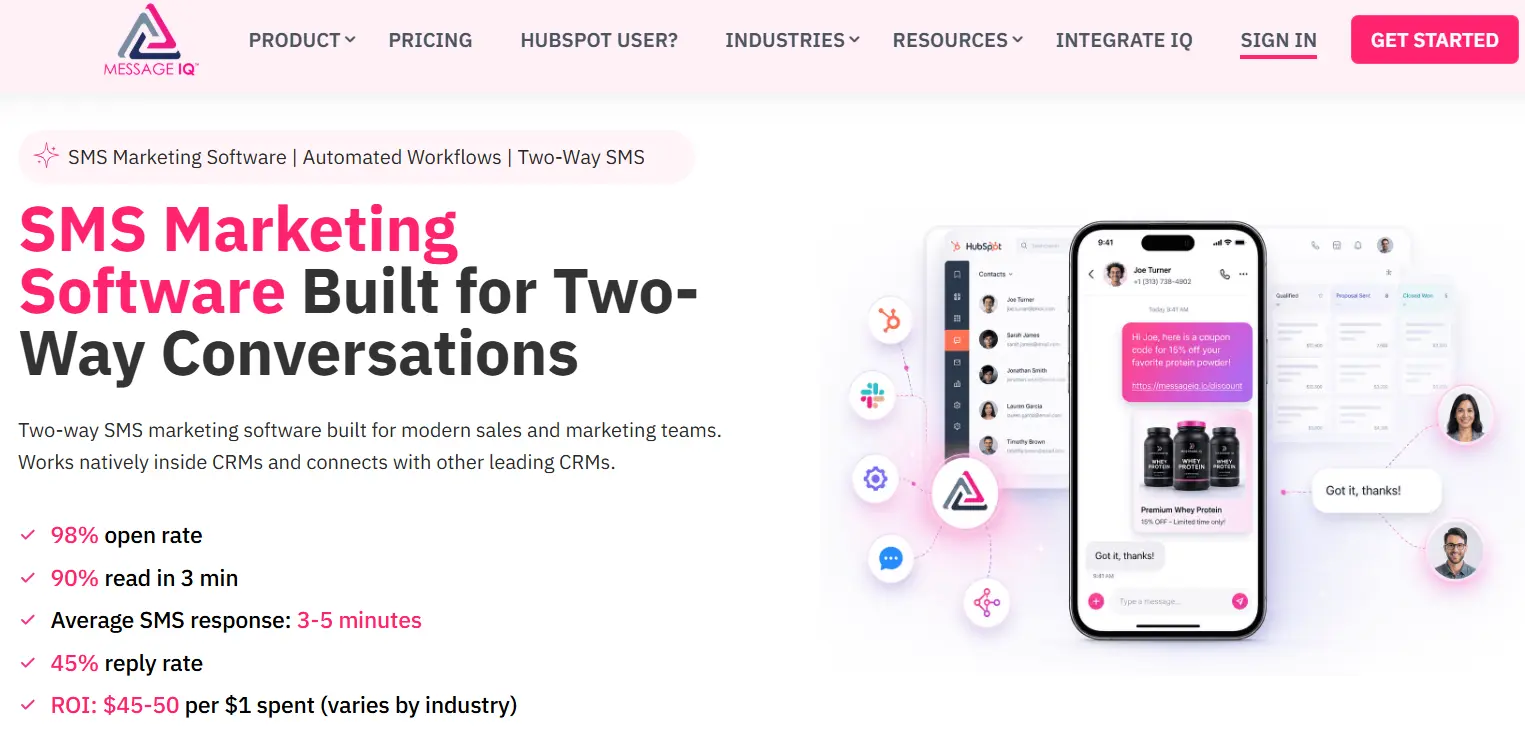

Turn HubSpot Into A Real-Time SMS Engine with
Message IQ

Two-Way Conversations

Shared Team Inbox

Automation Triggers

Advanced Reporting

Compliance Tools
-
98%
SMS read within 3 min -
78%
Buy from first responder -
21×
More likely to qualify
3–5 min avg response
$45–$50 ROI / $1

*MessageIQ is an IntegrateIQ product – built natively for HubSpot by the same team.
SMS Marketing Software by Industry: What Actually Changes
Generic “best HubSpot texting app” advice misses something important: what a CRM SMS integration needs to do is different depending on what you sell. A few verticals make the differences obvious.
SMS Marketing for Insurance Brokers
For brokers, the job isn’t broadcast marketing, it’s renewal reminders, claims status updates, quote-to-bind follow-up, and payment reminders that protect commission revenue before a policy lapses. A producer texting from a personal phone loses every one of those conversations the day they leave the agency. SMS marketing for insurance brokers done through a CRM-native platform like Message IQ fires renewal texts 60, 30, and 7 days before the x-date directly from the contact record, logs every reply for the principal to see, and respects TCPA and 10DLC rules automatically. One compliance note specific to this vertical: SMS isn’t a HIPAA-secure channel, so health and Medicare brokers should keep texts transactional (appointment confirmations, callback requests, generic renewal nudges) and leave protected health information off the channel entirely.
Real Estate SMS Marketing
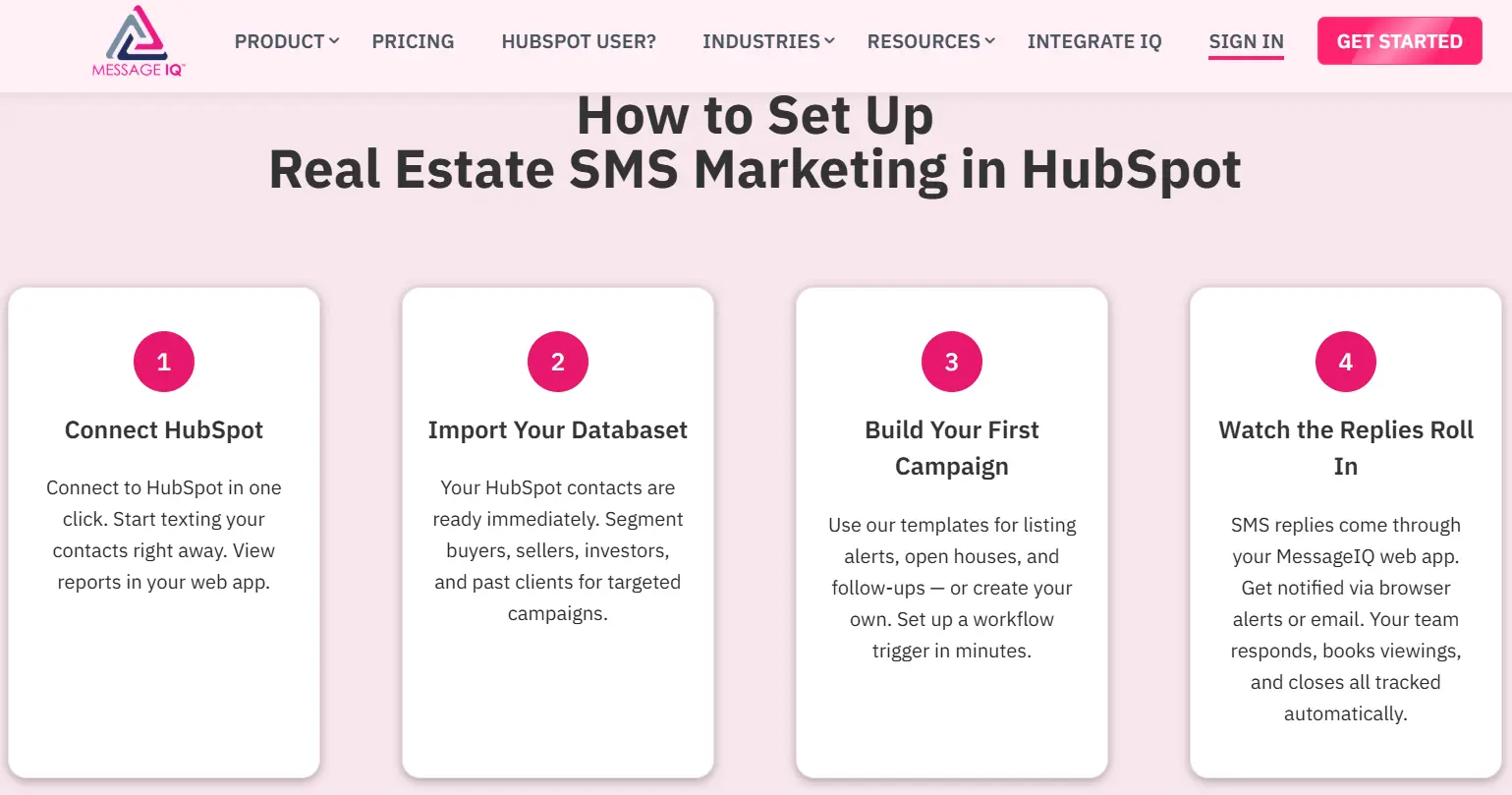
Real estate runs on response speed. Most buyer leads go to whichever agent responds first, and email alerts sitting in a promotions tab don’t win that race. Real estate SMS marketing built into HubSpot lets agents text new listing alerts, open house invites, and showing follow-ups the moment a lead matches a saved search, with property photos sent over MMS instead of a separate gallery link. The conversation logging matters as much as the speed here. When an agent leaves a brokerage, the texts they sent from a personal number leave with them. When SMS runs through HubSpot, the broker keeps the conversation history and the relationship on the contact record, not on someone’s personal phone.
SMS for Auto Glass Shops
Mobile service businesses live and die by no-shows and missed dispatch calls. SMS for auto glass shops typically covers four moments: an instant booking confirmation, a technician dispatch alert with an ETA, a 24-hour appointment reminder, and a same-day insurance claim follow-up so a job doesn’t stall waiting on paperwork. Shops running ADAS recalibration after windshield replacement add one more automated reminder, both to protect liability and to capture a service that often gets skipped. None of this needs a developer once it’s wired into HubSpot workflows. It needs the booking trigger, the reminder trigger, and the claim-status trigger mapped once.
Healthcare Text Messaging
Healthcare text messaging has one rule that overrides everything else: the SMS itself should be a notification, not a data carrier. A message that says “your lab results are ready, log in here” is fine. A message that includes a diagnosis or test result is not. Done correctly, clinics use SMS for appointment confirmations and 24-hour and 2-hour reminders, lab-results-ready alerts, prescription pickup notifications, and billing reminders with a secure payment link, all logged to the patient’s CRM record automatically. Average no-show rates across primary care and specialty practices run 15% to 30%, and most of that is the kind of preventable miss that an automated reminder sequence closes without adding staff.
When a Custom CRM SMS Integration Is the Right Call
A custom build earns its cost in a specific set of situations, not as a default. Here’s the decision framework we walk clients through:
- Your texting platform isn’t in the HubSpot Marketplace. Plenty of vertical-specific platforms (industry texting tools built for field service, healthcare, or logistics) never built a HubSpot connector. If your business already standardized on one of those, a native connector simply doesn’t exist to install.
- Texting data needs to flow to more than HubSpot. If an SMS reply should update a record in your ERP, trigger a status change in a field service tool, or close a ticket in your help desk, you need one CRM SMS integration that writes to all of those systems, not three separate point connections that drift out of sync.
- You’re running multiple HubSpot portals or a multi-brand setup. Marketplace apps are usually built around a single portal connection. Agencies and multi-brand companies often need texting data routed to the correct portal based on business unit, region, or brand.
- Compliance or data residency requirements go beyond what a marketplace app configures. Healthcare, financial services, and regulated industries sometimes need consent records, audit trails, or data storage rules that off-the-shelf apps don’t expose as configuration options.
- You want texting baked into a broader data sync, not a bolt-on app. If you’re already running real-time sync between HubSpot and other platforms, adding SMS as one more object in that same pipeline is more maintainable than introducing a separate vendor relationship.
If none of those five apply to you, install SMS marketing software from the Marketplace and move on. If two or more do, a custom CRM SMS integration stops being overkill and starts being the only approach that actually holds up.
What Breaks (and Why It’s Usually Not the API)
When a HubSpot SMS integration fails, the cause is rarely the connection itself. It’s almost always one of these:
- 10DLC throughput limits. Carriers cap how many messages an unregistered or newly registered number can send per day. Teams scale a campaign before the number’s trust score catches up, and messages start queuing or getting filtered.
- Opt-out sync gaps. A contact replies STOP in the texting platform, but if that suppression doesn’t sync back to HubSpot’s subscription status, marketing emails or future texts go out anyway. That’s a compliance problem, not a technical inconvenience.
- Field mapping mismatches. Phone number formatting (missing the +1 country code, inconsistent dashes or parentheses) causes silent sync failures. HubSpot expects an 11-digit +1 format, and most legacy systems don’t store numbers that way.
- Webhook timeouts under volume. A workflow that fires an SMS on every form submission works fine at low volume and starts dropping messages once submission volume spikes, because the webhook wasn’t built with retry logic or queuing.
- Carrier filtering on bulk sends. Even compliant messages get throttled or blocked when carriers flag a sending pattern as bulk or spam-like, which is a routing issue, not something visible in HubSpot’s UI.
A properly scoped integration accounts for retry logic, suppression sync, and number formatting up front. That’s the difference between a connector that works in a demo and one that holds up at production volume, which is also why our integration team treats SMS data sync the same way we treat any other system-of-record sync: with field-level mapping documentation before a single line of code ships.
What Implementation Actually Looks Like
A custom CRM SMS integration built by our team typically lands within 8 weeks of kickoff, the same timeline we hold across the 300+ platforms we’ve connected to HubSpot. That breaks down roughly as:
- Discovery and field mapping (week 1-2). We map every field, object, and trigger condition across HubSpot and the texting platform (or platforms) involved, including consent and opt-out fields.
- Architecture and build (week 3-5). We build the sync logic, including retry handling, suppression sync, and number formatting rules specific to your contact data.
- Testing against real volume (week 6-7). We run the integration against production-like message volume to catch carrier filtering or throughput issues before launch, not after.
- Launch and handoff (week 8). We document the integration so your internal team can maintain it, not just use it.
We process over 16 billion records a year across the integrations we maintain, and SMS-triggering workflows get the same monitoring as any other high-volume sync we run.
HubSpot SMS Integration FAQ
Does HubSpot have native text messaging?
Yes. HubSpot offers a built-in SMS feature powered by Twilio, available as a paid add-on for Marketing Hub. It supports US and Canada numbers only and requires 10DLC or short code registration before you can send marketing texts.
What’s the difference between SMS marketing software and a custom HubSpot SMS integration?
SMS marketing software like TextUs, Salesmsg, or Message IQ connects HubSpot to that one texting platform through a pre-built, single-purpose connector. A custom CRM SMS integration is built to sync texting data across HubSpot and any other systems you run, including ERPs, help desks, or platforms that don’t have a marketplace connector at all.
Can HubSpot send SMS internationally?
Not through the native SMS add-on. Native HubSpot SMS only sends to +1 (US and Canada) numbers. International texting requires third-party SMS marketing software or a custom integration built around a provider with international carrier relationships.
How long does HubSpot SMS number registration take?
10DLC registration typically takes 6 to 8 business days. Short code registration takes 8 to 12 weeks. Plan your launch timeline around whichever registration type your sending volume requires.
Do I need a custom integration if I already use SMS marketing software?
Not if that app covers everything you need. A custom CRM SMS integration becomes worth building when texting data needs to reach systems beyond HubSpot and the texting tool, when your platform isn’t in the Marketplace, or when you’re running multiple HubSpot portals that a single-portal app wasn’t built to handle.
Is there a HubSpot-native two-way SMS option besides the built-in add-on?
Yes. Message IQ is SMS marketing software built specifically for HubSpot, with accounts going live within 1 business day and brand registration typically clearing the same day. It logs every conversation to the contact timeline automatically and handles opt-out compliance without manual work.
Is healthcare text messaging through HubSpot HIPAA compliant?
SMS itself is not a HIPAA-secure channel, so healthcare text messaging should stay limited to notifications, like an appointment reminder or a “your results are ready” alert, rather than carrying diagnoses, test results, or other protected health information. Keep clinical details inside a secure patient portal and use SMS purely to prompt action.
Does SMS marketing for insurance brokers and auto glass shops need different compliance handling?
The TCPA and 10DLC fundamentals (consent, registration, fast opt-out handling) apply across every industry. What changes is the message content and timing: insurance brokers need to stay transactional on health lines, while auto glass shops lean on appointment and dispatch alerts that don’t carry the same compliance sensitivity.
See your 12-month revenue impact with HubSpot CRM
Enter your current numbers — visitors, leads, deal size — and get a personalized projection based on real HubSpot customer benchmarks.

Get Texting Connected the Right Way
If your team is stuck choosing between SMS marketing software that almost fits and a manual process that’s burning rep time, that’s usually the sign a custom HubSpot SMS integration is worth scoping. We’ve built this kind of CRM SMS integration for clients running multi-system stacks where SMS needed to update a CRM record, a support ticket, and an ERP order status from a single reply, and we can usually have it live within 8 weeks of kickoff. Talk to our integration team about what your stack actually needs, or see how we approach a build on our HubSpot integration process page.


Table of Contents
- What HubSpot's Native SMS Add-On Actually Does
- SMS Marketing Software for HubSpot: Marketplace Apps Compared
- SMS Marketing Software by Industry: What Actually Changes
- When a Custom CRM SMS Integration Is the Right Call
- What Breaks (and Why It's Usually Not the API)
- What Implementation Actually Looks Like
- HubSpot SMS Integration FAQ
- Get Texting Connected the Right Way
