

Explore this article with AI:

Nonprofits don’t have time for software that requires a full IT team to maintain. You’re working with small staff, tighter budgets, and donors who expect communication that feels personal, not generic. HubSpot CRM for nonprofits gives you a central place to manage donor relationships, track outreach, run email campaigns, and monitor fundraising progress. And because HubSpot’s free plan supports up to 1 million contacts, most organizations can start immediately without spending a dollar.
But here’s what most guides don’t tell you: the base CRM is only as useful as the tools you connect to it. Donation platforms, event tools, volunteer management systems, accounting software, and grant tracking databases all need to talk to HubSpot for your data to actually be reliable. That’s where the real setup work happens, and where most nonprofits run into problems.
We’ve helped nonprofits build these connections properly as a HubSpot Diamond Solutions Partner with custom integration accreditation. This guide walks through what HubSpot gives you out of the box, how to connect the tools your team already relies on, and when a native marketplace app won’t cut it.
Free estimator
Know what your HubSpot project costs before the first call.
Select your services and get a transparent price range in minutes. No sales call needed to get a number.
Connect HubSpot to your ERP, billing platform, or database field mapping, custom logic, and support included.
Pipelines, workflows, email templates, and reporting configured for how your team actually works.
Live, role-based sessions with recordings and written guides built around a custom plan for your team.
HubSpot Partner
Client retention
Platforms integrated
What Is HubSpot CRM for Nonprofits?
HubSpot CRM for nonprofits is the same CRM platform that mid-market and enterprise companies use, made more accessible through HubSpot’s nonprofit pricing program. Qualifying organizations receive a 40% discount on Professional and Enterprise tiers, and the core CRM is permanently free. The platform covers donor management, marketing automation, pipeline tracking, and reporting, all inside one system.
The key difference between HubSpot and dedicated nonprofit CRMs like Salesforce NPSP or Blackbaud is that HubSpot wasn’t purpose-built for the sector. It’s a commercial CRM that nonprofits adapt. That’s both a strength (it’s polished, well-supported, and integrates with almost everything) and a limitation (you’ll need to customize fields, pipelines, and objects to match how your organization actually works).
Key HubSpot CRM Features That Matter for Nonprofits
Donor Contact Management
Every donor gets a contact record in HubSpot that stores their giving history, email engagement, event attendance, and any custom fields you add. You can segment your donor base by giving level, recency of last gift, campaign source, or any property you define. This segmentation drives every downstream activity, from targeted email sequences to major donor calls.
HubSpot’s contact timeline pulls in every interaction automatically: emails sent, links clicked, forms submitted, pages visited. That full view means your team doesn’t have to dig through separate systems to understand where a donor stands.
Marketing Automation and Email Campaigns
HubSpot’s workflow builder lets you automate donor communication based on specific triggers. A first-time donor gets an automated thank-you sequence. A lapsed donor who hasn’t given in 12 months enters a re-engagement workflow. A recurring supporter gets personalized impact updates timed to your reporting cycle.
The email builder works on drag-and-drop, and templates are plentiful. Personalization tokens pull data directly from contact records, so ‘Dear [First Name], thank you for your $[Last Gift Amount] gift’ is easy to set up without developer help.
Grant and Pipeline Tracking
HubSpot’s deal pipeline works well for grant management with a little customization. You create a pipeline with stages that match your grant cycle: researching, application submitted, under review, awarded, reporting required. Each grant becomes a deal record linked to the relevant foundation contact and company. Automated reminders ping your team when deadlines approach.
This approach isn’t as specialized as dedicated grant management software, but for organizations running 10 to 50 grants at a time, it’s usually enough. The advantage is that your grants live in the same system as your donor outreach, so you can see the full relationship with a foundation in one place.
Volunteer Management
HubSpot doesn’t have native volunteer management functionality. But you can build it using custom contact properties and lists. Track volunteer hours, skills, availability, and engagement history as custom fields. Create workflows that send volunteer appreciation emails, schedule reminders, or tag contacts for specific opportunities. It’s workable, though teams running complex volunteer programs usually integrate a dedicated tool like VolunteerHub or Galaxy Digital and sync the data back to HubSpot.
Reporting and Dashboards
HubSpot’s reporting tools let you build dashboards that track donor acquisition, campaign performance, email engagement rates, pipeline value by grant stage, and donor retention over time. The free plan gives you access to standard reports; custom report builders and cross-object reporting require paid tiers.
One thing worth knowing: HubSpot reports on CRM data, not financial data. If you need reports that combine HubSpot donor activity with your accounting system, you’ll need an integration that syncs those records, or you’ll run reports separately.

Turn HubSpot Into A Real-Time SMS Engine with
Message IQ

Two-Way Conversations

Shared Team Inbox

Automation Triggers

Advanced Reporting

Compliance Tools
-
98%
SMS read within 3 min -
78%
Buy from first responder -
21×
More likely to qualify
3–5 min avg response
$45–$50 ROI / $1

*MessageIQ is an IntegrateIQ product – built natively for HubSpot by the same team.
HubSpot Integrations Nonprofits Actually Need
HubSpot’s App Marketplace has over 1,500 pre-built connectors. For nonprofits, the tools that typically need connecting fall into five categories.
Donation Platforms
Platforms like Donorbox, Classy, Givebutter, Fundraise Up, and Give Lively all have HubSpot integrations available. When these connect properly, every donation creates or updates a contact record, logs the gift amount and date, and can trigger an automated thank-you workflow. Without this connection, someone on your team manually imports donation data, and that’s where errors and delays happen.
The native connectors for these platforms handle standard donation flows well. Where they break down is with recurring giving. If a monthly donor upgrades their giving level, cancels, or reactivates, some native connectors don’t pass those status changes to HubSpot in real time. You end up with stale data that causes your automation to trigger on incorrect assumptions.
Payment Processors
Stripe and PayPal both integrate with HubSpot, though neither integration was built with nonprofit use cases in mind. They pass transaction data into HubSpot, but the field mapping is generic. Donation-specific data like fund designation, campaign attribution, or tribute gift information typically requires custom field configuration or a middleware layer to sync correctly.
Event Management
Eventbrite and Zoom are both in HubSpot’s marketplace. For nonprofits running fundraising galas, volunteer orientations, or donor appreciation events, these integrations log registrations and attendance directly against contact records. Eventbrite’s native connector is solid for event basics. If your events involve complex ticketing tiers, sponsorship tracking, or post-event segmentation, you’ll likely need a more customized sync.
Accounting Software
QuickBooks Online and Xero both have HubSpot connectors available. For nonprofits, the typical use case is syncing donation records from HubSpot to accounting for reconciliation, or pulling financial data into HubSpot for reporting. Both native connectors handle basic contact and transaction sync, but they weren’t designed for fund accounting or restricted gift tracking that nonprofits need. Custom integrations solve this, particularly for organizations managing multiple restricted funds or complex grant financial reporting.
Volunteer and Program Management
Tools like VolunteerHub, Galaxy Digital, or Apricot (for case management) don’t have native HubSpot connectors. These require custom API integrations to sync volunteer records, program participation data, or client outcomes back to HubSpot contact records. We’ve built these types of connections for nonprofits that want a unified view of constituent relationships across programs.
Native Connector vs. Custom Integration: Which One Do You Need?
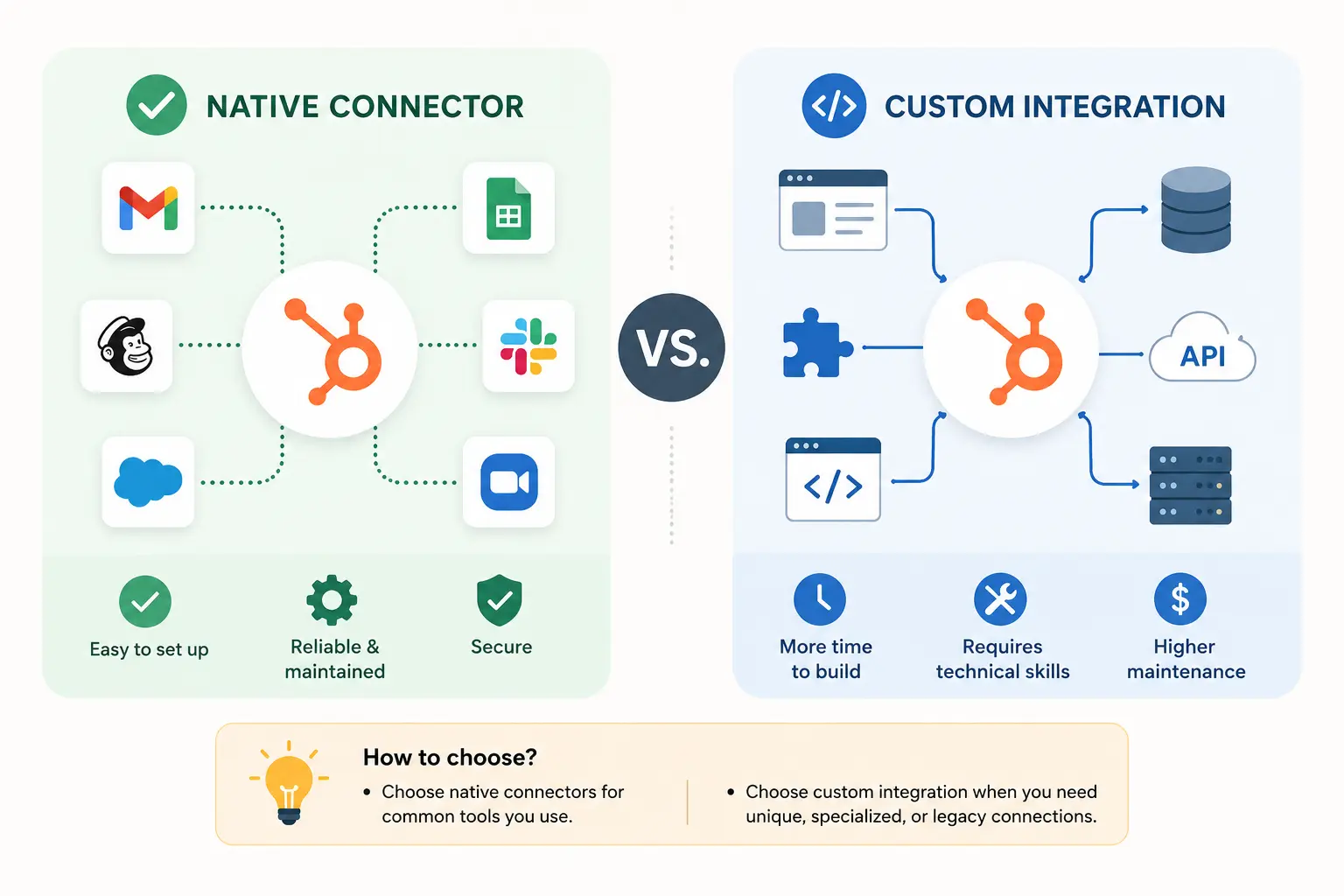
This comes up with every nonprofit we work with. The short answer: native connectors work for standard data flows, custom integrations are necessary when your data model or business logic doesn’t fit the connector’s assumptions.
| Scenario | Native Connector | Custom Integration |
| Syncing basic contact data from donation platform | Usually sufficient | Not required |
| Tracking recurring donor status changes in real time | Often incomplete | Recommended |
| Connecting a niche or legacy tool without a marketplace app | Not available | Required |
| Syncing fund designation or restricted gift data to accounting | Not supported | Required |
| Bidirectional sync between HubSpot and volunteer management tool | Not available | Required |
| High-volume donation data (50,000+ records/month) | May hit rate limits | Recommended |
| Custom field mapping with nonprofit-specific properties | Limited flexibility | Full control |
Native connectors are the right starting point for most nonprofits. They’re faster to set up, don’t require developer involvement, and cost less. But if you’re finding that your data is frequently out of sync, your automation is triggering on stale records, or you’re manually correcting errors after imports, that’s a sign the native connector isn’t handling your actual data complexity.
How to Set Up HubSpot CRM for Your Nonprofit: Step by Step
- Apply for HubSpot’s Nonprofit Discount :Submit your 501(c)(3) documentation through HubSpot’s nonprofit program. Approval typically takes a few business days. This gets you 40% off Professional or Enterprise plans. The free CRM is available immediately without an application.
- Configure Your Contact Properties : HubSpot’s default contact properties are built for B2B sales. You’ll need to create custom properties for donor-specific data: preferred giving method, giving level tier, first gift date, last gift date, fund preference, major gift capacity flag, and volunteer status. Map these out before you start importing data.
- Set Up Your Pipelines: Create a deal pipeline for grants with stages that match your actual grant cycle. If you run major gift fundraising, a separate pipeline for major donor cultivation works well. Each pipeline stage should have clear definitions so your team uses them consistently.
- Import Your Existing Donor Data :HubSpot’s import tool handles CSV files. Clean your data before importing: standardize name formats, check for duplicate email addresses, and make sure custom property values match your defined options. Bad data imported at the start is harder to fix later.
- Connect Your Donation Platform : Install the native connector for your donation platform from HubSpot’s App Marketplace. Map the donation platform’s fields to your HubSpot contact properties. Test with a few real records before relying on the sync for production data.
- Build Your Automation Workflows:Start with the basics: new donor thank-you sequence, lapsed donor re-engagement, recurring donor appreciation, and major gift prospect notification to your development team. Add complexity as your team gets comfortable with how workflows behave.
- Set Up Your Reporting Dashboards: Build dashboards that show what your leadership team actually asks about: monthly donor acquisition, email engagement by campaign, grant pipeline by stage, and year-over-year giving comparisons. Limit your starting dashboards to data you’ll actually review weekly.
- Train Your Team : HubSpot Academy has free certification courses that cover CRM basics, marketing automation, and reporting. Budget two to four hours for each team member during onboarding. Consistent data entry habits are what make your CRM useful long-term.
What to Expect: Implementation Timeline
For nonprofits doing a basic HubSpot setup with one or two marketplace integrations, you’re looking at two to four weeks from account creation to active use. Most of that time goes to data cleaning, property configuration, and testing your integrations.
For organizations that need custom integrations, connecting tools that don’t have marketplace apps, or migrating from a legacy CRM, a realistic timeline is eight weeks from project kickoff to go-live. That includes requirements gathering, integration development, data migration, testing, and team training. We work on an eight-week delivery model for most custom integration projects, and it’s a timeline we’ve validated across 300+ platform integrations.
Rushing this process is where nonprofits get into trouble. A contact database loaded with duplicate records, broken integrations that push bad data into automation workflows, or team members who don’t know how to log activities consistently will create more work than you started with. The time investment upfront pays off in a system your team actually trusts.
Frequently Asked Questions
Is HubSpot free for nonprofits?
HubSpot’s core CRM is permanently free for any organization, including nonprofits. It supports up to 1 million contacts and includes basic email marketing, contact management, and pipeline tracking. Qualifying nonprofit organizations can get 40% off Professional and Enterprise tiers through HubSpot’s nonprofit pricing program. The discount applies to the main Hubs (Marketing, Sales, Service, Content) but not to add-ons, capacity packs, or Starter tiers.
Can HubSpot replace our existing donor database?
It depends on what your current system does. HubSpot handles donor contact management, communication history, email automation, and pipeline tracking well. It doesn’t have native functionality for things like gift receipting, tax acknowledgment letters, or integrated online giving. Most nonprofits connect HubSpot to a dedicated donation platform rather than replacing their donor database entirely. HubSpot becomes the relationship management and outreach layer; the donation platform handles transaction processing and receipting.
What donation platforms integrate with HubSpot?
Donorbox, Classy, Givebutter, Fundraise Up, Give Lively, and Stripe all have integrations available. Most connect through HubSpot’s App Marketplace and sync donation records, donor contact information, and campaign data. The quality of these native integrations varies by platform, particularly for recurring donation status changes and custom field mapping. Organizations with complex giving programs often need a custom integration layer to handle data reliably.
Does HubSpot work for volunteer management?
HubSpot doesn’t have built-in volunteer management features, but you can track volunteer data using custom contact properties and lists. For organizations with simple volunteer programs, this works fine. Nonprofits running complex volunteer operations, with scheduling, hour tracking, skills matching, and multi-program coordination, typically integrate a dedicated volunteer management tool and sync that data to HubSpot contact records for a unified view of each constituent.
When does a nonprofit need a custom HubSpot integration instead of a native connector?
You need a custom integration when your data or business logic doesn’t fit the native connector’s assumptions. Common triggers include: the tool you want to connect isn’t in HubSpot’s App Marketplace, you need real-time bidirectional sync that the native connector handles with delays, your donation data includes fund designation or restricted gift fields that don’t map to standard connector fields, or you’re running high volumes that hit the native connector’s rate limits. Custom integrations give you full control over field mapping, sync frequency, error handling, and logic, at the cost of more upfront development time.
How long does it take to implement HubSpot for a nonprofit?
A basic setup with the free CRM and one or two marketplace integrations takes two to four weeks. A full implementation with custom integrations, data migration from a legacy system, and team training runs eight weeks from project kickoff. That’s the timeline we work to on custom integration projects, and it accounts for the full scope of work including requirements, development, testing, and go-live support.
See your 12-month revenue impact with HubSpot CRM
Enter your current numbers — visitors, leads, deal size — and get a personalized projection based on real HubSpot customer benchmarks.

Ready to Build a HubSpot Setup That Actually Works for Your Organization?
Most nonprofits get HubSpot up and running quickly. The harder part is connecting it to the tools your team already uses, cleanly, reliably, and without manual work in between. We’ve done this across 300+ platforms, processing over 20 billion records annually, with a 98.5% client retention rate.
If you’re evaluating HubSpot, migrating from another CRM, or trying to fix a broken integration, we can scope what your organization actually needs and deliver a working system in eight weeks. Start the conversation at integrateiq.com/contact-us/ or explore our integration process at integrateiq.com/our-hubspot-integration-process/.



Table of Contents
- What Is HubSpot CRM for Nonprofits?
- Key HubSpot CRM Features That Matter for Nonprofits
- HubSpot Integrations Nonprofits Actually Need
- Native Connector vs. Custom Integration: Which One Do You Need?
- How to Set Up HubSpot CRM for Your Nonprofit: Step by Step
- What to Expect: Implementation Timeline
- Frequently Asked Questions
- Ready to Build a HubSpot Setup That Actually Works for Your Organization?

