

Explore this article with AI:

What is HubSpot for law firms? Using HubSpot for law firms means deploying HubSpot’s CRM, marketing, and operations tools to manage client intake, automate follow-ups, track matter pipelines, and connect digital marketing to case revenue. As a general-purpose CRM, HubSpot requires configuration and, in most cases, a custom integration with your practice management software to work as a complete legal operations platform.
Law firms are adopting HubSpot fast. Research shows at least 78% of legal firms already use some form of CRM to manage client intake and marketing campaigns. The challenge isn’t whether HubSpot for law firms works it does. The challenge is getting it to work with the rest of your legal tech stack.
Most guides stop at the surface: HubSpot has pipelines, email workflows, and a free tier. All true. But when a prospect signs a retainer and moves into Clio or My Case, what happens to the HubSpot data? For most firms, the answer is: someone re-enters it by hand. That’s the gap nobody talks about and the one that costs firms the most time.
We’ve built custom integrations across 300+ platforms as a HubSpot Diamond Solutions Partner with custom integration accreditation. What follows is a practical guide to setting up HubSpot for your law firm and connecting it to your practice management software in a way that actually holds up at scale.
Free estimator
Know what your HubSpot project costs before the first call.
Select your services and get a transparent price range in minutes. No sales call needed to get a number.
Connect HubSpot to your ERP, billing platform, or database field mapping, custom logic, and support included.
Pipelines, workflows, email templates, and reporting configured for how your team actually works.
Live, role-based sessions with recordings and written guides built around a custom plan for your team.
HubSpot Partner
Client retention
Platforms integrated
Why Law Firms Are Choosing HubSpot Over Legal-Specific CRMs
The legal CRM market splits into two camps. One includes purpose-built tools like Clio Grow, Lawmatics, and PracticePanther software designed specifically for legal intake, with conflict check automation, matter pipelines, and tight billing system integration. The other camp is HubSpot: a general-purpose CRM that’s become unusually powerful for professional services firms willing to configure it properly.
Marketing automation depth drives most of the migration. Clio Grow handles intake brilliantly. But if your firm relies on content marketing, Google Ads, email campaigns, or organic search to generate leads, Clio Grow’s marketing tools don’t keep up. HubSpot’s Marketing Hub includes attribution tracking, landing page builders, email sequencing, SEO tools, and direct Google Ads signal sending capabilities that rival standalone marketing platforms.
The free tier gets firms started. HubSpot’s free CRM supports 2 seats and 1 million contacts with contact management, deal tracking, and basic reporting at no cost. For a solo practitioner or small firm testing CRM adoption, that’s a real entry point. Pricing scales: Starter at $20/user/month, Professional at $100/user/month (plus a $750 onboarding fee).
Results justify the choice. Legartis, a Swiss legal tech company, cut cost per lead by 75% and grew marketing qualified leads 20x after implementing HubSpot. Seed Legals, a British corporate legal firm, consolidated scattered email marketing into HubSpot and recorded a 20% productivity gain across its team.
HubSpot doesn’t do everything, though. It doesn’t handle trust accounting, conflict checks, or matter billing natively. If those are core requirements and for most law firms they are you need a practice management platform running alongside it. That means the two systems need to exchange data cleanly. That’s the integration problem.
Key HubSpot Features Built for Legal Workflows
Client Intake Automation
HubSpot’s intake workflow starts with lead capture. A potential new client fills out a form on your website. HubSpot automatically creates a contact record, assigns them to an intake coordinator, and fires a confirmation sequence all without manual intervention. Intake coordinators work through prioritized lead queues instead of digging through a contact database. Playbooks give staff a guided consultation script, which matters for multi-practice firms where intake questions differ by case type.
Appointment scheduling connects directly to attorney calendars through HubSpot Meetings, cutting out the back-and-forth email entirely. Firms that automate appointment reminders consistently report lower no-show rates some legal-specific CRMs like Clio Grow have published reductions from 20-25% down to under 5%.
Marketing Automation for Law Firms
Law firms traditionally live on referrals, but inbound marketing is closing that gap. HubSpot handles email campaigns, landing pages, blog publishing, and social scheduling from a single platform. For a personal injury firm running Google Ads, HubSpot’s conversion event tracking feeds qualified lead signals back into Google Ads lowering cost-per-click over time as the ad platform learns what a real client looks like. For a corporate firm publishing thought leadership content, HubSpot’s SEO tools identify topic gaps and track keyword performance against competitors.
Multi-step nurture sequences automate the long follow-up process for prospects who aren’t ready to retain yet. A workflow can drip educational content, send follow-up check-ins, and trigger consultation reminders over weeks without anyone touching it manually. For practice areas with long decision cycles estate planning, business litigation this kind of persistence pays off in conversion rates.
Deal Pipeline for Matter Tracking
HubSpot’s deal pipeline adapts to legal intake stages. Most firms configure it as: Initial Inquiry → Consultation Scheduled → Conflict Check Completed → Retainer Signed → Matter Opened. Each stage transition triggers automated tasks, internal notifications, and client-facing emails. The pipeline gives managing partners real visibility into how many prospects are at each stage and where the intake funnel leaks.
Personal injury firms processing high inquiry volumes use lead scoring to rank inbound contacts by case strength signals practice area, case type, injury severity, and engagement with firm content. Intake staff work the highest-value prospects first rather than a flat queue.
Reporting and Analytics
HubSpot’s reporting dashboards show which channels generate your best clients not just your most leads. A family law firm can discover that organic search drives 40% of inquiries but 60% of retained clients, while paid social drives 30% of inquiries but only 12% of retained clients. That attribution data changes budget decisions immediately. Operations Hub takes reporting further with custom field mappings and programmable automation, enabling complex data pulls across the full client lifecycle.

Turn HubSpot Into A Real-Time SMS Engine with
Message IQ

Two-Way Conversations

Shared Team Inbox

Automation Triggers

Advanced Reporting

Compliance Tools
-
98%
SMS read within 3 min -
78%
Buy from first responder -
21×
More likely to qualify
3–5 min avg response
$45–$50 ROI / $1

*MessageIQ is an IntegrateIQ product – built natively for HubSpot by the same team.
The Integration Problem: HubSpot and Your Practice Management Software
HubSpot handles the front end of the client relationship: marketing, lead capture, intake automation, and pipeline visibility. Your practice management software Clio, My Case, Practice Panther handles the back end: active matter management, time tracking, billing, document storage, and case status.
The problem surfaces at the handoff. When a prospect signs a retainer and becomes an active client, someone at your firm creates a matter record in Clio. That means manually entering information that already exists in HubSpot: client name, contact details, case type, attorney assignment, intake notes. For a small firm with two new clients a week, that’s annoying. For a personal injury firm onboarding 50 new matters a month, that’s a part-time staffing cost.
Beyond data entry, the sync breaks in both directions. If a client’s billing status changes in Clio say they’ve paid their retainer HubSpot doesn’t know. If a HubSpot marketing sequence re-engages a lapsed client, Clio doesn’t see it. Both systems carry a partial picture of the client relationship. The platforms most affected by this gap: Clio, MyCase, PracticePanther, LawPay (payment processing), and TimeSolv (time tracking and billing). Our HubSpot integration services exist specifically to close this gap.
HubSpot Legal Integration Options Compared
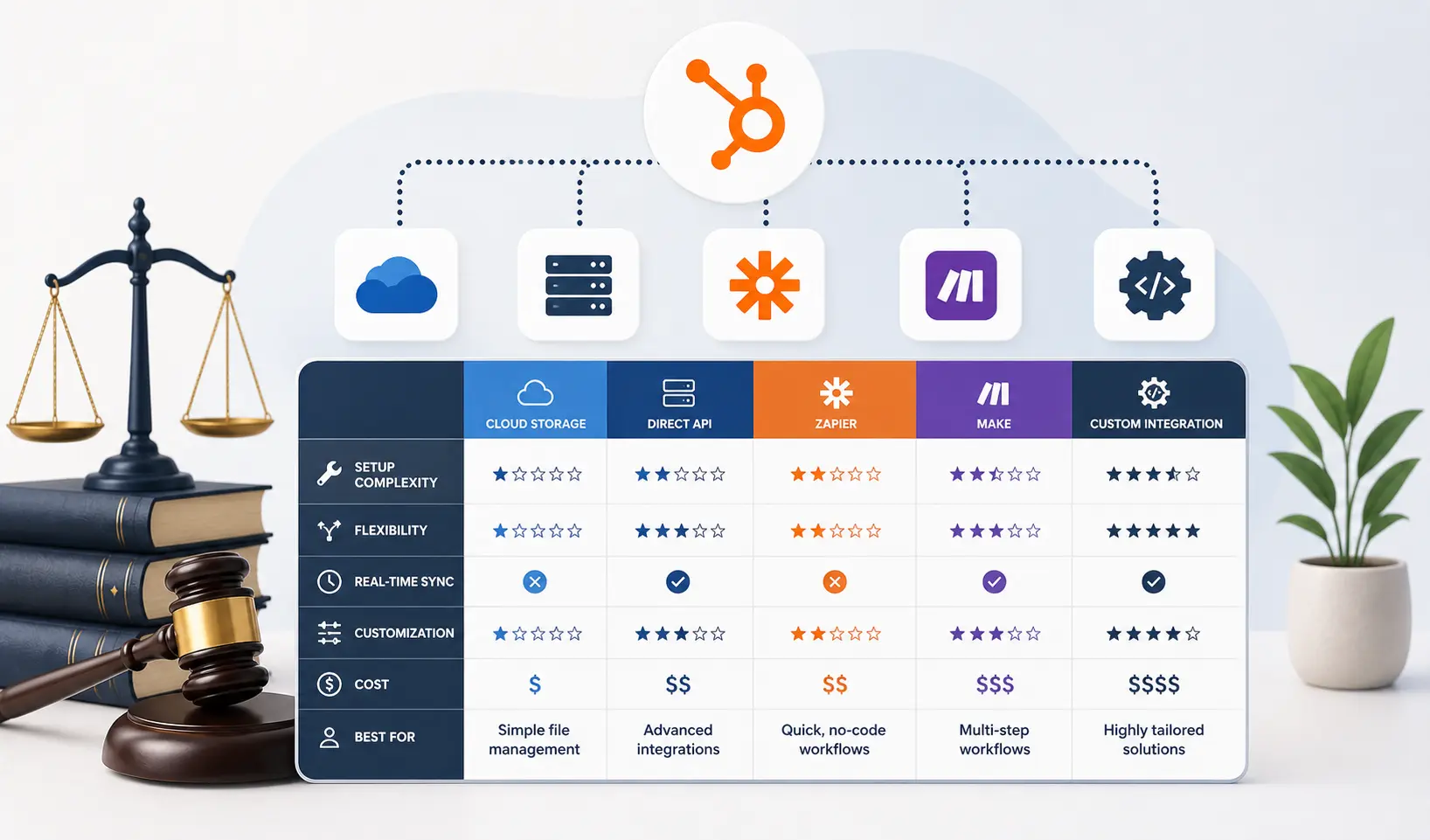
Three main approaches exist for connecting HubSpot to your practice management software. Each carries different tradeoffs on speed, reliability, and technical depth:
| Integration Method | Setup Time | Real-Time Sync? | Supports Custom Objects? | Handles High Volume? | Failure Risks | Best For |
| Native marketplace connector | Hours | Partial only | No | Limited | Field mapping gaps; no custom matter fields | Solo/small firms, basic needs |
| Zapier / Make (no-code iPaaS) | Days | No (5-15 min batch) | No | No (rate limits) | Breaks silently; no error alerts; rate limits | Early testing only |
| Custom API integration | 6-8 weeks | Yes (real-time) | Yes | Yes | Requires expert build; ongoing maintenance | Firms with 10+ new matters/month |
The Zapier option deserves an honest look because so many firms start there. Zapier works for basic contact sync between HubSpot and Clio. It runs on a polling schedule though, not a real-time webhook so there’s always a lag. More critically, Zapier doesn’t support HubSpot’s custom objects. If you’ve built a Matters custom object in HubSpot (which is the right approach for legal pipeline tracking), Zapier can’t touch it. And when a Zap fails mid-sync, there’s no native error alerting you find out when a client record is missing, not before.
Native connectors in HubSpot’s App Marketplace set up faster but carry the same limitations: a predefined set of standard fields syncs, and any customization beyond that requires workarounds that break under volume. Custom API integrations built against HubSpot’s and Clio’s REST APIs handle all of this properly full field mapping, real-time webhooks, proper error handling. The tradeoff is build time: 6-8 weeks from kickoff to go-live.
When to Use a Custom HubSpot Integration for Your Law Firm
Five signals tell you that a Zapier or native connector won’t hold up long-term:
- Your firm opens more than 20 new matters per month. At this volume, sync delays and manual error correction become a real staffing cost.
- You’ve built custom HubSpot objects for matters, cases, or practice areas. Native connectors and Zapier can’t touch custom objects a custom API integration is the only option.
- Billing events need to trigger HubSpot workflows. If a LawPay payment should trigger a client satisfaction follow-up in HubSpot, you need a bidirectional API connection.
- You operate across multiple offices or practice groups with data isolation requirements. Custom integrations enforce routing rules that generic connectors can’t replicate.
- Your Clio and HubSpot contact records are constantly getting out of sync. When attorneys correct duplicate records weekly, the native connection has already broken down.
If two or more of these apply, a custom integration is the right call. Not because it’s more complex, but because it’s the only approach that keeps working as your firm grows. Learn more about our HubSpot integration process and what a typical engagement looks like.
What a HubSpot Legal Integration Actually Looks Like
A real HubSpot-to-Clio integration project runs roughly 8 weeks from kickoff to go-live. We’ve built 300+ integrations and processed over 20 billion records through our integrations annually here’s what the process looks like for a law firm:
- Weeks 1-2: Discovery and Field Mapping. We document every data object your firm uses in both systems. On the HubSpot side: Contacts, Companies, Deals, and any custom objects. On the Clio side: Clients, Matters, Bills, and custom practice area fields. We map every field pairing HubSpot Contact ‘Email’ to Clio Client ‘Email Address,’ HubSpot Deal Stage ‘Retainer Signed’ triggering Clio Matter ‘Status: Active.’
- Weeks 3-4: API Build and Authentication. Our engineers build the integration against both REST APIs using OAuth 2.0 authentication. We configure webhooks on both ends so changes in either system propagate in real time rather than on a polling schedule.
- Weeks 5-6: Testing with Real Data. We test every sync scenario against a staging environment using real, anonymized data from your firm. Edge cases get handled here: duplicate detection logic, contacts appearing in both systems with different email addresses, billing sync scenarios where a LawPay payment needs to update a HubSpot lifecycle property.
- Weeks 7-8: Go-Live and Handoff. We cut over to production, monitor the first week of live sync closely, and hand off documentation to your team. Our 98.5% client retention rate across all integrations we’ve built reflects what happens after the handoff the monitoring infrastructure to catch sync errors before your team does is already built in.
For law firms currently running disconnected systems, the productivity shift from a working bidirectional sync is substantial. Attorneys stop correcting duplicate records. Intake staff stop re-entering data. Managing partners get a single source of truth across marketing, intake, matter status, and billing. Our CRM migration service also handles cases where firms are switching from an older legal CRM to HubSpot and need historical data preserved in the process.
HubSpot for Law Firms: Frequently Asked Questions
Does HubSpot integrate natively with Clio?
HubSpot and Clio offer a native integration through HubSpot’s App Marketplace that handles basic contact sync: client names, email addresses, and phone numbers. For firms that have built custom HubSpot objects (like a Matters object for tracking legal intake stages), the native connector can’t sync those fields. Billing events and matter status changes from Clio also don’t trigger HubSpot workflows through the native connection. Firms needing full bidirectional sync with custom field mapping should use a custom API integration built against both systems’ REST APIs.
Is HubSpot compliant with ABA rules and data security requirements for law firms?
HubSpot maintains SOC 2 Type II compliance, GDPR compliance, and enterprise-grade data encryption with access controls and audit trails. For most law firms, this meets the baseline security requirement. Attorney-client privilege, however, is a workflow and access control question firms need to configure HubSpot’s user permission settings to restrict access to sensitive client communications to authorized team members. HubSpot doesn’t handle trust accounting or ABA-specific compliance logging natively, so firms managing client trust funds should ensure their billing platform (not HubSpot) controls those records.
What’s the difference between HubSpot and Clio Grow for law firm CRM?
Clio Grow specializes in legal client intake: it integrates directly with Clio Manage for matter management, includes legal-specific pipeline stages, and handles conflict check workflows. HubSpot’s strength is marketing automation depth email campaigns, attribution tracking, lead scoring, content marketing, and Google Ads integration. Most firms using Clio Manage for practice management and wanting serious inbound marketing run both: Clio Grow for intake-to-matter conversion and HubSpot as the marketing engine feeding leads into it. Connecting those two systems with a proper bidirectional sync is exactly the type of integration we build.
How long does it take to set up HubSpot for a law firm?
Basic CRM setup importing contacts, configuring deal stages, connecting email takes days. A fully configured HubSpot instance with intake workflows, marketing automation, and custom reporting dashboards takes two to four weeks. Adding a custom bidirectional integration with Clio, My Case, or another practice management platform takes six to eight weeks from kickoff to go-live. That timeline covers discovery and field mapping, API build, testing with real data, and documentation handoff.
Can HubSpot handle legal billing and trust accounting?
HubSpot doesn’t do trust accounting, matter billing, or time tracking. Those functions belong in your practice management software: Clio Billing, TimeSolv, LawPay, or a dedicated legal accounting tool. HubSpot’s role in the billing cycle is reacting to billing events sending a client satisfaction survey when a matter closes, or flagging a lapsed client for a re-engagement sequence. Getting billing events from your PM platform to trigger HubSpot workflows requires a custom integration. See how we handle HubSpot financial tool integrations for context on the architecture involved.
How much does HubSpot cost for a law firm?
HubSpot’s free CRM tier covers 2 users and 1 million contacts with basic pipeline and contact management at no cost. Starter plans start at $20 per user per month. Professional plans which unlock automation, advanced reporting, and the marketing features most law firms actually need start at $100 per user per month, plus a $750 onboarding fee. For a 10-attorney firm using both Sales Hub Professional and Marketing Hub Professional, budget roughly $2,000 to $3,000 per month in platform costs before integration build costs. Use our ROI calculator to model the cost against the time savings from automation.
See your 12-month revenue impact with HubSpot CRM
Enter your current numbers — visitors, leads, deal size — and get a personalized projection based on real HubSpot customer benchmarks.

Ready to Connect HubSpot to Your Legal Tech Stack?
Most law firms running into problems with HubSpot aren’t running into a HubSpot problem. They’re running into an integration problem: disconnected systems, manual data entry, and a prospect-to-client handoff that loses information at every step.
We’ve built integrations between HubSpot and 300+ platforms, processing over 7 million fields daily. Our team scopes, builds, and delivers working integrations in 8 weeks from kickoff full field mapping, bidirectional API sync, error monitoring, and documentation included.
If your firm is ready to stop double-entering data and run HubSpot and your practice management platform as a unified system, start with our integration process overview: integrateiq.com/our-hubspot-integration-process/ Or tell us about your current setup: integrateiq.com/contact-us/



Table of Contents
- Why Law Firms Are Choosing HubSpot Over Legal-Specific CRMs
- Key HubSpot Features Built for Legal Workflows
- The Integration Problem: HubSpot and Your Practice Management Software
- HubSpot Legal Integration Options Compared
- When to Use a Custom HubSpot Integration for Your Law Firm
- What a HubSpot Legal Integration Actually Looks Like
- HubSpot for Law Firms: Frequently Asked Questions
- Ready to Connect HubSpot to Your Legal Tech Stack?

